Template details
Personal Agent Template
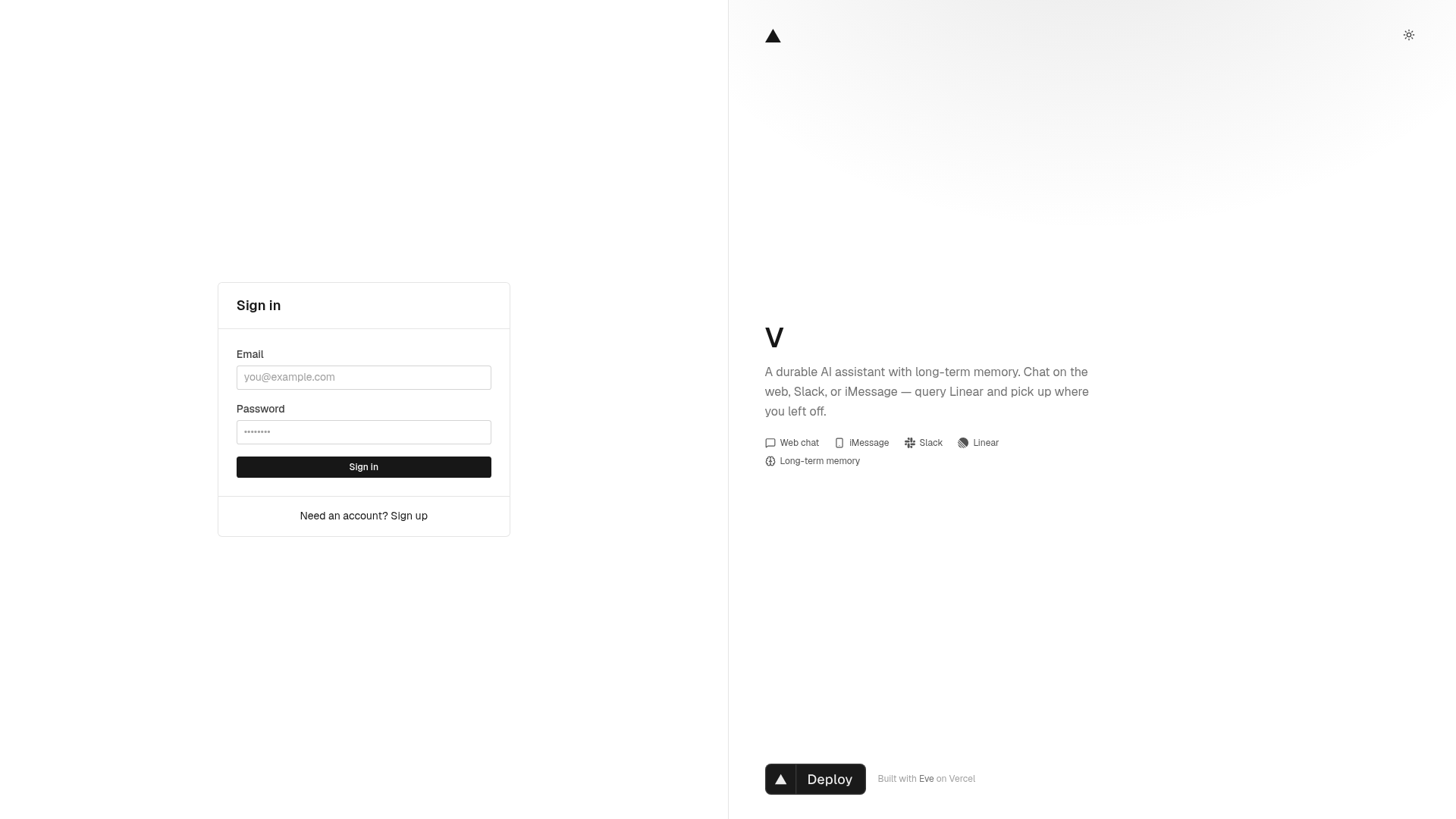
Open-source template for a durable personal AI agent — web chat, Slack, iMessage, Linear, and long-term memory with user-approved saves.
About this template
Personal Agent Template is an open-source Vercel Labs boilerplate for deploying a durable personal AI agent across web chat, Slack, iMessage, GitHub, and Linear — with user-approved long-term memory.
What is the Personal Agent Template?
The Personal Agent Template is an MIT-licensed boilerplate from Vercel Labs that produces a durable personal AI agent, shipped with "V" as the example persona. It uses the Eve agent framework for durable sessions and channel handling, a Nuxt full-stack application for the UI, Nitro API routes, Better Auth email/password authentication, and SQLite storage through NuxtHub. It takes chat messages from any connected channel and imported memory text as input, and outputs agent replies, real-time tool-call rendering, and memory saves that are stored only after the user explicitly approves the save_memory proposal. On Vercel it deploys as two services — the web app and the Eve agent runtime — defined in vercel.json.
What makes the Personal Agent Template stand out?
This template puts web chat, Slack, iMessage, GitHub, and Linear in one codebase and requires explicit user approval for every memory save before it is stored.
- Durable web chat — browser threads resume across sessions, tool calls render in real time, and save_memory proposals store nothing until the user approves them.
- Slack integration — DMs and @mentions reach the same agent, and linking a Slack account to a web profile carries memory and context across channels.
- iMessage integration — users text the agent over iMessage via Sendblue after adding a phone number in Profile, with the same memory and context as web and Slack.
- GitHub and Linear tools — GitHub connects through Vercel Connect to answer questions about repositories, pull requests, issues, and workflows using @github-tools/sdk tools with durable approval on writes; Linear connects via Vercel Connect MCP to query issues, projects, and cycles.
- Long-term memory — a Raycast-style import flow brings in memory from ChatGPT or other assistants into five fixed categories with one prose block each; entries can be edited, deleted, or proposed by the agent via save_memory.
- Daily summary skill — an on-demand morning briefing reports active focus from memory, assigned Linear issues, and a suggested next action, triggered from the home quick action or by asking in chat.
- Nuxt-based stack — Nuxt with Nuxt UI components, Nitro API routes, Drizzle ORM, and the Eve agent framework; self-hosting requires Node.js 24+ and pnpm.
Who should use the Personal Agent Template?
The template suits solo developers, small teams, and Vercel Platform users who want a working multi-channel agent without building the chat and memory infrastructure from scratch.
- Developers building personal AI agents — fork the repository, rename the agent and persona, swap the AI model, and add tools and skills using the documented customization guide.
- Teams deploying a multi-channel assistant — stand up one agent that users can reach from web, Slack, or iMessage with shared memory and context across every surface.
- Vercel users — deploy with the one-click button that pre-fills required environment variables such as BETTER_AUTH_SECRET, BETTER_AUTH_URL, and INTERNAL_API_SECRET, and rely on Vercel Connect for the Linear and Slack integrations.
Use cases
The template supports three concrete workflows out of the box: daily briefings, repository queries, and memory import.
- Morning briefings: ask the agent in chat or press the home quick action to get a daily summary of active focus from memory, assigned Linear issues, and a suggested next action.
- Repository and workflow queries: connect GitHub and ask about repositories, pull requests, issues, and CI workflows, with durable approval required for any writes.
- Memory import: copy the export prompt into ChatGPT or Claude, paste the response into Profile → Import Memory, and start a new chat so the agent picks up the latest context.
How does the Personal Agent Template work?
Users sign in via Better Auth with email and password, then Eve fetches the profile and memory at session start and injects them into the agent instructions. Chat streams through Eve from the web UI, Slack events reach the Slack channel, and iMessage messages arrive via Sendblue. The agent calls tools such as weather, save_memory, and Linear MCP as needed, and reads or writes memory, Slack links, and phone links through authenticated Nitro routes.
FAQ
Is the Personal Agent Template free?
Yes — the code is open source under the MIT License, so you can fork, customize, and self-host it without a license fee. Deploying to Vercel uses Vercel's platform services, which have their own billing terms.
Which channels does the template support?
Web chat with persistent threads, Slack DMs and @mentions, iMessage through Sendblue, GitHub via Vercel Connect, and Linear via Vercel Connect MCP — all sharing one agent and the same memory store.
What does it take to self-host?
Node.js 24+ and pnpm. After cloning, run pnpm install, copy .env.example to .env, run pnpm db:migrate, then pnpm dev and open localhost:3000 to create an account. Three environment variables are required: BETTER_AUTH_SECRET, BETTER_AUTH_URL, and INTERNAL_API_SECRET.
How do I change the agent beyond renaming it?
The customization guide explains how to change the AI model, add tools and skills, configure Slack, iMessage, and Linear, theme the UI, and deploy your own fork. The repo ships with V as a replaceable example persona.
How does long-term memory get into the agent?
Two paths exist: you manually import memory through Profile → Import Memory, or the agent proposes new facts via save_memory and you approve or skip them in chat. Memory is injected into every Eve session for authenticated users on web, linked Slack, and iMessage.