Template details
Portfolio Template For Artists
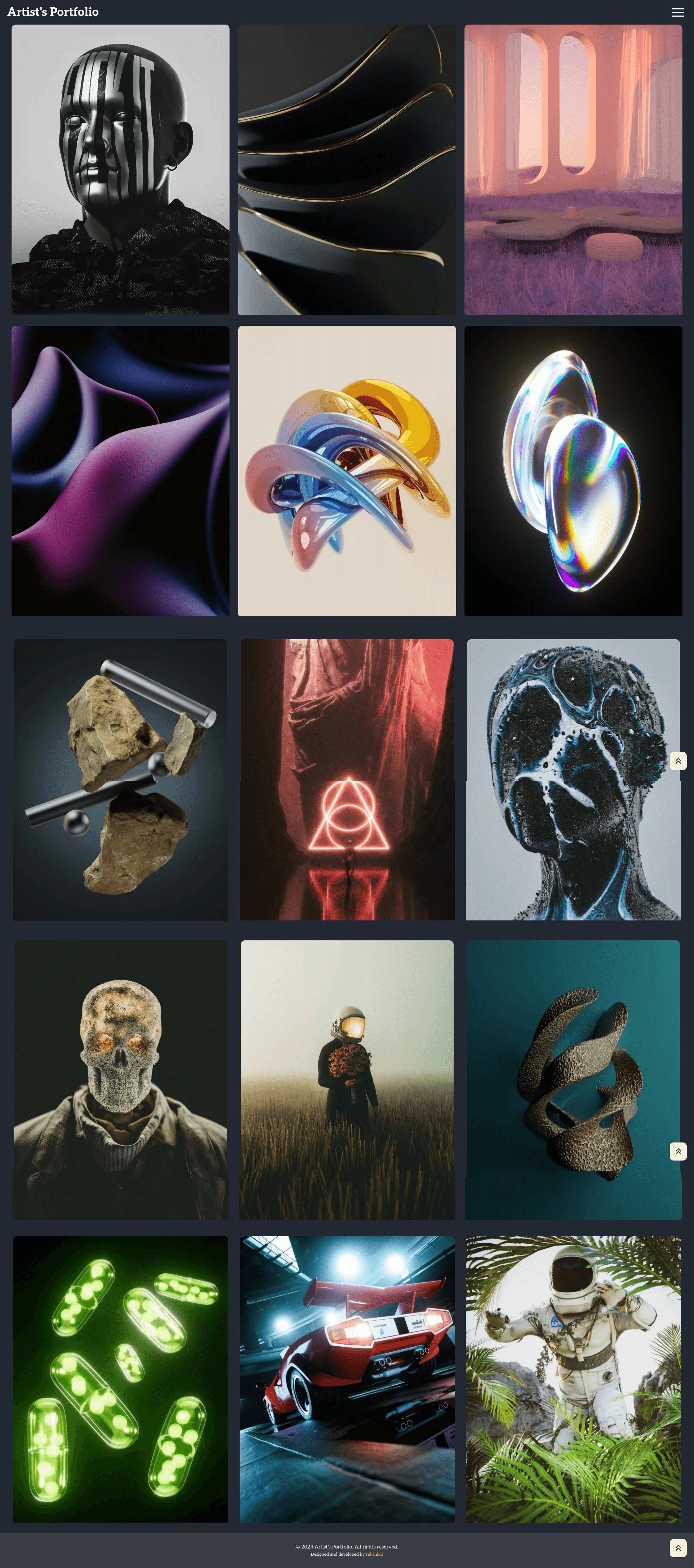
A sleek, responsive portfolio template/website for artists, built with React.
About this template
Portfolio Template For Artists is a free, MIT-licensed React portfolio template for visual creators, built on Vite with React 18, that converts a folder of images and a single content file into a responsive gallery website.
What is Portfolio Template For Artists?
Portfolio Template For Artists is an open-source portfolio website starter for artists, illustrators, photographers, and other visual creators. It takes artwork files placed in src/assets/images/, a profile photo in src/assets/profile/, and site text in src/Data.js as inputs, and produces a static site with a lazy-loaded gallery and an about page. The project runs on Vite, builds to a dist/ folder, and is licensed under the MIT License. It is a migration away from Create React App, using Vite's import.meta.glob instead of require.context for image loading.
What makes this template stand out?
- Vite-based development workflow — The project uses Vite for the dev server and production builds, with scripts for
npm start,npm run build, andnpm run preview; two host variants expose the server on your local network for phone testing. - React 18 with React Router 6 — Routing is handled by React Router 6 with lazy-loaded route pages, which keeps the initial JavaScript bundle smaller.
- Framer Motion gallery reveals — Gallery cards animate with a fade-and-lift effect when about 10% of the card enters the viewport, and they re-animate when scrolling up or down.
- CSS Modules for component styling — Styling is organized in
src/css/with CSS Modules tied to reusable components insrc/components/. - Automatic gallery loading — Replacing files in
src/assets/images/automatically updates the gallery because Vite'simport.meta.globloads supported image files from that folder at build time. - Centralized content editing — Header title, footer text, about page copy, and contact email are all configured in
src/Data.js, and the browser tab title lives insrc/SetWebsiteTitle.js. - Supporting utilities —
react-hot-toastprovides toast notifications andhamburger-reactsupplies the animated mobile menu icon.
Who is this template for?
- Artists and illustrators can replace the sample images in
src/assets/images/with their own artwork and publish a polished gallery site without writing routing or animation code. - Photographers get a responsive portfolio with an about page that uses the first supported image in
src/assets/profile/as the portrait, plus scroll-triggered galleries that work well for visual storytelling. - Front-end developers can use the project as a reference implementation of Vite, React Router 6 lazy loading, Framer Motion scroll animations, and CSS Modules in a single template.
What can you do with this template?
- Share artwork online: Swap in your images and update
src/Data.js, then deploy thedist/folder to any static host. - Test on real mobile devices: Run
npm run start:hostornpm run preview:hostso a phone on the same Wi-Fi can open the site during development. - Learn a modern React stack: Study how lazy-loaded routes, scroll-based Framer Motion reveals, and CSS Modules fit together in a small Vite project.
How does the template work?
After running npm install, use npm start to launch the Vite development server locally. The production build is created with npm run build and outputs to dist/, which can be previewed with npm run preview or deployed to services like Vercel, Netlify, Cloudflare Pages, or GitHub Pages. Because the gallery reads from the images folder automatically, there is no admin panel—you edit source files and rebuild.
Pros and cons
- Pros: Free under the MIT License; modern Vite toolchain; no dependency on Create React App or react-scripts; supports mobile testing via network-exposed scripts; automatic gallery updates from a folder.
- Cons: Content editing requires working with source files like
src/Data.jsrather than a visual CMS, and there is no built-in blog, store, or contact form—only the about and gallery pages described in the project structure.
Pricing
The template is free and open source, released under the MIT License, so you can use, modify, and deploy it for personal or commercial projects without a license fee.
FAQ
Is Portfolio Template For Artists free?
Yes, the project is licensed under the MIT License, which permits free use, modification, and distribution, including for commercial portfolios. No payment or account is required to download or deploy the template.
How do I add my own artwork to the gallery?
Place your image files in src/assets/images/. The gallery uses Vite's import.meta.glob to load supported image files from that folder, so new artwork appears in the gallery automatically without manual configuration.
How do I change the text on my portfolio site?
Open src/Data.js and edit the header title, footer text, about page copy, and contact email. To change the browser tab title, review src/SetWebsiteTitle.js and update the title value there.
How can I test the site on my phone?
Run npm run start:host to start the Vite dev server on your network, then open the displayed URL on a phone connected to the same Wi-Fi. For testing the production build, use npm run preview:host instead.