Template details
Portfolio Website
A sleek portfolio built with React and Tailwind CSS to showcase your skills, projects, and experience in a modern design.
About this template
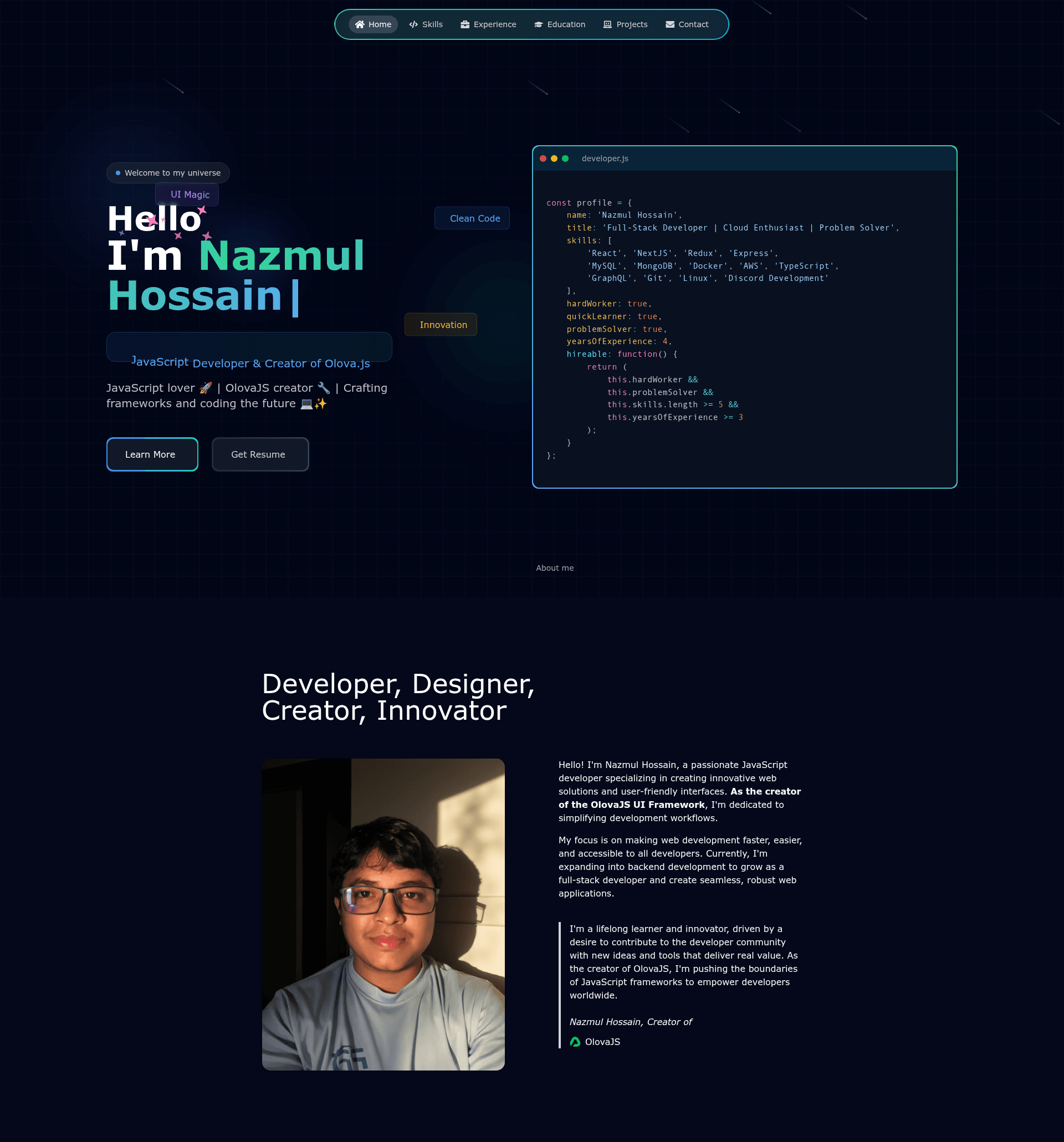
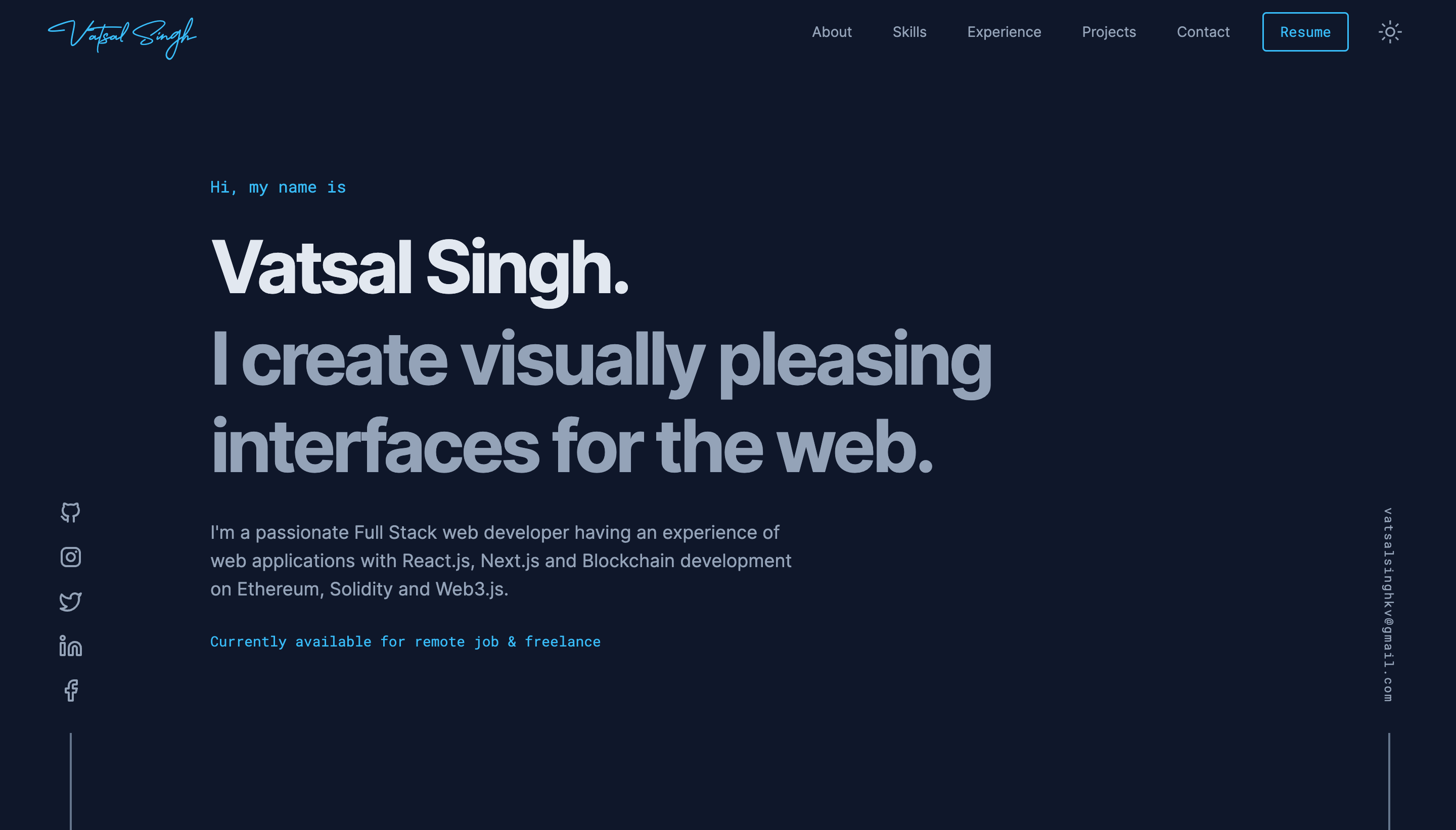
Portfolio Website is a free, open-source React portfolio template built with Vite and Tailwind CSS that lets developers showcase their skills, projects, and experience in a modern animated design. The template comes with six pre-built sections — Home, Skills, Experience, Education, Projects, and Contact — along with a toolbar of reusable UI components such as badges, buttons, cards, flip-words, icon-cloud, meteors, and tooltips. It was created by Nazmul Hossain and is licensed under the MIT License, so you can fork, modify, and deploy it freely.
What is Portfolio Website?
Portfolio Website is a personal portfolio template designed for software developers and creatives who want a polished online presence. It takes your content — biography, skill lists, work history, education, project links, and contact details — and renders it as a responsive single-page application. The template runs on React with Vite as the build tool, uses Tailwind CSS for styling, and includes a vercel.json file for one-click deployment on Vercel. A live demo is available at codervai.vercel.app.
Key Features
- React and Vite stack — Built with React and Vite, giving you fast hot module replacement and a development server at localhost:5173.
- Tailwind CSS styling — All layout and components are styled with Tailwind CSS, configured in tailwind.config.js, so you can customize the theme in one place.
- Framer Motion animations — Smooth page and component animations are handled by Framer Motion, adding motion to hero text, cards, and transitions.
- Reusable UI components — The src/components/ui folder includes badge, button, card, evervault-card, flip-words, icon-cloud, meteors, sparkles-text, and tooltip components you can drop into any page.
- Pre-built sections — Six main sections (Home, Skills, Experience, Education, Projects, Contact) are implemented as separate JSX components under src/pages, making content swaps straightforward.
- React Icons — Iconography throughout the site uses React Icons, with no other icon library dependency.
- Vercel deployment ready — A vercel.json file and a live preview at codervai.vercel.app show the template works on Vercel out of the box.
- MIT License — Free to use, modify, and distribute for personal or commercial projects.
Who is it for?
- Junior developers — Use the template to build a professional portfolio that presents your skills and projects without starting from scratch.
- Freelancers — Replace the sample content with your own services, client work, and contact channels to establish a landing page for leads.
- Job seekers — Highlight your experience and education in the dedicated sections so recruiters can quickly review your career history.
- Open-source contributors — Fork the repository and customize the design for a project- or GitHub-profile portfolio that reflects your contributions.
What can you do with Portfolio Website?
- Showcase your work — Add your projects with links and descriptions to the Projects section and let visitors browse them from a single page.
- Display your technical stack — List your skills in the Skills section using the included icon-cloud component to generate a visual tag cloud.
- Publish your résumé — Use the Experience and Education sections to present your career timeline and academic background in a structured layout.
- Create a contact point — Embed your email and social links in the Contact section so potential employers or clients can reach you directly.
How does the template work?
The template is a standard Vite-powered React app. After cloning the repository, run npm install to fetch dependencies, then npm run dev to start the development server at http://localhost:5173/. Each section lives as a component inside src/pages, and content is edited directly in the JSX files. To ship the site, deploy the repository to Vercel using the included vercel.json.
Pricing
Portfolio Website is free to use. It is released under the MIT License, which permits commercial use, modification, distribution, and private use without paying a fee.
FAQ
Is Portfolio Website free?
Yes. The project is licensed under the MIT License, meaning you can freely use, copy, modify, merge, publish, and distribute it. There are no hidden costs or premium tiers.
How do I run the template locally?
Clone the repository, then run npm install to install dependencies and npm run dev to launch the development server. Open http://localhost:5173/ in your browser to preview the site.
What tech stack does it use?
The template is built with React and Vite, styled with Tailwind CSS, and animated with Framer Motion. Icons come from React Icons, and the development server runs through Vite.
What sections are included?
It includes Home, Skills, Experience, Education, Projects, and Contact sections. Each is a separate component under src/pages, so you can add, remove, or reorder them as needed.
Can I deploy this to Vercel?
Yes. The repository contains a vercel.json configuration file, and a live demo is hosted on Vercel at https://codervai.vercel.app/. You can deploy directly by importing the repository into Vercel.