Template details
Gatsby Theme Amsterdam
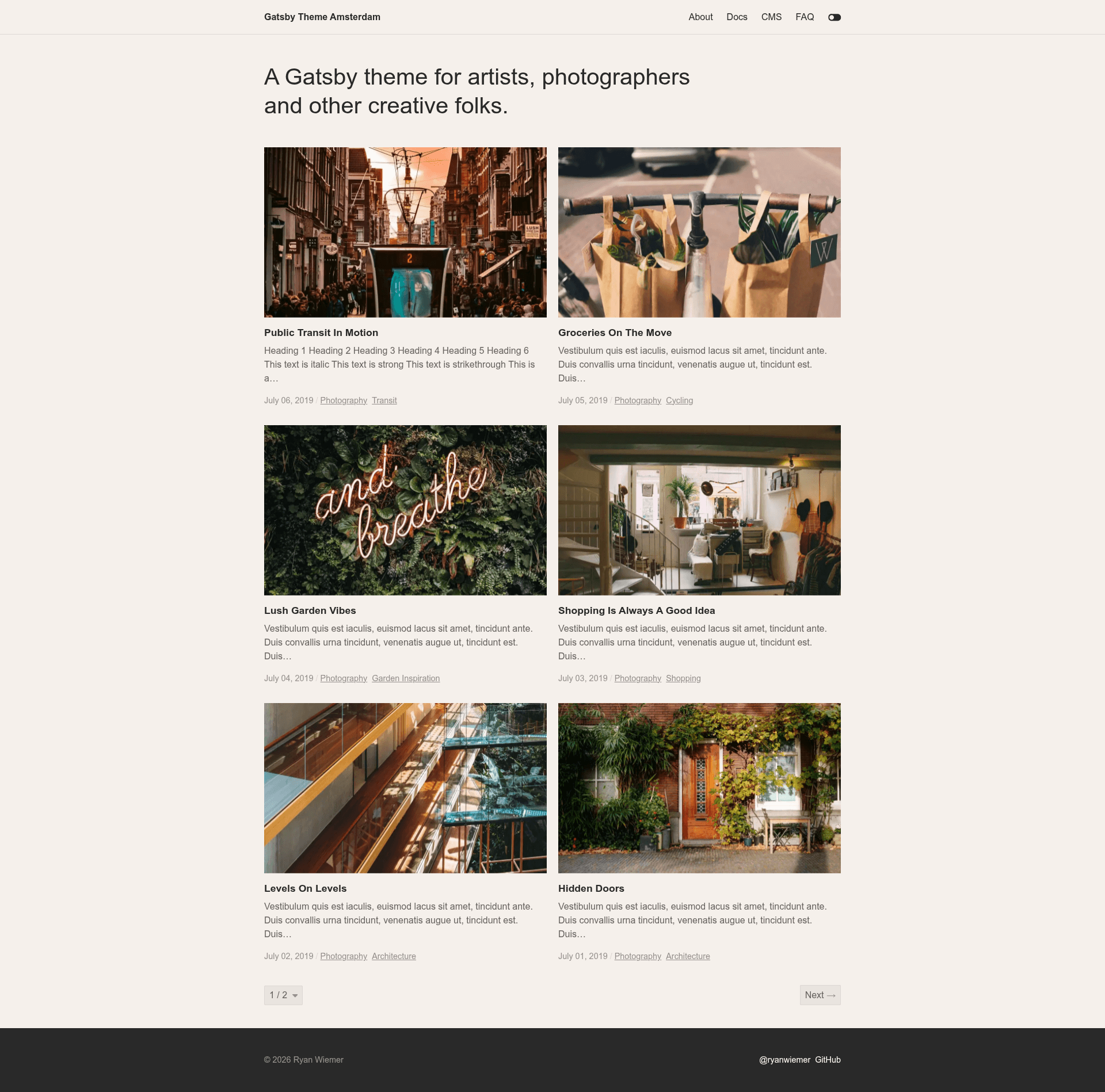
A Gatsby theme for artists, photographers and other creative folks.
About this template
Gatsby Theme Amsterdam is a free, MIT-licensed Gatsby theme that helps artists, photographers, and creative professionals publish a portfolio or blog from markdown and MDX content, with a minimal responsive design and deep theming via Theme UI.
What is Gatsby Theme Amsterdam?
Gatsby Theme Amsterdam is a Gatsby theme — not a starter — meaning it is installed as a plugin into an existing Gatsby site's gatsby-config.js file and provides all the templates, pages, and styling for a creative portfolio. It takes content in the form of .md or .mdx files placed in a configurable content directory and outputs a static site with post listing, tag pages, pagination, and SEO metadata. The theme was created by Ryan Wiemer and is published on npm under the name gatsby-theme-amsterdam. A live demo is hosted at amsterdam.netlify.com.
Key Features
- Minimal responsive design — The theme ships with a clean, responsive layout that works on mobile and desktop without additional configuration.
- MDX support — Posts can be written in either plain markdown (.md) or MDX (.mdx), allowing custom components and JSX inside content.
- Theme UI customization — Colors and typography are controlled through Theme UI; you can override the default amsterdamTheme object in src/gatsby-plugin-theme-ui/index.js.
- Multiple grid options — Two grid layouts are available for the posts and tag templates: 'basic' and 'list', selected via the grid theme option.
- Optional page transitions — Powered by framer-motion, the transitions option (default true) adds simple animated page transitions.
- Pagination and tags — The theme includes posts per page (default 6) and tag templates, so large sets of posts are organized automatically.
- Built-in SEO component — Seo metadata is generated from siteMetadata fields such as title, description, url, image, and author.
- Offline support — Because it is built on Gatsby, the site gets progressive web app offline support out of the box.
Who is it for?
Gatsby Theme Amsterdam is aimed at creative professionals — photographers, artists, illustrators, and designers — who want a simple, fast portfolio site without building the front end themselves. Developers also benefit: it is a well-structured theme with documented options and a starter (gatsby-starter-amsterdam) for rapid setup. Bloggers who publish long-form content with tags and need pagination will find the built-in templates sufficient.
What can you do with Gatsby Theme Amsterdam?
- Photographers: Display a photography portfolio using the grid layout, with a cover image per post and a minimal gallery-style reading experience.
- Artists and illustrators: Publish process notes, project case studies, or sketchbook entries as MDX posts, embedding custom React components for media.
- Developers: Set up a client site quickly by installing the theme and configuring siteMetadata for menu links, footer links, and an intro section, then hand the content directory to the client.
- Creative bloggers: Write in markdown, organize posts with tags, and get paginated archives and a scroll progress indicator on article pages.
How does Gatsby Theme Amsterdam work?
Start with the starter: run gatsby new your-themed-site https://github.com/ryanwiemer/gatsby-starter-amsterdam. The starter pre-configures the theme. Alternatively, install with npm install --save gatsby-theme-amsterdam, add it to the plugins array in gatsby-config.js, and set theme options like basePath, contentPath, postsPerPage, grid, transitions, progressIndicator, and colorToggle. Content files live in the content directory by default, and each post uses front matter with title, date, cover, and tags. Styling overrides are applied by creating a theme file that imports and spreads the default amsterdamTheme.
Pricing
Gatsby Theme Amsterdam is free and open source under the MIT license, and the npm package can be used commercially without a license fee.
FAQ
How do I install Gatsby Theme Amsterdam?
Use the official starter: gatsby new your-themed-site https://github.com/ryanwiemer/gatsby-starter-amsterdam. Or install the package with npm or yarn and add it to the plugins list in your gatsby-config.js file.
What content formats does it support?
It supports both markdown and MDX files. Place .md or .mdx files in the content directory (default 'content'), and specify front matter fields: title, date, cover, and tags.
How do I change the theme colors?
Create a file at src/gatsby-plugin-theme-ui/index.js, import the default amsterdamTheme, and spread it, overriding the colors object. For example, you can set background to any hex value and the rest of the theme inherits the defaults.
Does the theme support tags and pagination?
Yes. Posts can be tagged in front matter, and the theme generates tag pages automatically. Pagination is controlled by the postsPerPage option, which defaults to 6 posts per page for both the posts and tag templates.