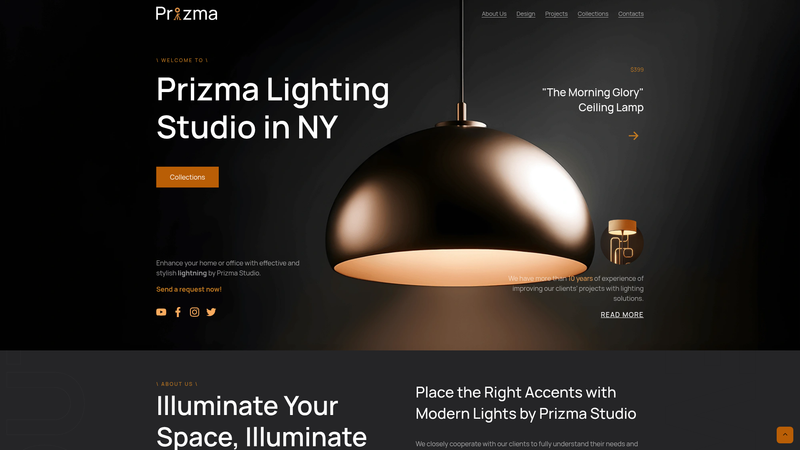
Prizma is a minimal Hugo theme for building promo brand websites, released as open source by GitHub user anastasiiaxfr under the MIT License. The theme renders static sites from Markdown content, with a demo site available at https://prizma-xforeal.netlify.app/.
What is Prizma?
Prizma is a Hugo-based website template whose input is a Hugo site with a content folder structured by language, and whose output is a fast static promo website. It is built on the popular Hugo static site generator and styled with Sass, as confirmed by its GitHub repository metadata ("Hugo + Sass"). The theme is minimal by design — no JavaScript framework, no database — and the source repository provides installation through cloning and updating via git pull. Its core page set is limited to five content types per language: about, contacts, policy, projects, and terms.
Key Features
- Hugo-based static generation — Prizma runs on Hugo, producing plain HTML files with no server-side dependencies, which keeps sites fast to deploy and easy to host anywhere.
- Sass styling — Sass is used for the theme's styles, giving developers comfortable tooling for maintaining and customizing design tokens.
- Multilingual content support — the expected content structure content/[lang] allows separate sets of pages for each locale, making translations straightforward through Hugo's language handling.
- Predefined page sections — about, contacts, policy, projects, and terms cover a typical small brand or personal site without requiring theme development.
- Simple logo swap — you can place an image or SVG file in the iamegs directory of your site's static directory, then uncomment the logo line in hugo.toml to replace the site logo.
- Local preview — Hugo's built-in server (
hugo server) serves the live site at http://localhost:1313 with no additional configuration. - Open source and free — licensed under the MIT License, so the theme can be reused, modified, and redistributed freely.
Who should use Prizma?
Freelancers and small studios who need a no-fuss promo site for their brand or services. Individual developers who are comfortable with Hugo can use it as a starting point for a personal website. Designers looking for a minimal multilingual setup for a side project can take advantage of the language-based content structure. Since the theme exposes only the standard Hugo structure, anyone who knows Hugo basics can maintain it without learning a proprietary control panel.
What can you do with Prizma?
- Build a brand promo site — publish an about page to tell your story, a projects page to showcase work, and a contacts page for inquiries, all within a minimalist layout.
- Maintain a multilingual presence — keep translations organized per language in the content directory, ensuring each locale has its own about, contacts, policy, projects, and terms pages.
- Launch a personal website — the demo site is the author's own personal website, showing that Prizma can serve as a clean personal homepage.
How does Prizma work?
After cloning the theme's repository into your Hugo site, you create the expected content/[lang] folder with the five section subfolders. Then you run hugo server to preview the site locally and later build the static files. Replacing the default logo only requires adding your image/SVG file to the iamegs directory and enabling the logo option in hugo.toml.
FAQ
Does Prizma require Go to run?
The installation instructions tell you to verify both Go and Hugo are installed with go version and hugo version. Although Hugo itself is a Go-based binary, the README explicitly asks users to have Go available, so following the theme's setup guide means checking Go before you start.
Which pages does Prizma include?
The theme expects a content folder per language with five sections: about, contacts, policy, projects, and terms. The homepage and any additional pages beyond that list are not specified in the README.
Is Prizma free to use?
Yes, the theme is open source under the MIT License, which allows personal and commercial use, modification, and redistribution as long as the license notice is kept intact.
How do I change the logo?
Put your image or SVG file into the iamegs directory inside your website's static folder, uncomment the logo line in hugo.toml, and set it to the path of your file. The theme will then display your logo instead of the default.
Can I use Prizma without a Git clone?
The README only documents installation via git clone from the GitHub repository and updating with git pull. No other installation method (such as Hugo Modules) is shown.