Template details
Pulsar Lite
A free, dark landing-page + blog theme for devtool companies. Astro 6 + Tailwind 4, no UI frameworks.
About this template
Pulsar Lite is a free, dark landing-page and blog theme for developer-tool and API companies, built with Astro 6 and Tailwind CSS 4, that compiles to fully static HTML with no client-side JavaScript beyond a small nav script and tab control.
What is Pulsar Lite?
Pulsar Lite takes a set of .astro components, Markdown blog posts, and a design-token stylesheet and outputs a static marketing site: a landing page, a blog, a 404 page, an OG image, a sitemap, and canonical URLs. It runs on Astro 6 and Tailwind CSS 4, requires Node 22.12+, and is packaged as an MIT-licensed starter from Comet Themes. The demo brand is "Vega," a fictional API platform, and every brand string is meant to be replaced.
Key Features
- No-UI-framework front end — The browser receives only a small navigation script and a tab control; all other components are
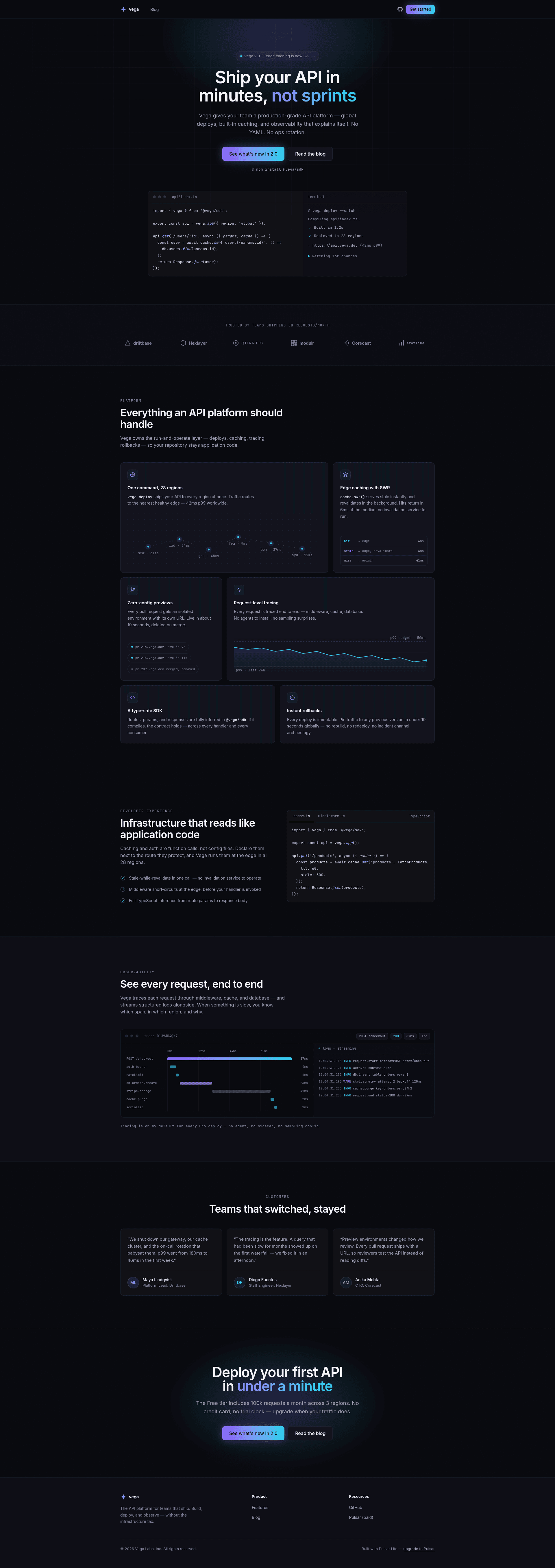
.astrofiles that render static HTML and CSS. - Landing page sections — Hero with code panel, logo cloud, bento feature grid with a region map and latency sparkline, tabbed code showcase, trace-waterfall observability section, testimonials, and call-to-action.
- Markdown blog — Blog index with a featured post, fully styled article pages, and four example posts stored as Markdown with frontmatter for title, description, pubDate, author, and optional authorRole, tags, or draft status.
- Design-token system — Rebrand the entire palette by editing a single
@themeblock insrc/styles/global.css; components reference only tokens, andDESIGN.mddocuments the full system. - Accessibility built in — Semantic landmarks, visible focus states,
prefers-reduced-motionsupport, and WCAG AA contrast targets. - SEO essentials included — Generated sitemap, canonical URLs, and an OG image are part of the template.
- Self-hosted fonts — Fonts ship with the project rather than depending on a third-party CDN.
Who is it for?
Developer-tool and API companies that need a cohesive marketing site and engineering blog without introducing a heavy JavaScript framework. Indie hackers and open-source maintainers who want a free, MIT-licensed theme with a dark, technical aesthetic. Small teams that want a starting point they can fully rebrand in one afternoon.
What can you do with Pulsar Lite?
- Devtool startups: launch a landing page with observability-themed sections such as a trace-waterfall demo, plus a blog for product announcements.
- API providers: replace the demo "Vega" brand and swap the violet-to-cyan accent palette to match your product.
- Technical founders: add new blog posts by dropping Markdown files into
src/content/blog/; routes are generated automatically from filenames.
How does Pulsar Lite work?
After cloning, run pnpm install, then pnpm dev for local development at http://localhost:4321, or pnpm build for a static output in dist/. Customization happens in three places: the @theme block for colors and type, the Logo.astro, BaseLayout.astro, Footer.astro, astro.config.mjs, and content.config.ts files for brand strings, and the src/content/blog/ directory for posts.
Pricing
Pulsar Lite is free and MIT-licensed. The commercial Pulsar theme costs $39 and adds a Starlight documentation section restyled to match, a pricing page with comparison table and FAQ, a changelog with timeline layout, and updates for the current Astro major plus 12 months.
Pros and cons
- Pros: free to use commercially; zero client-side JavaScript; fully static output; design tokens make rebranding fast; accessibility features are baked in.
- Cons: the Lite version omits the documentation, pricing, and changelog pages that the paid Pulsar theme includes, so a devtool company that needs docs must either buy Pulsar or build those pages itself.
FAQ
Is Pulsar Lite really free?
Yes. The theme is released under the MIT license, so you can use it for commercial and personal projects at no cost. The paid Pulsar theme adds documentation, pricing, and changelog sections if you need them.
What versions does Pulsar Lite require?
It is built with Astro 6 and Tailwind CSS 4 and requires Node 22.12 or newer. The quick-start commands use pnpm, though npm may also work.
Does Pulsar Lite include a documentation site?
No. The Lite version ships only the landing page and blog. Documentation is the core differentiator of the paid Pulsar theme, which restyles Starlight to match the same design system.
How do I change the brand from "Vega" to my own?
Edit the @theme block in src/styles/global.css for colors and type, then replace the wordmark in src/components/Logo.astro, the default description in src/layouts/BaseLayout.astro, the company line in src/components/Footer.astro, the site URL in astro.config.mjs, and the author default in src/content.config.ts. Run grep -ri vega src/ to find remaining references.
Can I add my own blog posts?
Yes. Add Markdown files to src/content/blog/ with the required frontmatter fields: title, description, pubDate, and author. Optional fields include authorRole, tags, and draft. The post route is derived from the filename.