Template details
Mobile App Landing Page Template
Free to use static generated website template for your mobile app
About this template
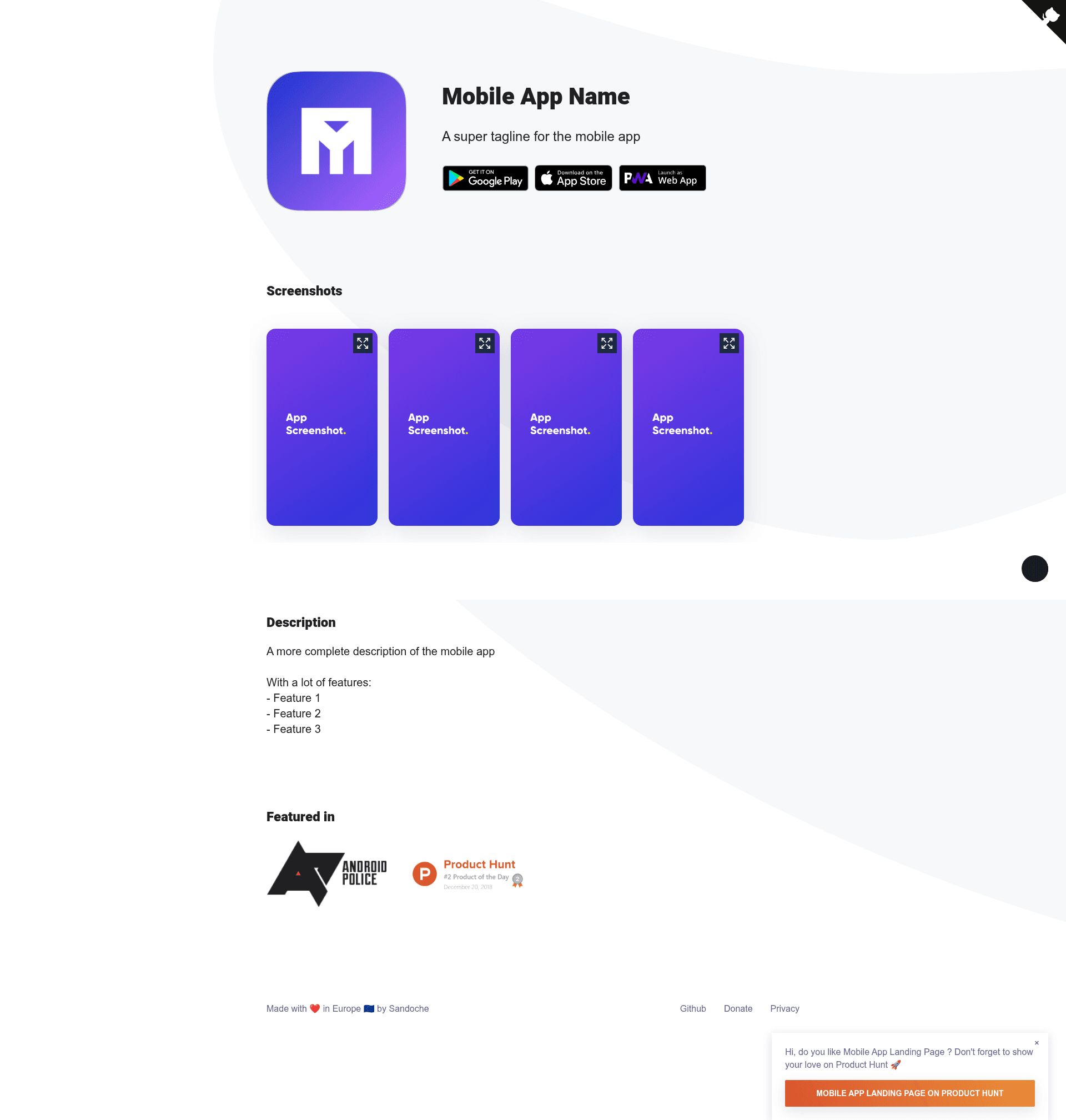
Mobile App Landing Page Template is a free, static website template for creating landing pages for mobile apps, built on Jekyll with the Jekyll-webpack-boilerplate.
What is the Mobile App Landing Page Template?
The Mobile App Landing Page Template is a free static website template that generates a marketing landing page for mobile apps. It takes configuration files (YAML data files) as input and outputs a static HTML site ready for deployment to Netlify, GitHub Pages, or Surge. The template is created by Sandoche, and it is MIT licensed. It includes pre-built sections for app icons, screenshots, app store links, press mentions, and more.
Key Features
- App icon and screenshots — Display your app icon and include an unlimited number of screenshots in the hero section.
- App store links — Add direct buttons to Google Play, the App Store, and your web app.
- Press mention section — Show logos or text from media outlets that have covered your app.
- Product Hunt prompt — A floating call-to-action prompt that can be customized or removed via the JavaScript source.
- Privacy policy page — A built-in privacy policy page is included.
- Google Analytics — Plug in your tracking ID from the config file to monitor visits.
- Cookie consent — Automatic cookie consent banner to comply with tracking regulations.
- Automatic dark theme — The template switches to a dark theme automatically based on user preferences.
- Doorbell widget — Include the Doorbell feedback widget so users can send messages.
- GitHub forking banner — A banner that encourages visitors to fork the repository on GitHub.
The tech stack is Jekyll with webpack via the Jekyll-webpack-boilerplate, which means you get the static-site generation of Jekyll and the asset pipeline of webpack. Styling is handled with SCSS.
Who is it for?
- Mobile app developers — Quickly publish a polished landing page for their app without designing from scratch.
- Indie hackers and solo founders — Use the no-code editor at t3mpl.n4no.com to generate and download a zip, then drag-and-drop it onto Netlify for free hosting.
- Marketing teams — Customize the press section, add analytics, and manage copy through YAML data files.
What can you do with it?
- Create a mobile app landing page — Fill in your app name, icon, screenshots, and store links in the YAML files, then build the static site.
- Deploy for free — Use the one-click Netlify deploy button to publish the site without paying for hosting.
- Customize the theme — Edit the SCSS files and JavaScript to change the look and behavior, including the dark theme and Product Hunt modal.
How does the template work?
The normal workflow is to fork the repository, edit _config.yml, _data/app.yml, and _data/strings.yml to set your app information, replace the images in the _images folder, and then run npm start for local development or npm run build to produce the static output. For a no-code approach, you can visit the template editor, adjust the settings on the left, click Publish, and download the page as a zip to upload to any static host.
Pricing
The template is free to use and released under the MIT license. You can deploy it to free hosting services like Netlify, GitHub Pages, or Surge.
FAQ
Is the template free?
Yes, the template is free to use and open-source under the MIT license. You can fork the repository, customize it, and even use it for commercial projects.
How do I customize the app information?
Edit the YAML data files: _data/app.yml holds your app name, icon, and store links; _data/strings.yml contains the text content and footer links. After modifying these, rebuild the site.
Can I deploy it without coding?
Yes, go to the no-code editor at t3mpl.n4no.com/editor, modify the settings, click Publish, and download the website as a zip. Then upload it to a hosting provider like Netlify.
Do I need Ruby or Node.js to run it locally?
Yes, the template uses Jekyll (which requires Ruby, Bundler) and webpack (which requires Node.js). Install both, then run npm install and bundler install to set up dependencies.