Template details
Rails Tabler Starter
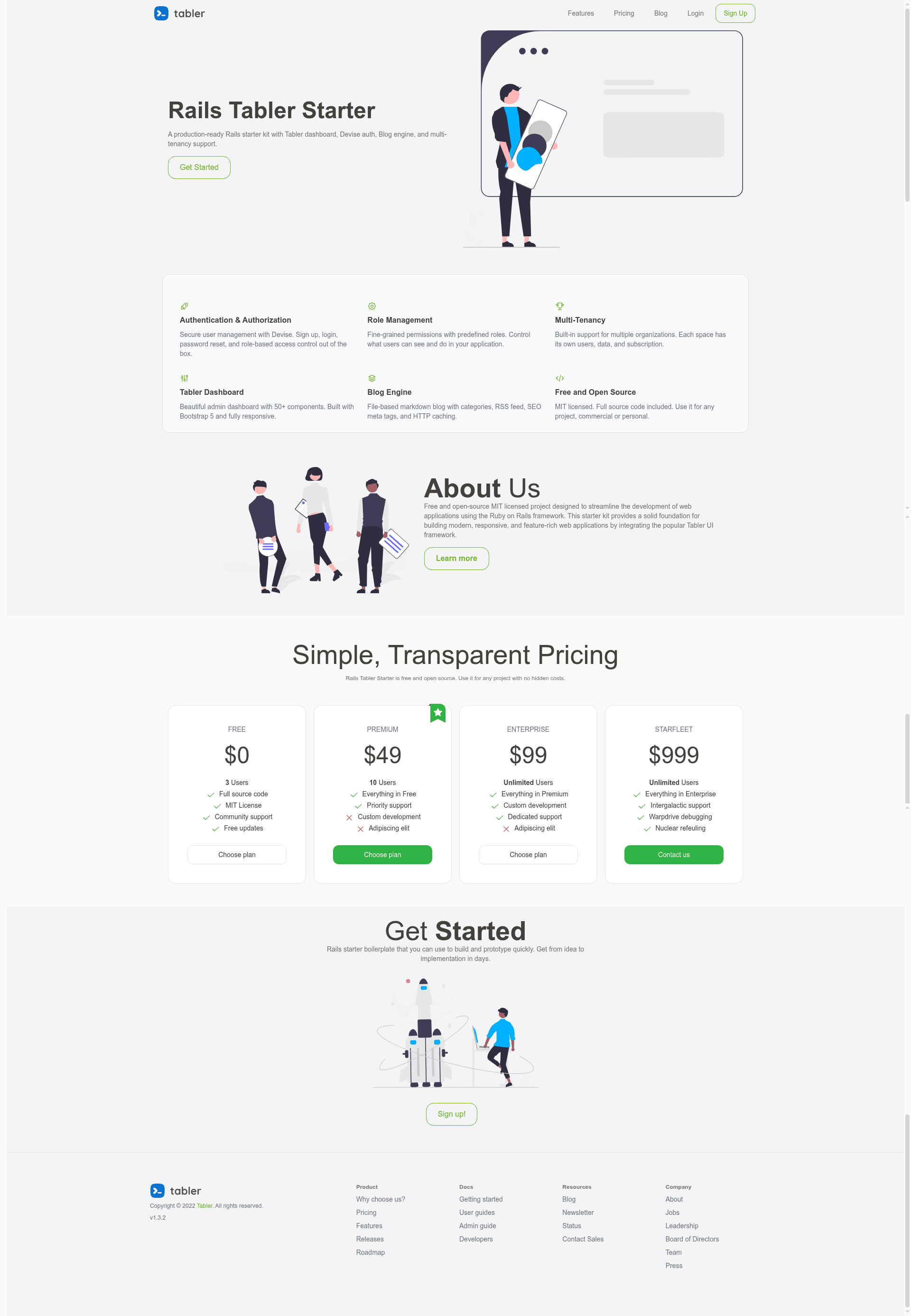
Free and open source Ruby on Rails 8 starter kit with Tabler dashboard UI, multi-tenancy, auth, and blog.
About this template
Rails Tabler Starter is a free, open-source Ruby on Rails 8 boilerplate that gives developers a production-ready dashboard UI built on Tabler (Bootstrap 5), skipping roughly 40 hours of frontend setup. It outputs a running Rails app with authentication, multi-tenant spaces, a file-based markdown blog, and a runtime theming engine.
What is Rails Tabler Starter?
Rails Tabler Starter is a free, open-source boilerplate created by Tarun Velli for building admin dashboards and SaaS applications on Rails 8. You start with a plain Rails project, run bin/setup, and get an app that includes Devise authentication, OmniAuth (Google/GitHub), Pundit authorization, Tabler components with Hotwire, and a blog engine. The stack targets Ruby 3.3+ and uses SQLite in production. The GitHub repository has 203 stars.
Key Features
- Zero-config UI — Tabler components integrated with Hotwire; dark mode, responsive layouts, and dashboard pages work immediately without Tailwind configuration.
- Built-in multi-tenancy —
Spacesarchitecture with Admin and Member roles per space; toggle between single-user and B2B SaaS mode with themulti_tenant_modeapp setting. - Rails 8 infrastructure — Uses
solid_queuefor background jobs andsolid_cachefor caching, so no Redis is required for small-to-medium deployments. - Authentication & authorization — Ships with Devise, OmniAuth strategies for Google/GitHub, Pundit policies, and custom role/access controls.
- Theming engine — The
AppSettingssingleton lets you change layout, dark/light mode, primary color (12 options), base theme, font family, and corner radius at runtime, all stored in the database. - Markdown blog engine — File-based posts in
content/blog/with frontmatter, syntax highlighting, categories, pagination, RSS feed at/blog/feed, and SEO meta tags. - Deployment-ready — Pre-configured for Kamal, Fly.io, or Heroku; includes a production-optimized SQLite setup.
Who is it for?
Rails developers who want a polished admin interface without configuring a separate frontend build can use this starter to go from clone to running dashboard in minutes. SaaS founders can enable multi_tenant_mode to create B2B workspaces with Admin and Member roles, while agencies can reuse the boilerplate to ship client admin panels faster. Indie hackers get a landing page, blog, authentication, and admin UI in one Rails app.
What can you do with Rails Tabler Starter?
- SaaS founders: toggle
multi_tenant_modein AppSettings to switch between a single-user app and a spaces-based B2B app, then deploy with Kamal, Fly.io, or Heroku. - Product developers: change the entire visual theme at runtime through the AppSettings singleton — layout, color mode, primary color, base theme, font, and corner radius are all database-backed.
- Content teams: add markdown files with frontmatter to
content/blog/and the engine renders categories, pagination, syntax-highlighted code, RSS, and SEO meta tags.
How does Rails Tabler Starter work?
Clone the repository, run bin/setup to install dependencies and set up the database, then start the server with bin/dev. To grant admin access, open a Rails console and run User.first.update(admin: true). Configuration lives in the AppSettings singleton, so most changes take effect at runtime without restarting the app.
Pricing
Free — the starter kit is open source and the README mentions no paid tiers or licensing costs.
FAQ
Is Rails Tabler Starter free?
Yes, the starter kit is free and open source. The repository is hosted at github.com/tarunvelli/rails-tabler-starter, and no paid tier or license fee is mentioned in the README.
Does Rails Tabler Starter require Redis?
No, not for small-to-medium deployments. It uses Rails 8's built-in Solid Queue and Solid Cache, so background jobs and caching work with SQLite. You can still add Redis if your app outgrows this setup.
How do I promote a user to admin?
Run User.first.update(admin: true) in the Rails console. This makes the first registered user an admin, giving them access to admin-only features in the dashboard.
What deployment targets are pre-configured?
Kamal, Fly.io, and Heroku are all pre-configured. The boilerplate also uses a production-optimized SQLite configuration, so you can run small deployments without a separate database server.