Template details
react-template-ts
Scalable React starter boilerplate with TypeScript, Redux, Redux Saga, SCSS, PWA support, and one-line zero-config install.
About this template
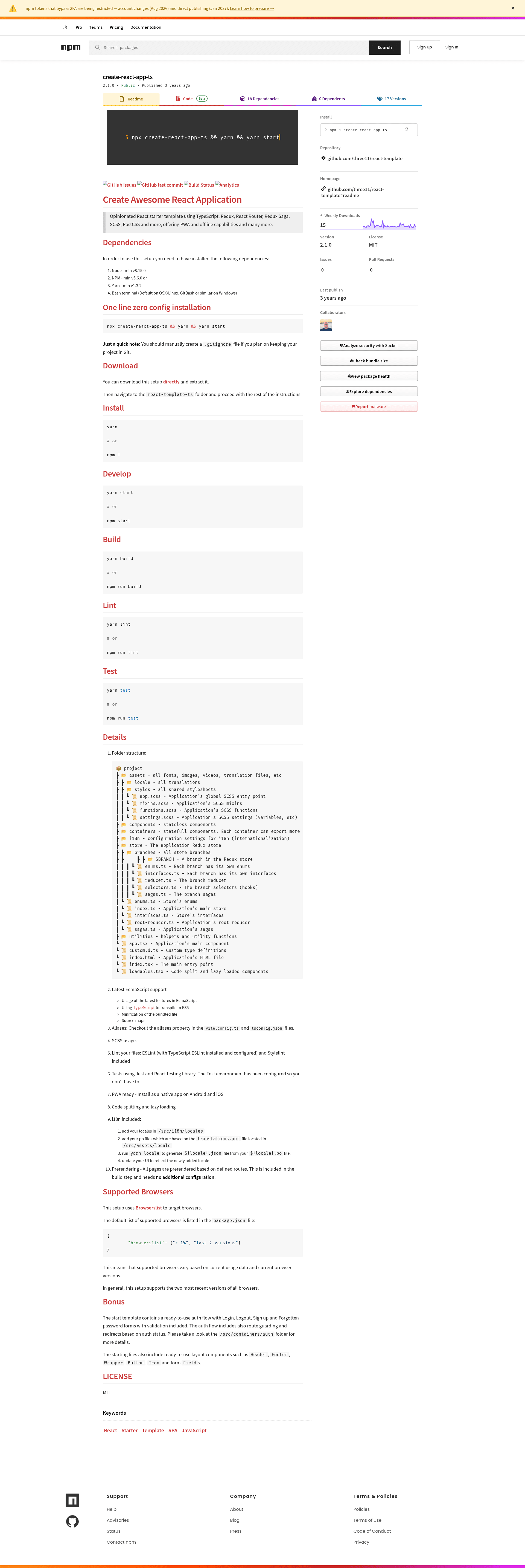
react-template-ts is a scalable React starter boilerplate that combines TypeScript, Redux, Redux Saga, React Router, SCSS, and PostCSS with PWA support, prerendering, and a one-line zero-config installation via npx.
What is react-template-ts?
react-template-ts is an opinionated React starter template that provides a complete application architecture: TypeScript for type safety, Redux and Redux Saga for state management, React Router for navigation, and SCSS/PostCSS for styling. It produces a production-ready React app with PWA offline capabilities, code splitting, and prerendered routes. The template is maintained by three11 on GitHub and distributed under the MIT license.
Key Features
- One-line install — Run
npx create-react-app-ts && yarn && yarn startto scaffold and launch a new project with zero configuration; requires Node v8.15.0+, npm v5.6.0+ or yarn v1.3.2+, and a Bash terminal. - TypeScript + ES6+ — Supports the latest ECMAScript features, transpiles TypeScript to ES5, and produces minified bundles with source maps.
- PWA ready — Includes service worker and offline support so the app can be installed as a native app on Android and iOS.
- State management — Redux store organized into branches, each with enums, interfaces, reducer, selectors, and sagas; root reducer and sagas wired centrally.
- Code splitting — Lazy-loaded components via loadables.tsx to reduce initial bundle size.
- i18n built in — Internationalization setup with locales in /src/i18n/locales, PO file processing via
yarn locale, and a translations.pot template. - Prerendering — All pages are prerendered based on defined routes during the build step, with no additional configuration needed.
- Auth flow included — A ready-to-use auth flow with Login, Logout, Sign up, and Forgotten password forms with validation, plus route guarding and redirects based on auth status.
Who is it for?
- React developers who want a production-ready starting point with TypeScript, Redux, and Saga already configured, avoiding boilerplate setup time.
- Teams building PWA-style applications that need offline support, code splitting, and prerendering out of the box.
- Developers who value linting and testing — the template ships with ESLint, Stylelint, Jest, and React Testing Library configured.
- Product owners who need internationalization and auth flows without writing them from scratch.
What can you do with react-template-ts?
- Create a new React app in one command:
npx create-react-app-ts && yarn && yarn startscaffolds a fully working project you can immediately edit. - Build a multilingual app with the included i18n workflow — add locale PO files, run
yarn locale, and your UI reflects the new language. - Ship a fast-loading PWA — prerendered routes, lazy loading, and manifest support let you install the app on mobile devices.
- Prototype a login/signup flow — the bundled auth containers and layout components (Header, Footer, Wrapper, Button, Icon, Fields) give you a head start.
How does react-template-ts work?
The template uses a Vite-based build (configured in vite.config.ts and tsconfig.json aliases). After installation, you run yarn start to launch the dev server, yarn build to create a minified production bundle with prerendered routes, yarn lint to check code style with ESLint and Stylelint, and yarn test to run Jest tests. The folder structure separates stateless components, stateful containers, store branches, i18n settings, and utilities, with an entry point at src/index.tsx.
FAQ
Is react-template-ts free?
Yes, the template is distributed under the MIT license, so you can use, modify, and distribute it freely, including in commercial projects.
What dependencies do I need?
You need Node.js v8.15.0 or newer, npm v5.6.0 or newer (or Yarn v1.3.2 or newer), and a Bash terminal (default on macOS/Linux, GitBash or similar on Windows).
Does it support internationalization?
Yes, i18n is included. You add locale PO files based on the translations.pot template, run yarn locale to generate JSON files, and update your UI to reflect the newly added locale.
Is there a built-in authentication flow?
The starter includes a ready-to-use auth flow with Login, Logout, Sign up, and Forgotten password forms with validation, plus route guarding and redirects based on auth status.
Do I need to configure prerendering?
No, prerendering is included in the build step and needs no additional configuration. All pages are prerendered based on defined routes.