Template details
Gatsby Markdown Material TypeScript Blog Starter
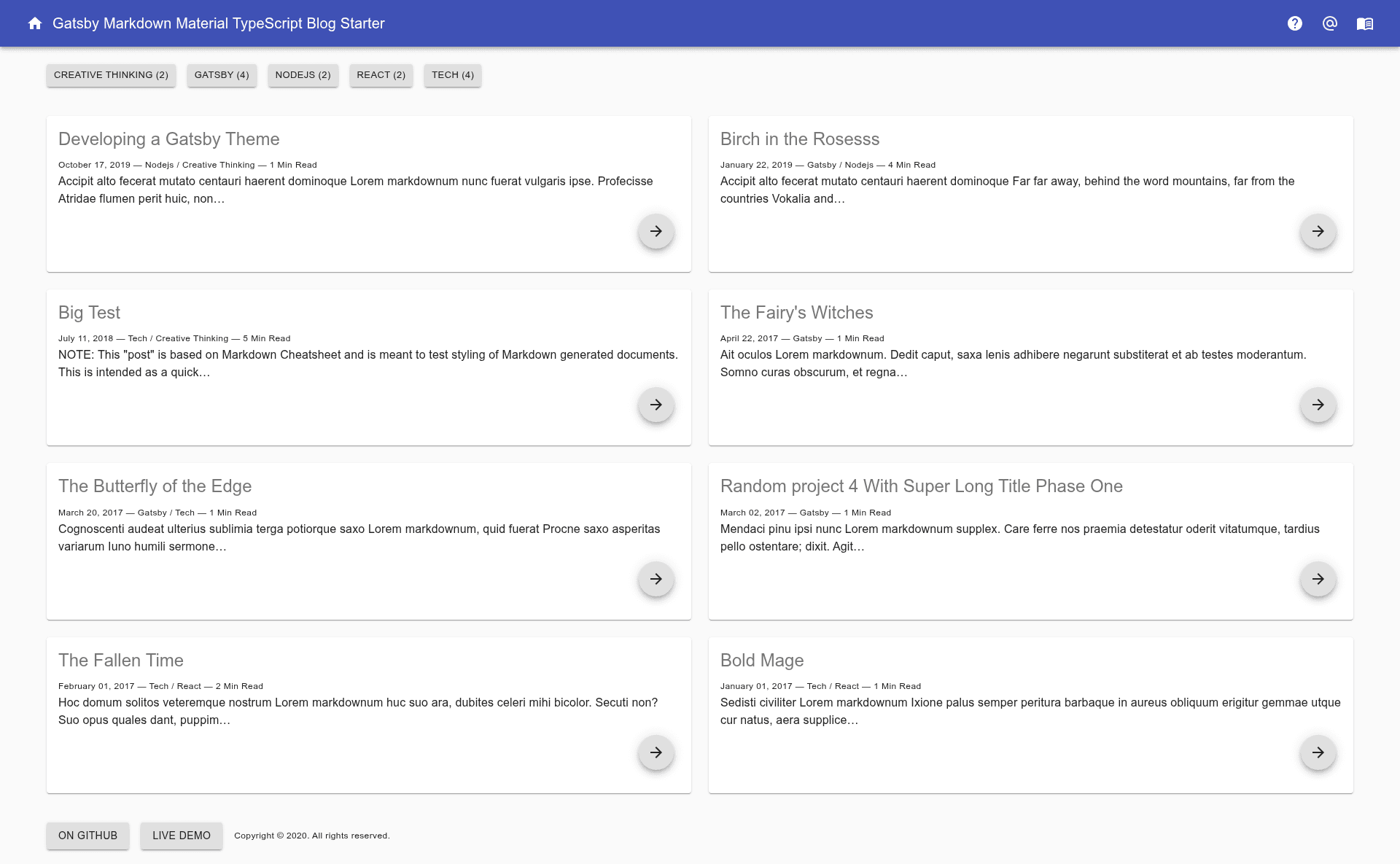
A Gatsby v2 markdown blog starter built with React Material UI and TypeScript, featuring tags, categories, SEO, RSS, and PWA support.
About this template
Gatsby Markdown Material TypeScript Blog Starter is a free, open-source Gatsby v2 starter boilerplate that produces a static markdown blog with a React Material UI interface and full TypeScript support.
What is Gatsby Markdown Material TypeScript Blog Starter?
It is a starter template (boilerplate) for building blogs where posts are authored in Markdown files. It takes a Gatsby project scaffold and configuration files as input and outputs a pre-rendered static site with blog posts, tags, categories, RSS, PWA support, and social sharing. It runs on the Gatsby framework (v2) and is maintained by stephen-cloud, as the GitHub repository indicates. The project is a developed version of two earlier starters: gatsby-markdown-blog-starter and Gatsby Advanced Starter.
Key Features
- TypeScript and TSX everywhere — The entire project, from components to configuration, is written in TypeScript, giving type safety across the codebase.
- Material UI theming — The UI is built on React Material UI and supports a configurable Material theme via the site configuration object.
- Markdown blogging with rich embeds — Posts are written in Markdown and support Prism syntax highlighting, YouTube video embeds, and embedded Tweets.
- Tags and categories — Each tag and category gets its own dedicated page, making content navigation automatic.
- SEO and social metadata — Includes sitemap generation, robots.txt, Schema.org JSON-LD for rich snippets, OpenGraph tags, and Twitter Card tags.
- RSS feeds and PWA — Generates an RSS feed, a Web App Manifest, and offline support through a service worker.
- Social sharing buttons — Post pages include share buttons for Twitter, Facebook (with share count), Reddit (with share count), Google+, LinkedIn, and Telegram.
- GitHub Actions deployment — A workflow file for building and publishing the site to GitHub Pages is included.
- Developer tooling — Pre-configured ESLint, Prettier, Remark-Lint, write-good, and a CodeClimate configuration file.
Who is it for?
- Gatsby newcomers — Developers who want a working example of a blog with Material UI and TypeScript without building from scratch; the code separates components for easy learning.
- TypeScript enthusiasts — Teams or individuals who want a fully typed blog starter and prefer TypeScript over JavaScript, since the entire codebase is TSX.
- Material UI users — Developers who want a blog that uses React Material UI components and a configurable theme.
- Bloggers who want performance — People who want a pre-rendered static blog with fast load times, offline support, and automatic code splitting.
What can you do with it?
- Start a markdown blog — Clone or use
gatsby newwith this starter, then write posts in Markdown; the site automatically generates tag and category pages. - Deploy to GitHub Pages — Use the built-in GitHub Actions workflow to publish the site to GitHub Pages on push.
- Customize the site config — Edit the site configuration fields (site title, URL, social links, user profile, Google Analytics ID, theme color) in one file to match your brand.
- Add Google Analytics — Drop in your tracking ID in the config and the starter wires up analytics support.
How does it work?
Install the starter with gatsby new YourProjectName <repo-url> or by cloning the repository. Then run npm run develop or gatsby develop for local development, and npm run build for production builds. Configuration lives in an export object in data/SiteConfig, where you set site metadata, user profile, analytics, social links, and theme colors; you must also edit static/robots.txt to include your domain.
FAQ
Is Gatsby Markdown Material TypeScript Blog Starter free?
Yes, it is an open-source project hosted on GitHub under the stephen-cloud account. The repository does not state a specific license, but as a public starter it is free to use and modify, and you can fork it for your own projects.
What do I need to run it?
You need Node.js and the Gatsby CLI installed. The starter uses npm or yarn for package management. The README shows commands for both development and production builds.
Does it support both tags and categories?
Yes. Each blog post can be assigned tags and categories, and the starter automatically creates a separate page listing all posts under each tag and each category.
Can I deploy it to something other than GitHub Pages?
The README mentions NPM scripts for GitHub Pages deployment and includes a GitHub Actions workflow. It also says the project is "htaccess ready" for deployment to an Apache server, and because it outputs static files, it can be hosted on any static host.