Template details
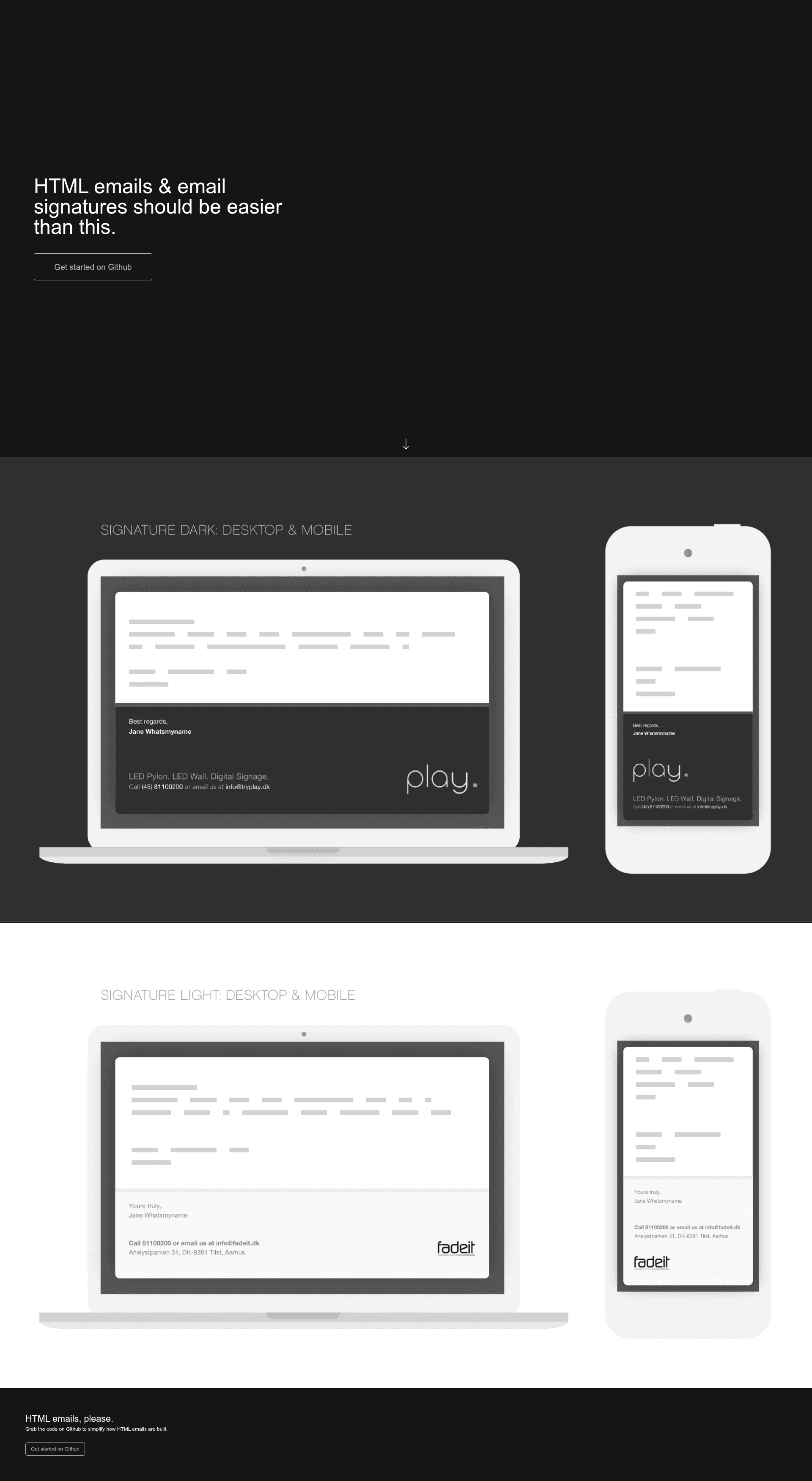
Responsive HTML Email Signature
Open-source template generator for responsive HTML email signatures, built with Node.js and Gulp, with CSS inlining and multi-template support.
About this template
responsive-html-email-signature is an open-source Node.js command-line tool that turns simple JSON configs and HTML/CSS template files into responsive HTML email signatures, automating the painful process of writing table-based email markup.
What is responsive-html-email-signature?
responsive-html-email-signature is a template generator for responsive emails and email signatures, built on Node.js and Gulp. It takes template directories containing HTML files, stylesheets (CSS, SASS, LESS, or PostCSS), and a conf.json configuration object, and outputs minified HTML signature files into a ./dist folder. The project is maintained by Dan Mindru on GitHub and published on npm, with support for generating multiple signatures from a single config array. It also includes a GitHub Actions workflow for automated builds and S3 deployment.
Key Features
- Config-driven generation — Edit the
conf.jsonin a template folder to set id, name, contactMain, contactMail, slogan, logoUrl, logoAlt, and website; pass an array of configs to generate multiple personalized signatures at once. - Automatic CSS inlining — Linked CSS is inlined into each signature using
gulp-inline-css, which also converts properties like background-color intobgcolorattributes on table elements. - Preprocessor support — SASS, LESS, and PostCSS stylesheets are processed automatically alongside plain CSS before being inlined.
- Responsive media queries — Basic media queries are added to signatures so they render reasonably on mobile mail clients that support them.
- Partials and multiple templates — Files named
*.inc.htmlbecome reusable partials that can be included with the@includecomment; every other.htmlfile in a template folder becomes a separate email template (e.g., full signature vs. reply signature). - Base64 image embedding — Local images referenced by
srcare embedded as base64 data URIs, keeping the signature self-contained (with a note that some clients have hard size limits). - Autoprefixer and linting — Vendor prefixes like
-moz-and-webkit-are added automatically, and config usage is linted to catch missing parameters. - Build automation and deployment — A sample GitHub Actions workflow generates the signature and uploads it to an S3 bucket using OIDC credentials, and
npm startwatches template files and rebuilds on every save.
Who is it for?
- Developers who maintain team-wide email signatures — They can keep signature markup in version control, edit one config array, and generate consistent signatures for every employee.
- Designers working with HTML email constraints — They can write signatures using SASS/LESS, partials, and standard HTML without hand-inlining every style or wrangling tables.
- DevOps / automation-minded teams — They can wire the included GitHub Actions workflow to build and deploy signatures to Amazon S3 as part of CI/CD.
- Individual professionals — Anyone comfortable editing JSON and running
npm installcan create a personal responsive signature for Gmail, Outlook, or Apple Mail.
What can you do with it?
- Company-wide signature rollout: Fill an array in
conf.jsonwith each person's name, role, and contact info, then run the build once to get a folder of individual signature HTML files. - Reply signature variants: The dark and light templates include a
signature.htmland a simplersignature-reply.html, so you can add a shortened signature for replies. - Automated S3 publishing: Use the provided
generate-email-signature.ymlworkflow to generate a signature and upload it to a cloud storage bucket with GitHub Actions. - Email-client-specific setup: The docs include concrete steps for Thunderbird (SmartTemplate4 plugin), Gmail, Office 365/Outlook on the web, Apple Mail, and Outlook 2010.
How does it work?
After cloning the repo, run npm install and then npm start. The default build reads template folders from ./templates, processes the HTML/CSS/config, and writes generated signatures to ./dist; the command stays running and rebuilds whenever HTML or CSS files change. To build a single time without watching, npm run once is available, and npm test runs the test suite once.
FAQ
Can I generate multiple email signatures at once?
Yes. Instead of a single object in conf.json, provide an array of configuration objects; each object produces one signature file, which is useful for teams or colleagues.
Does it work with Gmail?
Gmail users can paste the generated HTML into their signature settings, but note that Gmail doesn't support inlined base64 images — you must use absolute http(s) URLs for images.
What email clients are covered in the docs?
The README walks through Thunderbird, Gmail, Office 365 / outlook.live.com, Apple Mail on macOS, and Outlook 2010 for Windows, including manual setup steps and known quirks like base64 not showing in Outlook 2010.
What CSS preprocessors are supported?
The build pipeline automatically handles plain CSS, SASS, LESS, and PostCSS files. Vendor prefixing is handled by autoprefixer so you don't need to write -moz- or -webkit- manually.
Is this project free?
Yes, it's open source under the license on GitHub, and you can clone or install it via npm to use as-is or customize.