Template details
ResumeCards
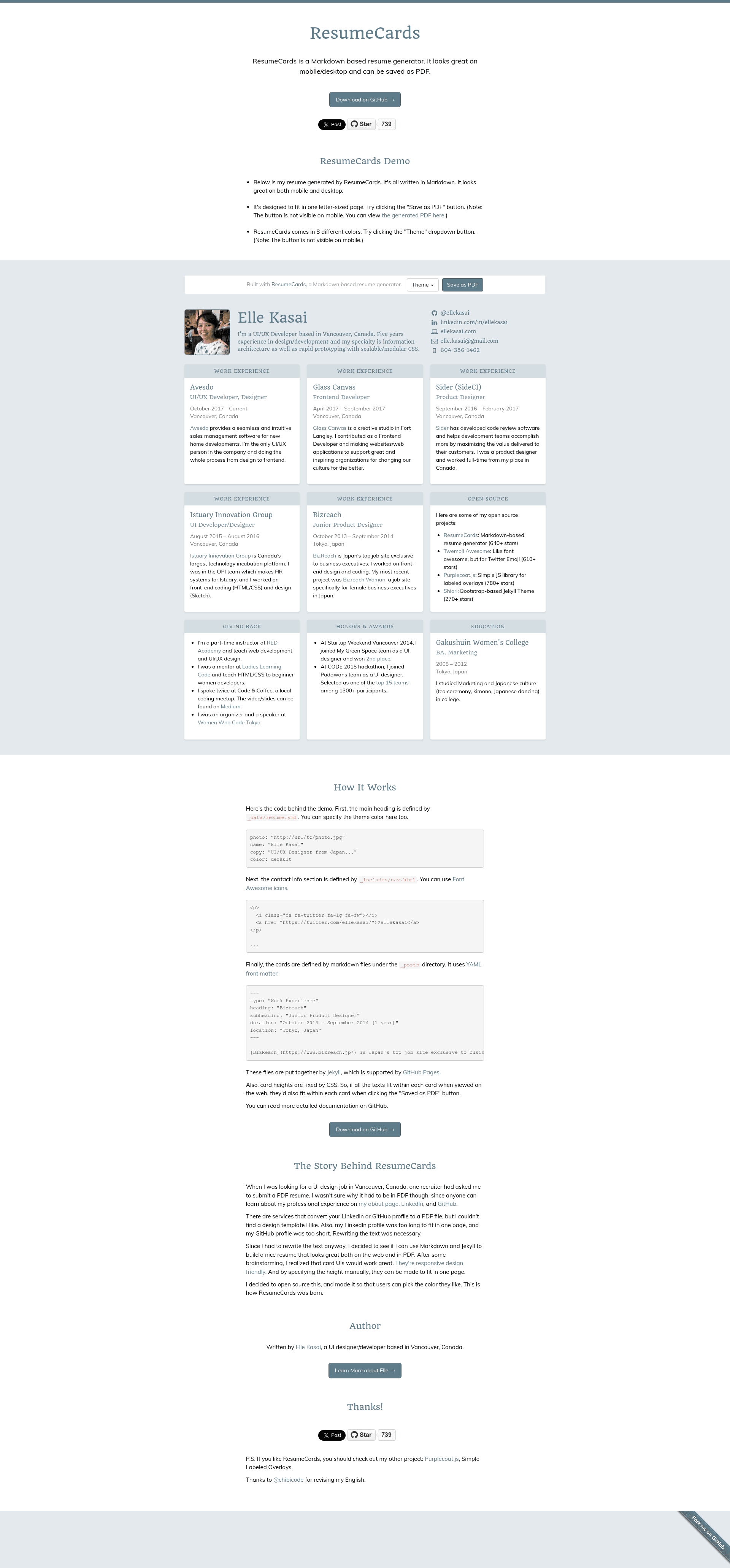
[Unmaintained] A Markdown based resume generator. It looks great on mobile/desktop and can be saved as PDF.
About this template
ResumeCards is a Markdown-based resume generator built with Jekyll that produces a single-page resume viewable on mobile and desktop and savable as a PDF. Created by Elle Kasai, the project is released under the MIT License but is no longer maintained.
What is ResumeCards?
ResumeCards turns Markdown files into a styled resume page. You write your resume content as YAML front matter and Markdown inside Jekyll post files named _posts/card-[1-9].md, and ResumeCards renders them as a card-style layout. The template runs on Jekyll and uses the github-pages gem, meaning it can be hosted for free on GitHub Pages. The project is authored by Elle Kasai and was designed with guidance from Shu Uesugi.
Key Features
- Markdown-based editing — Resume content is written in Markdown with YAML front matter fields for type, heading, subheading, duration, and location; optional fields can be removed.
- Mobile and desktop layouts — The generated resume is responsive and looks good on both screen sizes.
- PDF saving — The page is designed so users can save it as a PDF via the browser's print functionality.
- Color themes — Eight built-in color schemes (red, pink, brown, blue, purple, teal, green, and the default) are configurable through the
colorsection of_data/resume.yml. - Customizable metadata — Personal details like photo, name, and URL are set in
_data/resume.yml, with ademoflag that hides extra navigation when set tofalse. - Contact links and analytics — The
_includes/nav.htmlfile controls contact links, and_includes/script.htmlincludes default Google Analytics code that can be changed or removed. - Custom domain support — A CNAME file is included for hosting the resume on a custom domain.
- Jekyll/GitHub Pages workflow — Setup requires forking the repo, running
bundle installto install thegithub-pagesgem, and starting the server withjekyll serve --watch.
Who is it for?
- Job seekers who want a clean, code-controlled resume that can be updated by editing Markdown and deployed to GitHub Pages.
- Developers and designers comfortable with Jekyll who prefer to keep their resume in a Git repository and customize the theme via YAML.
- People needing a printable resume who want a layout that renders well when saved as a PDF from the browser.
What can you do with it?
- Create a personal resume page — Write your work history and education in
_posts/card-[1-9].mdand see it rendered as a styled card on a single page. - Customize the visual theme — Change the color scheme by editing the
colorvalues in_data/resume.yml; eight swatches are provided. - Deploy to GitHub Pages — Set
baseurlandurlin_config.yml, push the repo, and host the resume for free on GitHub Pages.
How does ResumeCards work?
After forking and cloning the repository, run bundle install to install the github-pages gem, then start the local server with jekyll serve --watch. Because the default baseurl is set to "/resumecards", the site initially runs at http://localhost:4000/resumecards/; change baseurl to "" in _config.yml to serve at the root. Editing resume content means modifying the Markdown files in _posts/ and updating personal data in _data/resume.yml; both changes take effect on page reload.
FAQ
Is ResumeCards still maintained?
No. The README states the project is no longer maintained; the author has other priorities and no longer has time to update the library.
What does ResumeCards require?
ResumeCards runs on Jekyll and requires the github-pages gem. You need Ruby and Bundler installed to run bundle install and start the local server with jekyll serve --watch.
Can I host ResumeCards on a custom domain?
Yes. A CNAME file is included in the repository. Change the CNAME contents to your domain and configure your DNS accordingly.
How do I change the color theme?
Edit the color section in _data/resume.yml. The README shows eight pre-built color options: red, pink, brown, blue, purple, teal, green, and the default.
Can I hide the demo navigation?
Yes. In _data/resume.yml, set demo to false to hide everything except the resume itself.