Template details
Shush
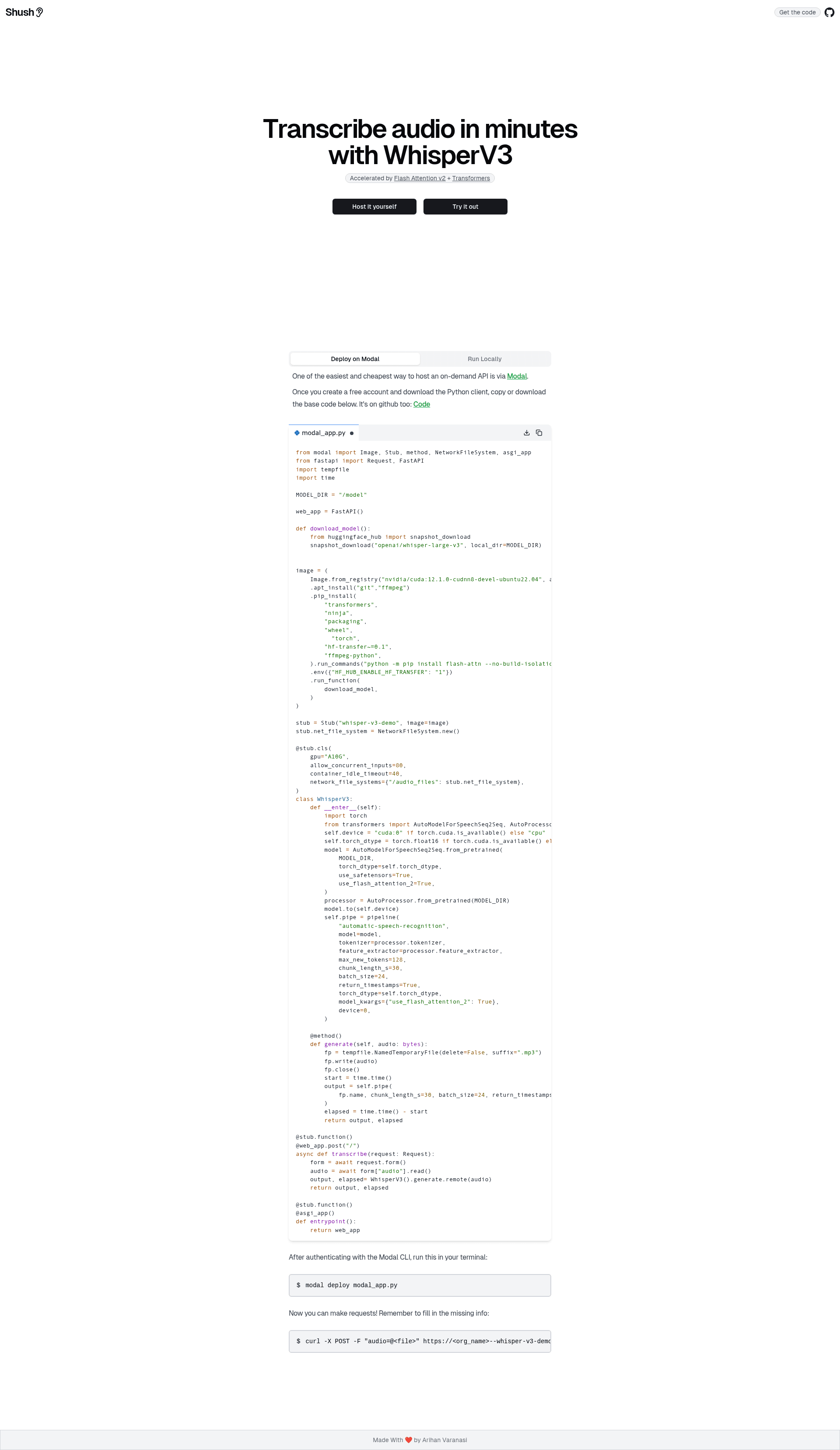
Shush is an app that deploys a WhisperV3 model with Flash Attention v2 on Modal and makes requests to it via a NextJS app
About this template
Shush is an open-source full-stack boilerplate that deploys OpenAI's WhisperV3 audio transcription model with Flash Attention v2 on Modal and connects it to a Next.js web frontend.
What is Shush?
Shush is a demo application built with Next.js on the frontend and Modal on the backend, created by GitHub user arihanv to show developers how to run high-performance models and reliable APIs on demand with auto-scaling. The repo contains a Modal Python stub (shush.py) that serves WhisperV3 and a Next.js app in the shush/ directory that makes transcription requests to the deployed endpoint. Its stated goal is to provide a full-stack reference for anyone interested in running models on Modal, with the WhisperV3 model using Flash Attention v2 for faster, lower-memory inference. The repository is tagged with topics including flash-attention-2, huggingface-transformers, modal, shadcn-ui, and transcription, and has 227 stars.
Key Features
- WhisperV3 transcription model — deploys OpenAI's WhisperV3 audio transcription model as a serverless Modal endpoint using a Python stub named shush.py.
- Flash Attention v2 — the deployed model runs with Flash Attention v2, reducing memory usage and accelerating inference for the transformer-based model.
- Next.js frontend — the shush/ directory contains a Next.js app that makes requests to the Modal endpoint and is styled with shadcn-ui components.
- Two-step deployment — the backend deploys with
modal deploy shush.py, and the frontend runs withbun iandbun run devafter adding the Modal URL to a .env file. - Environment-based configuration — a .env.example file documents the Modal endpoint URL variable that the Next.js app needs at runtime.
- Serverless auto-scaling — Modal handles scaling the model on demand, which is the core infrastructure pattern the demo is built to illustrate.
Who is it for?
- Developers learning serverless ML deployment — they can run the repo end to end to see a real WhisperV3 model served on Modal and called from a web app.
- Full-stack engineers — they can study how a Next.js app authenticates and communicates with a Modal-deployed model endpoint through an environment variable.
- ML engineers evaluating WhisperV3 — they get a working setup of WhisperV3 with Flash Attention v2 that they can test through the browser instead of in a notebook.
What can you do with Shush?
- Test WhisperV3 from the browser: deploy the Modal backend, start the Next.js dev server, and open http://localhost:3000/ to try transcription through the app.
- Study a production-style Modal deployment: read the shush.py stub to see how WhisperV3 is wrapped as a Modal entrypoint and deployed with a single CLI command.
- Use it as a demo foundation: fork the repository and build an audio-to-text product demo on top of the working Modal-plus-Next.js architecture.
How does Shush work?
The setup is split into backend and frontend. First, create a free account at modal.com, install the Modal Python package, and authenticate in the CLI. Then run modal deploy shush.py from the modal/ directory, which returns a URL in the form https://[ORG_NAME]--[STUB_NAME]-entrypoint.modal.run. Next, from the shush/ directory, create a .env file with that URL (view .env.example for reference), install dependencies with bun i, start the dev server with bun run dev, and open http://localhost:3000/ to test the app and model.
FAQ
Is Shush free to use?
The repository is open source and free, but running it requires a Modal account. The README instructs users to create a free account at modal.com, install the Modal Python package, and authenticate via the CLI before deploying the backend.
What model does Shush use?
Shush deploys WhisperV3, an audio transcription model built by OpenAI, on Modal. The model runs with Flash Attention v2, and the repository lists huggingface-transformers as a dependency topic.
What frontend framework does Shush use?
The frontend is a Next.js app located in the shush/ directory, styled with shadcn-ui components. The README documents running it with the Bun JavaScript runtime using bun i and bun run dev.
Where does the app run locally?
After following the setup steps, the Next.js frontend runs at http://localhost:3000/ in the browser. The Modal backend runs in the cloud and is reachable at the URL returned by modal deploy shush.py.