Template details
Nlang
Prototype of the Nlang Scripting Language with Intellisense Code Editor
About this template
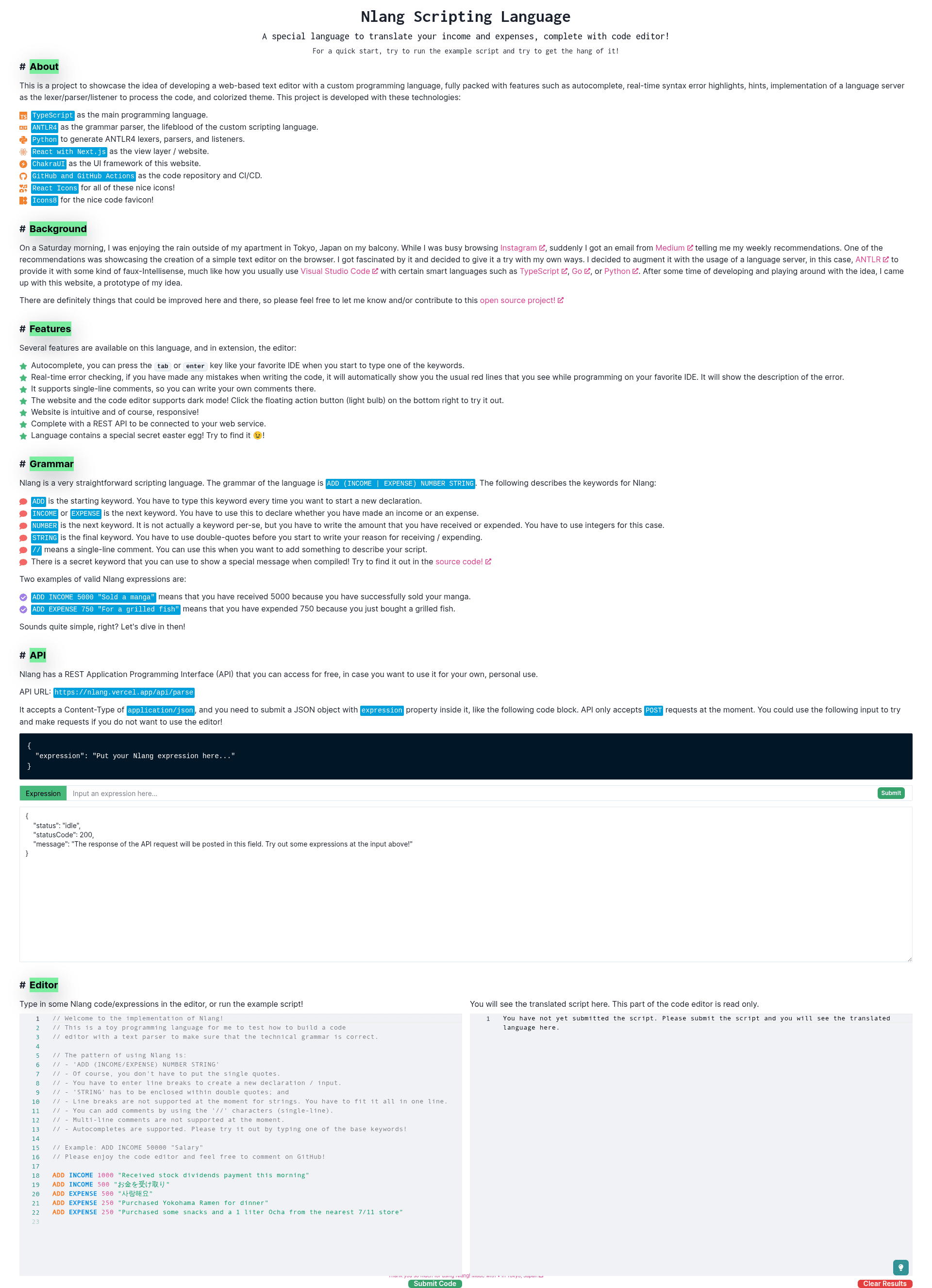
Nlang is an open-source prototype of a scripting language bundled with an intellisense code editor, built on Next.js and ANTLR4, that lets developers experiment with a custom grammar and get real-time error checking in the browser.
What is Nlang?
Nlang is a prototype scripting language project that pairs a custom language grammar with a web-based code editor. It takes a grammar file (nlang/lang/nlang.g4) written for ANTLR4 and generates a TypeScript parser, which powers autocomplete and real-time error checking in the editor. The project runs as a Next.js application, with Chakra UI components for the interface, and is distributed under the MIT License on GitHub.
Key Features
- Intellisense code editor — Autocomplete and real-time error checking are integrated into a web-based editor, showing language feedback as you type.
- Real language parser — The language is implemented with ANTLR4, not regex, and the grammar is compiled into TypeScript via the command
antlr4 -Dlanguage=TypeScript. - Next.js frontend — Built on Next.js, so you get React components, file-based routing, and a
yarn build/yarn startproduction workflow. - Chakra UI styling — The repository uses Chakra UI for its component library, giving a consistent atomic UI system.
- Testing and quality commands —
yarn testruns integration tests andyarn quality-checkenforces code standards; there are additional scripts inpackage.json. - Grammar experimentation workflow — You can edit the grammar in ANTLR Lab, then recompile with the provided ANTLR4 tools and Python virtual environment steps.
- Open-source license — MIT License allows reuse and modification for your own language projects.
Who is it for?
- Language designers — Experiment with custom grammar in ANTLR Lab and quickly regenerate the TypeScript parser to see how syntax changes affect the editor.
- Web developers — Use the project as a starter boilerplate for building an online code editor with autocomplete and error checking inside a Next.js app.
- Educators — Demonstrate parsing concepts and language implementation using a live editor that runs locally with
yarn dev. - Open-source contributors — Fork the repository, improve the grammar or editor, and submit changes with confidence thanks to the included tests and quality checks.
What can you do with Nlang?
- Runnable language playground — Clone the repo, run
yarnandyarn dev, and open the local server to type in the custom language with live feedback. - Grammar remixing — Edit
nlang/lang/nlang.g4, recompile with ANTLR4, and change the language's syntax, keywords, or rule structure. - Production deployment — Run
yarn buildfollowed byyarn startto serve the editor as a static/SSR Next.js app. - Test-driven development — Use
yarn testandyarn quality-checkto keep the codebase healthy while you add new language features.
How does Nlang work?
The project has two development flows. For the application, you clone the repository, install dependencies with Yarn, and start the dev server with yarn dev. For the language, you create a Python virtual environment, install antlr4-tools via pip, edit the grammar file, and compile it to TypeScript using antlr4 -Dlanguage=TypeScript ./nlang/lang/nlang.g4. The generated TypeScript files are then used by the editor for parsing and validation.
Pros and cons
- Pros — MIT licensed; includes integration tests and quality checks; uses a genuine parser generator (ANTLR4) instead of pattern matching; the grammar is separated in its own file for easy modification.
- Cons — It's explicitly a prototype, so it's not production-ready; the README notes that generated files contain intentional
@ts-ignorecomments because they fail TypeScript checks; running the website requires Node.js 18+ and Yarn Classic.
FAQ
What is Nlang?
Nlang is a prototype scripting language that comes with an intellisense code editor. It uses ANTLR4 to generate a TypeScript parser from a grammar file, and the editor provides autocomplete and real-time error checking. The project is open source under the MIT License.
How do I run Nlang locally?
Clone the repository, ensure you have Node.js 18+ and Yarn Classic installed, then run yarn to install dependencies and yarn dev to start the development server. For production, use yarn build and yarn start.
What are the requirements to run the website?
The website requires Node.js 18+ and Yarn Classic. If you want to modify and recompile the grammar, you also need Python 3.11+ (recommended) and ANTLR4 Tools.
Can I modify the Nlang language grammar?
Yes. The grammar lives in nlang/lang/nlang.g4. You can edit it in ANTLR Lab, then compile it to TypeScript with antlr4 -Dlanguage=TypeScript ./nlang/lang/nlang.g4 inside a Python virtual environment with antlr4-tools installed.
What license is Nlang under?
Nlang is licensed under the MIT License, which permits free use, modification, and redistribution with attribution.