Template details
Scribbler – Free HTML5 Online Documentation Template
Free HTML5 documentation template for apps, themes, and software, built with vanilla JavaScript and CSS grids.
About this template
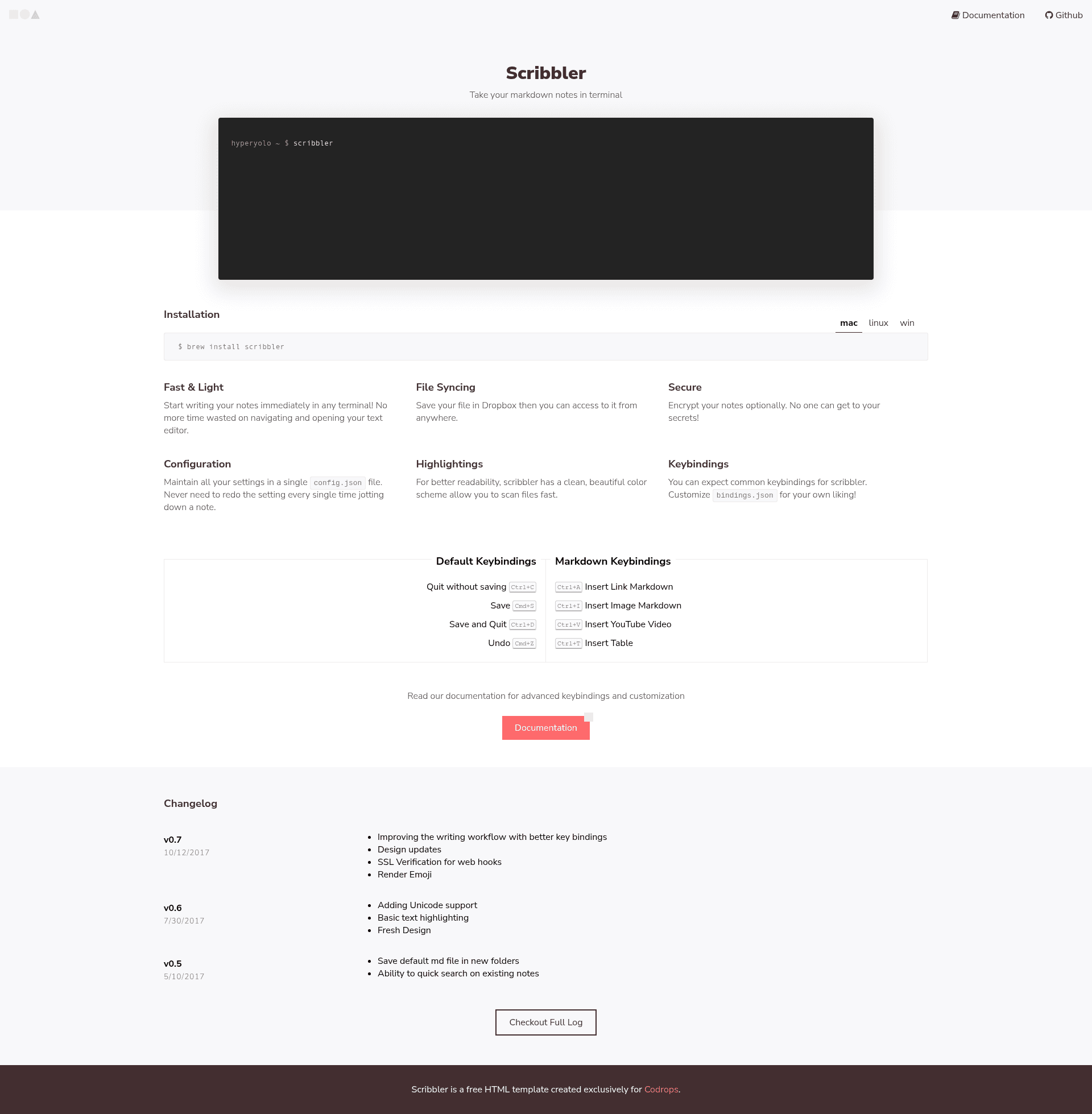
Scribbler is a free, minimalist HTML5 documentation template from ThemeWagon and Codrops that lets developers publish static documentation pages for apps, themes, API references, and software manuals.
What is Scribbler?
Scribbler is a documentation website template built with vanilla JavaScript, CSS variables, and CSS grids. It takes plain HTML content and renders it as a responsive online manual with a changelog and a terminal component. The template was created by Codrops and is distributed by ThemeWagon; it is open source and can be used in commercial projects. It is currently at version 1, first released nine years ago and last updated four years ago, and has been downloaded 3,761 times from ThemeWagon.
Scribbler is designed for developers who need to ship documentation without designing a layout from scratch. The entire doc structure is contained in two HTML files, three CSS files, and one JavaScript file, plus an editable Sketch design source. Because it relies on static files only, it can be hosted on any web server or static host, including GitHub Pages.
What makes Scribbler stand out?
- Vanilla JavaScript core — No framework dependencies; the single JavaScript file powers interactive elements like the terminal display and animated buttons.
- CSS variables and grids — The styling system uses CSS custom properties for quick theme changes and CSS grid for a responsive, fluid layout that adapts to any screen size.
- Built-in changelog — A dedicated changelog section lets you inform users about version updates.
- Terminal component — A terminal block is included for writing or displaying code snippets.
- Font Awesome icons — UI icons are supplied by Font Awesome, integrated without any extra libraries.
- Responsive across browsers — Verified to work on Chrome, Edge, Firefox, Mobile, Opera, and Safari.
- Clean file structure — The simple layout of the HTML and CSS files makes customization and reuse straightforward.
- Reusable doc file — The documentation layout can be copied into multiple projects, reducing time for new docs.
Who should use Scribbler?
- Software developers — Write user manuals and API documentation for completed applications before release.
- WordPress theme authors — Provide customization instructions for users of their themes.
- Plugin and template sellers — Document web or desktop programs, plugins, and templates.
- Open-source projects — Add a lightweight, readable docs page without a heavy framework.
What can you do with Scribbler?
- Static doc sites: Assemble a docs site by editing the provided HTML files, then host it on any static server.
- API references: Structure endpoint and parameter documentation in the clean, readable layout.
- Project hand-offs: Hand a self-contained documentation folder to a client or team with no build tools required.
Pricing
Scribbler is free to download, open source, and licensed for use in commercial projects with lifetime free updates.
FAQ
Is Scribbler free?
Yes, Scribbler is free to download from ThemeWagon. It is open source, allowed for commercial use, and receives lifetime free updates.
What files are included in Scribbler?
The template contains 2 HTML files, 3 CSS files, 1 JavaScript file, and 1 Sketch design file. The HTML and CSS are organized for easy navigation and customization.
Does Scribbler use Bootstrap?
No, Scribbler does not use Bootstrap. It is built with vanilla JavaScript, CSS variables, and CSS grids to keep the template lightweight and fast-loading.
Is Scribbler responsive?
Yes, Scribbler is responsive. It works on mobile phones and is compatible with Chrome, Edge, Firefox, Mobile, Opera, and Safari.
Can I use Scribbler for commercial projects?
Yes, the template is open source and the license explicitly allows use in commercial projects with lifetime free updates.