Template details
Simple Static Site Generator
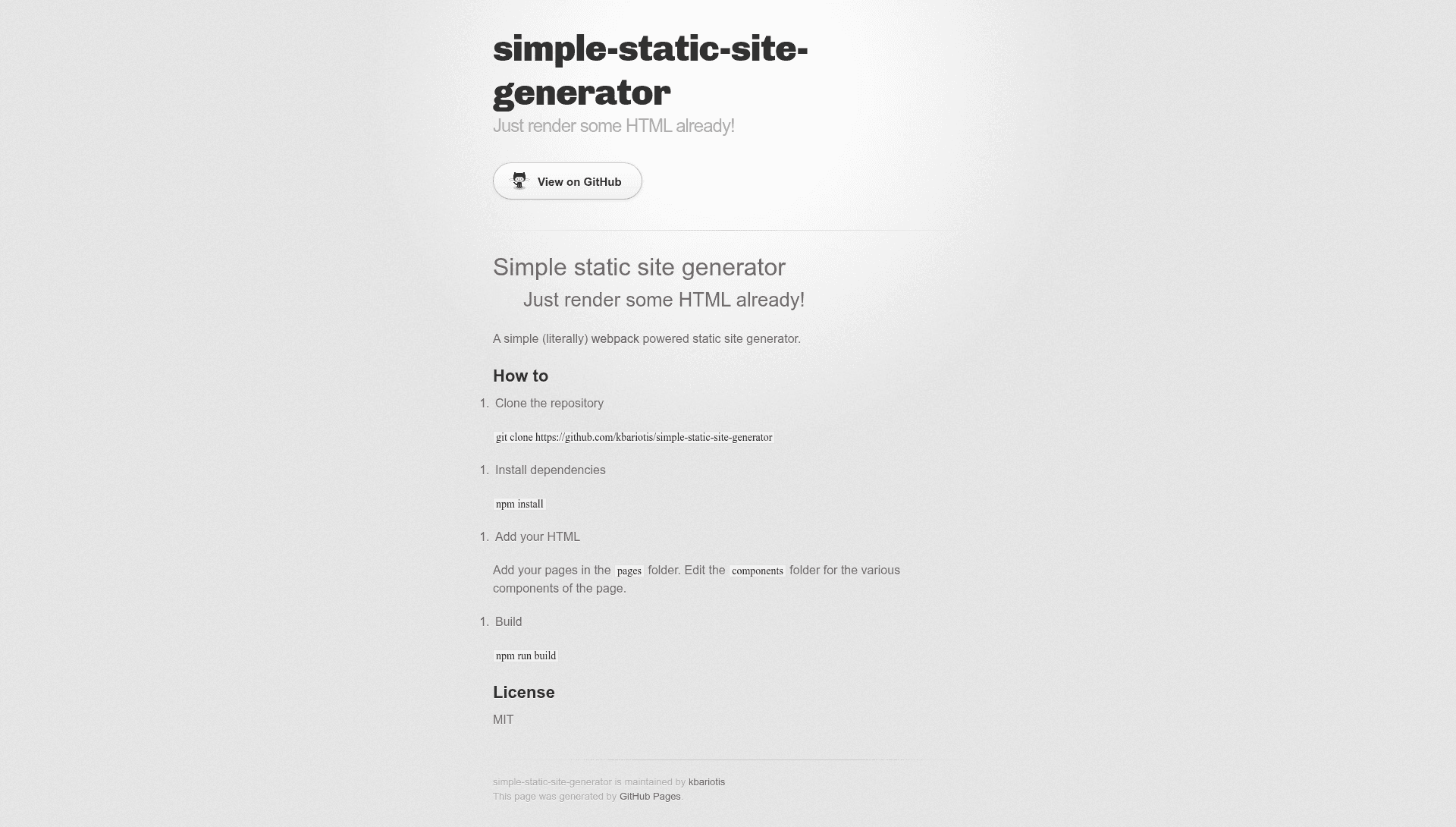
A simple webpack-powered static site generator that renders plain HTML pages and components into a static site with one command.
About this template
Simple Static Site Generator is a minimal webpack-powered static site generator that turns plain HTML pages and shared components into a built static site with a single npm command.
What is Simple Static Site Generator?
Simple Static Site Generator is a small Node.js project, created by kbariotis, that uses webpack to compile static HTML sites. It takes HTML files from the pages folder and component snippets from the components folder as input, and produces a fully built static site when you run npm run build. The project is distributed as a public GitHub repository under the MIT license, with the tagline "Just render some HTML already!" signaling its stripped-down approach.
Key Features
- Webpack-powered build — The entire build pipeline runs on webpack, so you get a familiar Node.js toolchain for bundling HTML and assets.
- Simple folder structure — Pages live in
pages, and reusable page components live incomponents; editing either is all the configuration you need. - One-command output — Running
npm run buildcompiles the site, with no JSON config to write or CLI flags to remember. - Plain HTML input — You write normal
.htmlfiles rather than a templating language, which keeps the learning curve near zero. - MIT licensed — The source can be freely reused, modified, and distributed, including in commercial projects.
- npm-based setup — Installation is just
git clonefollowed bynpm install, so any Node.js environment can start building immediately.
Who is it for?
Simple Static Site Generator suits developers who want a no-frills static site without adopting a full static-site framework. Beginners can use it to learn how webpack and static site generation work through a minimal codebase. It also works for small, single-purpose sites like landing pages or internal documentation where a heavy toolchain would be overkill. If you need a blog engine, themes, or content collections, this project intentionally does not include them.
What can you do with it?
- Landing page builder: Drop an
index.htmlinto thepagesfolder and run the build to get a production-ready static homepage. - Multi-page sites: Add more HTML files in
pagesto create additional routes, each compiled by the same webpack pipeline. - Reusable components: Edit files in
componentsto share headers, footers, or other snippets across multiple pages.
How does Simple Static Site Generator work?
The workflow is a four-step process: clone the repository from GitHub, install dependencies with npm install, add your HTML pages to the pages folder (and edit the components folder for shared parts), then run npm run build. Webpack processes the files and outputs the finished static site. There are no configuration files to customize before the first build.
FAQ
Is Simple Static Site Generator free?
Yes. The project is published under the MIT license, so you can use it, modify it, and distribute it without paying a license fee. That includes commercial use, as long as you retain the original copyright notice.
How do I add a new page?
Create a new HTML file inside the pages folder and run npm run build. Each file in that folder becomes a page in the generated static site. The build automatically picks up new files without extra configuration.
What technology does it use?
It runs on Node.js and uses webpack as the build tool. The input is plain HTML, so there is no template engine, Markdown parser, or frontmatter involved. The project's GitHub topics list nodejs, static-site, static-site-generator, and webpack.
Does it support Markdown or a blog?
No. The project is intentionally limited to rendering plain HTML files. There is no Markdown conversion, no blog post layout, and no content pagination. For those features, you would need a more feature-complete static site generator.
Where can I find the source code?
The repository is publicly available on GitHub at https://github.com/kbariotis/simple-static-site-generator. You can clone it directly with git clone https://github.com/kbariotis/simple-static-site-generator and run it locally.