Template details
Merlot
Merlot is a Jekyll theme for GitHub Pages
About this template
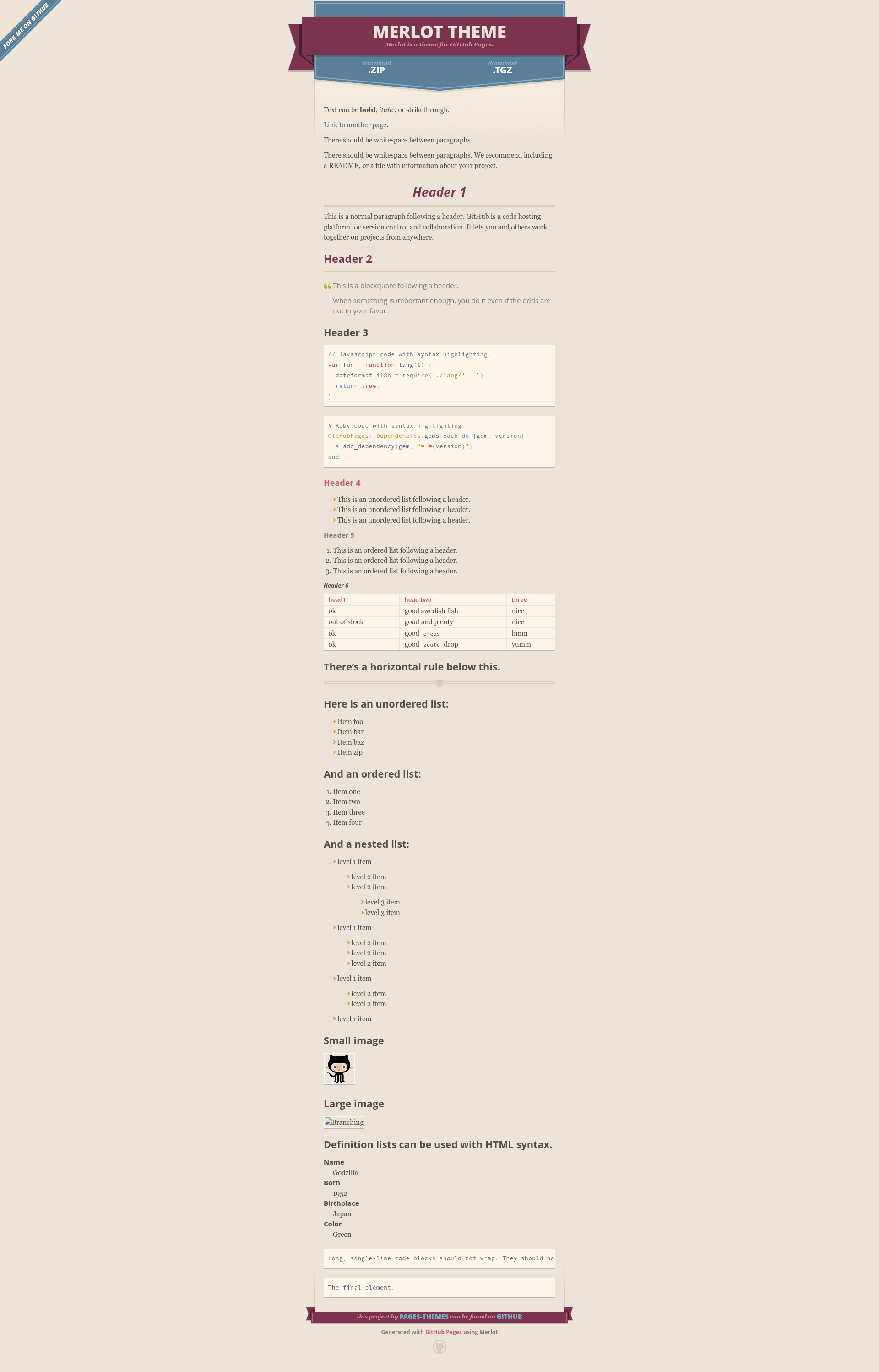
Merlot is an open-source Jekyll theme for GitHub Pages, maintained in the pages-themes GitHub organization, that turns a Markdown-based repository into a static project or documentation site. It is installed by declaring remote_theme: pages-themes/merlot@v0.2.0 in _config.yml, and the project repo includes a live preview at http://pages-themes.github.io/merlot.
What is Merlot?
Merlot is a Jekyll theme built to run on GitHub Pages with no additional hosting or build servers. The theme takes standard Jekyll content — Markdown files plus optional title, description, show_downloads, and google_analytics variables in _config.yml — and outputs a static HTML site with a clean article layout and a download button area. It is free to use and its source code is open, with the _includes, _layouts, and Sass asset folders exposed for overriding.
Key Features
- One-line remote installation — Add
remote_theme: pages-themes/merlot@v0.2.0to_config.ymland addjekyll-remote-themeto your plugins list to use the theme without cloning or forking the repository. - Configurable site metadata — The theme respects
title,description,show_downloads, andgoogle_analyticsset in_config.yml;show_downloadscontrols whether a download URL is displayed. - Custom stylesheet override — Create
/assets/css/style.scssin your site, add an@importof the theme at the top, then append custom CSS or Sass; Sass variables can be changed before the import line. - HTML layout override — Copy
_layouts/default.htmlfrom the theme repository into your site to edit the full layout, or drop small custom files into_includesfor changes like a custom favicon. - Google Analytics hook — Paste current tracking code into
_includes/head-custom-google-analytics.htmlwithout modifying the theme's layout. - GitHub URL overrides — Replace default repo and download URLs by setting variables such as
github.zip_urlin_config.yml, which the default layout uses when building links. - Local preview and tests — The repo includes
script/bootstrapto install dependencies andscript/cibuildto run the minimal build test suite;bundle exec jekyll serveserves the site atlocalhost:4000.
Who should use Merlot?
- GitHub Pages beginners who want a working site quickly by editing Markdown and a few
_config.ymlvariables. - Open-source maintainers who need a clean default page for a project repo, including an optional download link.
- Jekyll developers who want a minimal base to customize; the README gives explicit steps for overriding the stylesheet, layout, and includes.
- Educators or workshop leaders who want to demonstrate static site publishing on GitHub Pages with minimal configuration.
What can you do with Merlot?
- Launch a project page: set
show_downloads: trueso visitors get a direct link to a zip or release artifact. - Publish documentation: write Markdown docs in the repo and have them served as a static site with the default Merlot layout.
- Create a personal portfolio: use the title and description fields to present yourself, and customize layout or styles for a personal look.
- Build a custom branded site: copy the default layout and stylesheet, then replace the header, footer, and Sass variables to match your design.
How does Merlot work?
Add the remote_theme line and the jekyll-remote-theme plugin to _config.yml, then push to GitHub Pages; the service fetches the theme from GitHub and builds the site automatically. To work locally, clone the Merlot repository, run script/bootstrap, then run bundle exec jekyll serve and open localhost:4000. The theme's stated philosophy is to err on the side of simplicity, giving most users what they need out of the box while allowing opt-in complexity.
Alternatives
- Cayman — another GitHub Pages theme from the same organization, known for its large dark header.
- Minima — Jekyll's default theme, which is blog-focused and ships with Jekyll itself.
FAQ
Is Merlot free to use?
Yes. Merlot is an open-source Jekyll theme distributed through the GitHub Pages remote theme system, so you can use it on any GitHub Pages site without paying a fee or self-hosting a build process.
How do I install Merlot?
Add remote_theme: pages-themes/merlot@v0.2.0 to your site's _config.yml and add jekyll-remote-theme to the plugins list. For local previews, also add the github-pages gem to your Gemfile.
Can I customize Merlot's design?
Yes. Create /assets/css/style.scss with an @import line to add custom CSS or Sass, copy _layouts/default.html to change the HTML, or add files to _includes for small tweaks such as a custom favicon.
How do I update Google Analytics to the latest tracking code?
The theme's default layout includes _includes/head-custom-google-analytics.html; paste your current Google Analytics snippet into that file in your Jekyll site. This works around the theme's original analytics code being outdated.
How can I preview Merlot locally?
Clone the theme repository, run script/bootstrap to install dependencies, run bundle exec jekyll serve, and open http://localhost:4000 in your browser. The repo also includes script/cibuild for running the test suite.