Template details
SimpleIT Hugo Theme
Responsive Hugo theme that displays articles by directory, with nested sections, SEO metadata, multilingual support, and per-section RSS feeds.
About this template
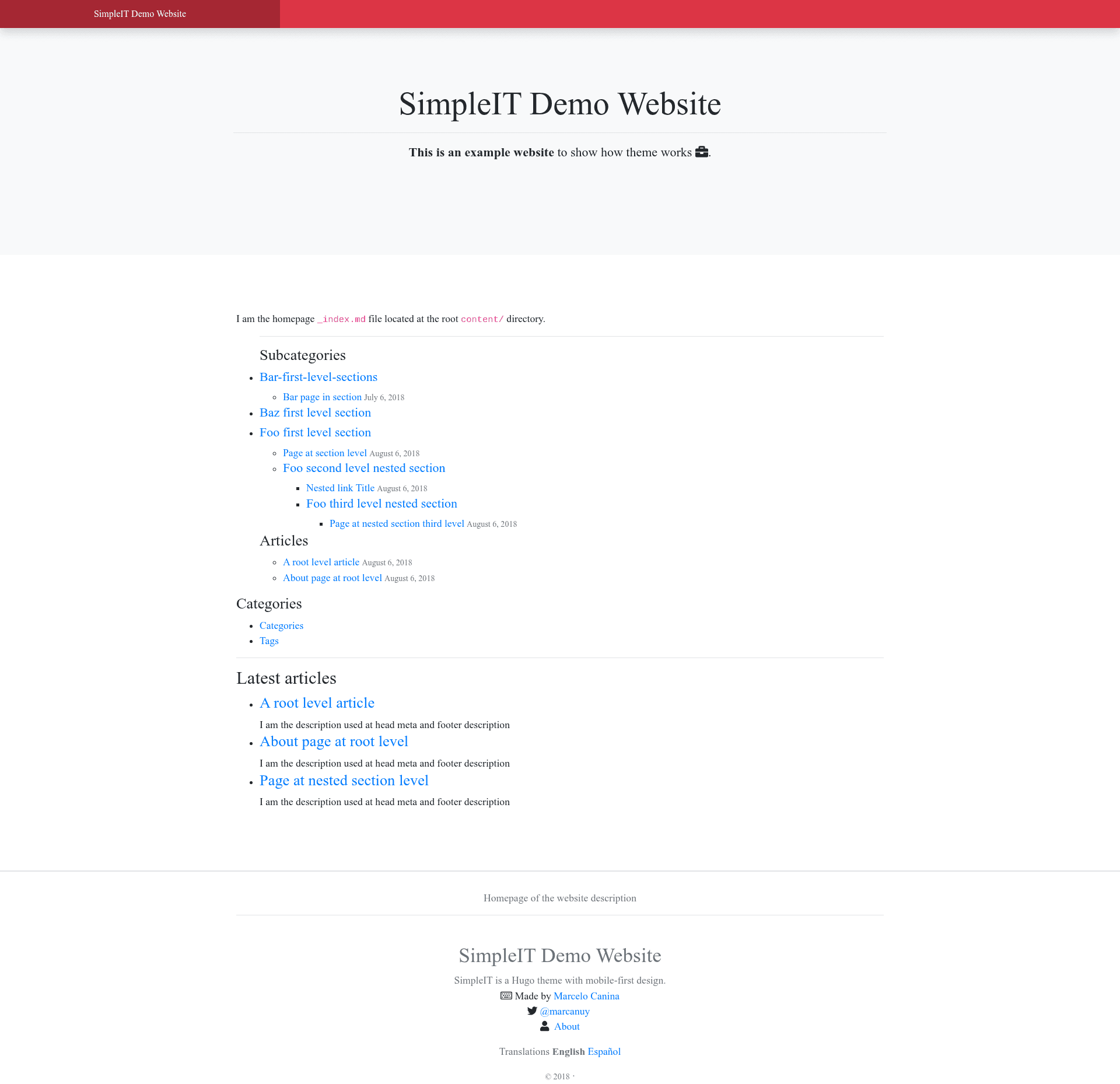
SimpleIT Hugo Theme is a responsive, MIT-licensed Hugo theme for hierarchical content websites that turns a folder tree of Markdown files into a navigable multi-level site.
What is SimpleIT Hugo Theme?
SimpleIT Hugo Theme is a Hugo theme that renders a directory structure of content into a static website where each folder becomes a section with its own articles and nested subdirectories. It takes Markdown files organized in directories under /content and outputs a mobile-friendly site that includes single-page layouts with automatic table of contents, section listing pages with cover images, and per-directory Atom RSS feeds. The theme is developed by marcanuy and demonstrated on simpleit.rocks, which uses a deep hierarchical content structure in Spanish and English.
Key Features
- Hierarchical content model — URLs mirror the physical folder structure (e.g., /foo-first-level-section/foo-second-level/page/), supporting arbitrary depth with each directory having its own _index.md.
- Two main layouts — Single pages offer an automatic TOC in the sidebar, sharing buttons (static or from sharingbuttons.io), Disqus comments, and previous/next article buttons; directory listing pages display a cover if /static/img/cover.jpg exists.
- SEO metadata — Uses Hugo internal templates for Open Graph, Schema (with dateModified pulled from the git repo), and Twitter Cards; also minifies HTML and compiles all SASS into one CSS file and one JavaScript file.
- Multilingual support — Each page emits alternate hreflang links in the head, the footer shows translations with fallback to available site languages, and content can be placed in per-language directories like /content/en and /content/es.
- Analytics and monetization — Config supports Google Analytics, Bing, Google AdSense page-level and automatic ads, plus optional Buy Me a Coffee and Ko-fi support buttons on articles.
- Per-directory Atom feeds — An index.xml file is generated for every directory and subdirectory, so subscribers can follow a specific section.
- Customizable styling — Users can copy assets/sass/custom_variables.scss (Bootstrap variables) and assets/sass/styles.scss to override theme styles, or include them via SCSS @import.
- Tech stack — Built with Hugo, Twitter Bootstrap 4, Font Awesome 5, and SASS; packages managed with npm via a Makefile.
Who is it for?
- Technical bloggers who write long-form tutorials organized into categories and subcategories and want their URL structure to mirror that taxonomy.
- Documentation maintainers who need clear article pages with an automatic TOC, author attribution, and per-section RSS feeds for a knowledge base.
- Multilingual site owners who publish the same content in several languages and want hreflang links and translation menus handled automatically.
- Static-site developers who prefer a self-hosted, MIT-licensed theme with no CMS dependency and customizable SASS variables.
Use cases
- Course or tutorial sites: nest lesson directories several levels deep, each with its own index page, cover image, and Atom feed, so students can follow a section.
- Project documentation: mirror the repository folder structure in /content, and every versioned module gets a stable URL that matches the directory tree.
- Personal blogs: use the single-page layout with author bio, Disqus, and sharing buttons to publish articles, and enable cover images for social sharing via OpenGraph and Twitter Cards.
How does the theme work?
Install it as a git submodule with git submodule add -f https://github.com/marcanuy/simpleit-hugo-theme themes/simpleit-hugo-theme. Then create content with hugo new <sections>/<article>.md, or create a directory containing an index.md and a resource named cover for posts with cover images. Run hugo server -t simpleit-hugo-theme locally to preview.
Pricing
Free and open source under the MIT License; no paid tiers are mentioned on the project page.
FAQ
Is SimpleIT Hugo Theme free?
Yes, the theme is released under the MIT License, so it is free to use, modify, and redistribute, including in commercial projects.
How do I add a cover image to a post?
Create a directory named after the post slug, place the image file in it, and reference the resource in the frontmatter with name: cover inside the resources array. That image is then used as the featured image for OpenGraph and Twitter Cards.
Does the theme support multiple languages?
Yes. Add a [languages] section in config.toml and create per-language directories under /content (e.g., en and es). Each page gets alternate hreflang links in the head, and the footer shows translation links with fallback to other available languages.
Can I customize the Bootstrap styles?
Yes. Copy assets/sass/custom_variables.scss and assets/sass/styles.scss from the theme into your site, edit them, and override Bootstrap variables. You can also import the theme's SASS files directly with an @import statement.
How do I update the theme after installing it as a submodule?
Run git submodule update --remote --merge from your site's root to pull the latest changes from the theme repository.