Template details
Slim
Minimal, clean Hugo theme for building fast, content-focused static blogs with social links, Disqus, and Google Analytics.
About this template
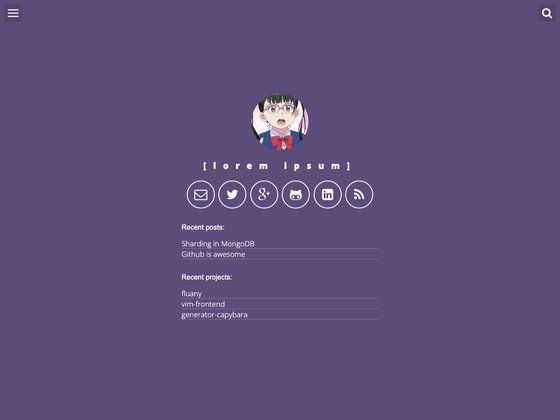
Slim is a minimal, clean Hugo theme for building fast, content-focused static blogs and personal sites.
What is Slim?
Slim is a minimal, clean theme for Hugo, a static site generator. It takes Hugo markdown content and configuration and produces a static HTML site. The theme is authored by GitHub user zhe and is open sourced under the MIT license. The live demo is hosted at themes.gohugo.io/theme/slim.
What makes Slim stand out?
- Minimal design — A clean, uncluttered layout that puts content first, with configurable site subtitle and social links.
- Social integration — Configure your GitHub and Twitter IDs in the site params to display links in the site.
- Google Analytics — Add your tracking code via the AnalyticsID param to enable analytics.
- Disqus comments — Add your Disqus shortname globally and enable or disable comments per-post using a
commentsfront matter flag. - Configurable summary/content display — Set Summary and Content params to true or false to control how post excerpts are shown; if both are true, the summary is shown.
- Flexible configuration formats — Works with both TOML (
config.toml) and YAML (config.yaml) Hugo site config files. - mainSections support — Restrict which sections appear on the home page by listing them in a mainSections array.
Who should use Slim?
- Personal bloggers who want a straightforward, fast Hugo theme without a lot of extra features.
- Developers who need a quick starting point for a Hugo site and want to customize the theme's source.
- Minimalist site owners who prefer a text-focused design with integrated social links and comments.
What can you do with Slim?
- Personal bloggers: set up a clean blog with a subtitle tagline, GitHub and Twitter links, and Google Analytics tracking in minutes.
- Content writers: enable Disqus comments on individual posts by adding
comments: trueto a post's front matter, while leaving other posts comment-free. - Hugo developers: clone the theme into your themes directory and run
hugo server -t slimto preview a new site quickly.
How does Slim work?
Install the theme by cloning the GitHub repository into your Hugo site's themes directory, then add the desired params to your config file. Build the site with hugo server -t slim for local development or hugo to generate static files. The theme reads the configured params and front matter to render the layout.
Pricing
Slim is free and open source under the MIT license, so you can use it for personal and commercial projects without paying a license fee.
FAQ
How do I install Slim?
Clone the repository into your Hugo site's themes folder: git clone https://github.com/zhe/hugo-theme-slim slim. Then add theme = "slim" to your site config, or use -t slim when running hugo commands.
How do I enable Disqus comments on a post?
Set your Disqus shortname in the site config under params.DisqusShortname. Then, in a post's front matter, add comments: true to enable comments for that post. If the variable is omitted or set to false, comments stay disabled.
How do I add social links?
Provide your GitHub and Twitter usernames in the site config under params.GithubID and params.TwitterID. The theme will display these links in the site.
Is Slim free?
Yes, Slim is released under the MIT license, which allows free use, modification, and distribution, including for commercial projects.
How do I customize the footer text?
Uncomment the FooterMsg param in your config file and set it to the text you want displayed in the footer. The comment in the config shows the default usage example.