Template details
SpaacedOut
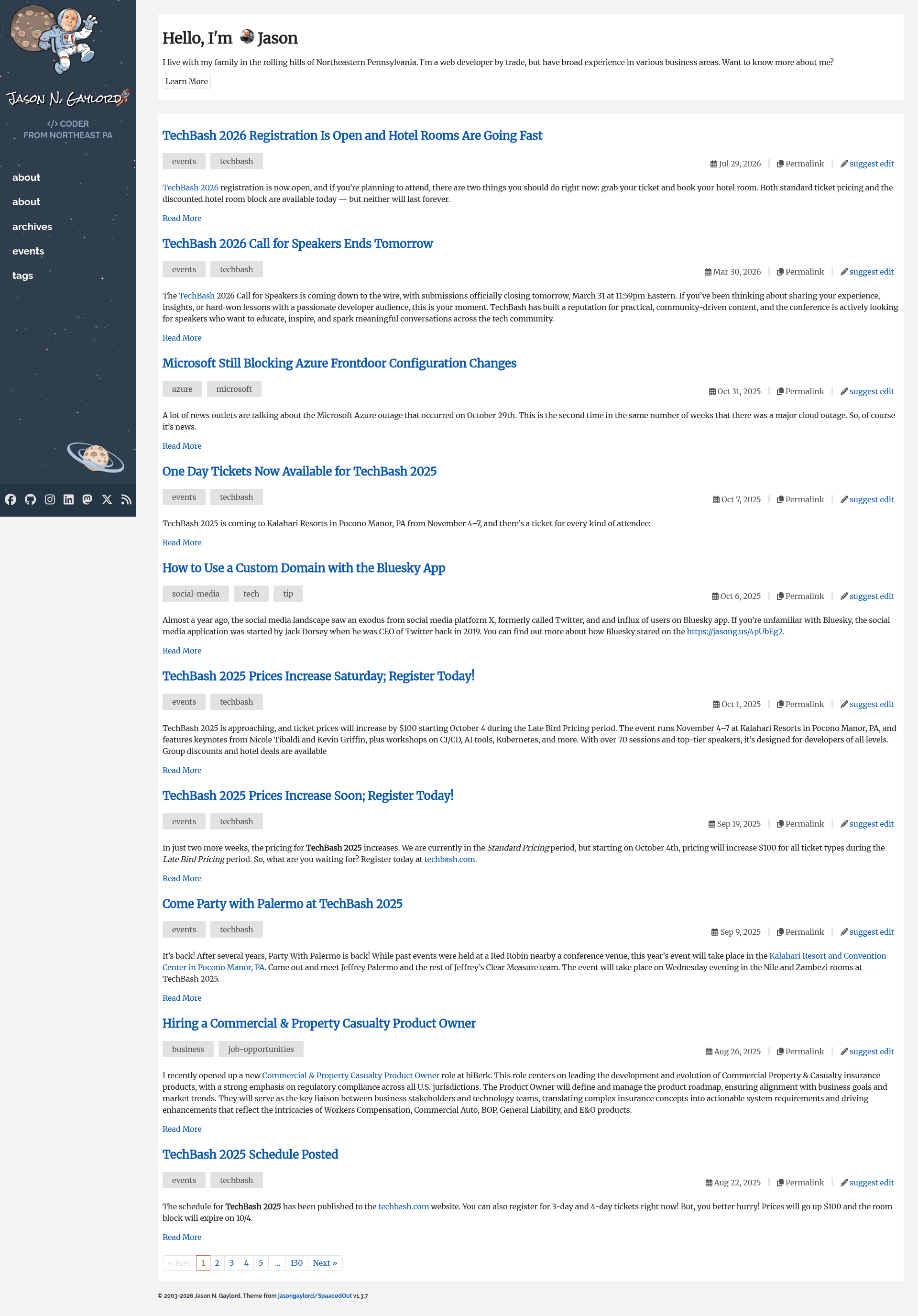
A responsive Jekyll theme for GitHub Pages with post excerpts, Google Analytics, Disqus, and social icons.
About this template
SpaacedOut is a responsive Jekyll theme built for GitHub Pages that turns a standard _config.yml into a blog with post excerpts, yearly archives, Disqus comments, and social icons. Created by Jason Gaylord, this open-source theme (MIT license) is a mashup of the 2019 JasonGaylord.com design, the Haacked theme, and the plainwhite theme, and is distributed as a Ruby gem for use as a remote theme.
What is SpaacedOut?
SpaacedOut is a Jekyll blog theme that provides layout templates, includes, SASS styles, and configuration defaults so you can publish a personal blog on GitHub Pages without writing front-end code. It takes as input a Jekyll site with _config.yml settings and Markdown/HTML posts, and produces a static blog with a home page, post pages, page layout, and a yearly archive. The theme is designed to work with GitHub Pages' supported Jekyll 3.8 environment, meaning it avoids Jekyll 4.0 features like dynamic includes.
Key Features
- Post excerpts on the home page — Insert the
moremarker inside an HTML comment in any post; only content above that comment appears in the homepage excerpt and archive lists. - Google Analytics tracking — Enable by defining your Analytics ID in
_config.yml; the include lives in_includes/head/google-analytics.html. - Post archival by year — The included
assets/pages/archives.mdpage lists posts in descending order by year. - Social media icons in the header — Supports Twitter (now X), Bluesky, Mastodon, Threads, and other icons; updated in version 1.3.x.
- Disqus comment support — Includes
_includes/comments/disqus_comments.htmlfor the comment block anddisqus_comments_link.htmlfor comment counts. - Dynamic menu support — The header menu adapts to your site's defined pages.
- Automatic line numbering and language indicator for syntax highlighting — Built on Jekyll's Rouge plugin via
assets/syntax-highlight.scss. - Git link for editing — Renders an "edit this page" link, defined in
_includes/post/edit.html. - No JavaScript or CSS framework — The theme deliberately avoids jQuery and Bootstrap; all script behavior lives in
assets/js/utils.js, keeping the theme lightweight.
Who is it for?
SpaacedOut is aimed at developers and bloggers who host a personal site or blog on GitHub Pages using Jekyll. A blogger who wants a clean, responsive layout with comments and analytics can use the abbreviated installation by copying the theme's _config.yml settings. A developer who wants to customize the theme can override layouts, includes, or SASS variables by copying _sass/variables/variables.scss into a local style.scss. A user who needs a minimal dependency theme will appreciate that it uses no jQuery or Bootstrap and supports only the plugins listed in the theme.
What can you do with SpaacedOut?
- Personal bloggers: publish posts with excerpts, yearly archives, and Disqus comments on a GitHub Pages site.
- Jekyll theme developers: study a working, lightweight theme implementation with overridable layouts and includes as a reference.
- Site owners who want SEO: enable the built-in
jekyll-seo-tagandjekyll-sitemapplugins to generate meta tags and an XML sitemap. - Remote-theme users: point your
_config.ymltojasongaylord/SpaacedOutviajekyll-remote-themeand get automatic updates from the theme's repository.
How does SpaacedOut work?
Installation follows a standard remote-theme pattern: copy the settings from the theme's _config.yml into your own, adjust title and social links, and push to GitHub Pages. For custom installation, create a SASS file in assets/style.scss, copy the variables you want to override from _sass/variables/variables.scss, then @import "SpaacedOut" to apply the rest of the theme's styles.
Alternatives
- plainwhite — a minimal Jekyll theme that SpaacedOut borrows from.
- Haacked — a Jekyll theme authored by Phil Haack, one of the design sources for SpaacedOut.
FAQ
Is SpaacedOut free?
Yes, the theme is open source under the MIT License, so you can use, modify, and redistribute it without charge.
Does SpaacedOut work with GitHub Pages?
Yes, the theme is designed for GitHub Pages and explicitly supports the Jekyll 3.8 environment currently available there. Because of this, it cannot use the dynamic includes introduced in Jekyll 4.0; instead it relies on configuration flags to inject optional content.
How do I customize the colors and fonts?
Create assets/style.scss in your site, copy the variables you want to override from the theme's _sass/variables/variables.scss, then add @import "SpaacedOut" below them. The theme compiles SASS to CSS automatically.
What plugins does SpaacedOut include?
The theme integrates jekyll-avatar, jekyll-feed, jekyll-paginate, jekyll-remote-theme, jekyll-seo-tag, and jekyll-sitemap. This covers avatars, Atom feed generation, pagination, remote theming, SEO tags, and XML sitemaps.
Does the theme have mobile support?
Yes, the theme is responsive and includes a full mobile flyout menu, as shown in the project's screenshots.