Template details
Split
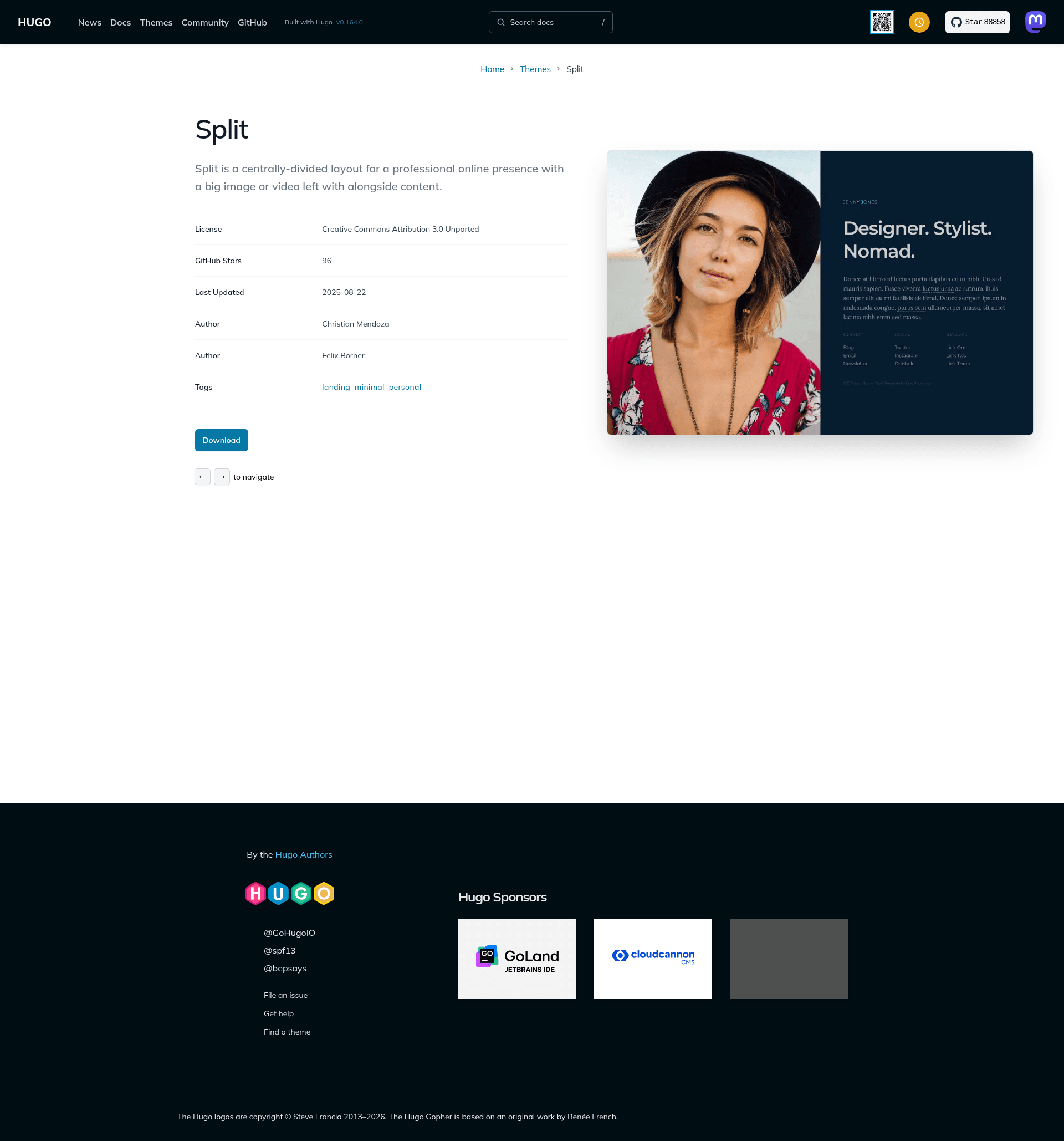
Hugo theme port of One Page Love's Split — a single-page, centrally-divided layout with an image or video side and content side.
About this template
Split is a Hugo theme that ports One Page Love's Split template into a single-page, centrally-divided layout: a large image or video sits on one side, and a content column on the other holds your name, tagline, bio, and links.
What is Split?
Split is a static-site theme for Hugo that recreates the one-page Split design from One Page Love. It takes markdown content and TOML config as input and outputs a static homepage with an image or video visual and a text column, plus optional subpages. The theme is maintained by GitHub user escalate and is released under the Creative Commons Attribution 3.0 License.
Key Features
- Centrally-divided layout — The single-page design pairs a full-size visual column with a text column for name, tagline, bio, and link lists.
- Image or video visual — Configure a background image with CSS position, or a self-hosted video or YouTube ID; videos autoplay and loop with a mute option.
- Per-page visual control — Front matter flags such as
visual.image.enableorvisual.video.enablelet you hide the visual on specific pages. - Up to three link lists — The links section supports up to three columns, each with a heading and multiple text/URL entries that can open in a new tab.
- Social sharing metadata —
shareImageandtwitterHandleconfig values control previews when the site is shared on social media. - Google Analytics integration — Enable analytics by adding a tracking ID under
[services.googleAnalytics]in the config file. - Custom CSS support — Add your own styles to
static/css/style.cssand turn on[params.custom.css]to load them. - License attribution toggle — Set
licensed = truein the config to remove the attribution line after purchasing the original template license.
Who is it for?
- Freelancers and consultants — Present a professional one-page profile with a portrait image or intro video, a short bio, and links to email, blog, or newsletter.
- Creative professionals — Photographers, designers, and stylists can lead with a visual that showcases their work and use the content column for a tagline like
Designer. Stylist. Nomad. - Hugo developers — Anyone who wants a minimal, configurable Hugo theme can clone it, adjust the TOML settings, and extend the partials.
What can you do with Split?
- Create a quick landing page — Publish a single-page site with your name, tagline, bio, and up to three groups of links without building a full navigation.
- Add a video background — Use a self-hosted MP4 or a YouTube video as the visual, with autoplay and looping, to make the page feel more personal.
- Keep SEO and social metadata in one place — Set author, description, share image, and Twitter handle in the config file to manage how search engines and social platforms display your site.
How does Split work?
- Clone the repository into your Hugo site's
themesdirectory. - Copy one of the example configuration files from the
testsfolder to your site root. - Create
_index.mdfor the homepage and add title, tagline, and markdown content. - Configure the image or video visual, link lists, metadata, and analytics in
hugo.toml. - Run
hugo serverand open localhost:1313 to preview the result.
Pricing
The Hugo theme is open source under the Creative Commons Attribution 3.0 License, so you can use it for free as long as you keep the attribution link. If you prefer to remove that attribution, the original Split template can be licensed from One Page Love's website; setting licensed = true in the config will disable the license text.
FAQ
Is Split free?
Yes, the Hugo theme is released under the Creative Commons Attribution 3.0 License, which allows free use with attribution. The optional paid license from One Page Love lets you remove the attribution text by setting licensed = true.
Can I use a video instead of an image?
Yes. Set [params.visual.image] to enable = false and enable [params.visual.video], then provide either a file path to a video in your static folder or a youtubeId. The video is configured to autoplay and loop, with a mute option.
How do I disable the image on a specific page?
In that page's front matter, add visual.image.enable = false (or visual.video.enable = false for videos) to hide the visual just for that page while keeping it on the homepage.
Does Split support Google Analytics?
Yes. Add your tracking ID under [services.googleAnalytics] in your config file, for example ID = "UA-XXXXXXXX-1", and leave it empty or remove the section if you don't need analytics.
Can I customize the styling?
Yes, you can put your own CSS in static/css/style.css and enable it with [params.custom.css]. You can also modify the layout partials, such as layouts/partials/video.html, to change video behavior like autoplay and looping.