Template details
Start Bootstrap - Blog Post
A free, MIT-licensed Bootstrap HTML template for creating blog post pages, built by Start Bootstrap.
About this template
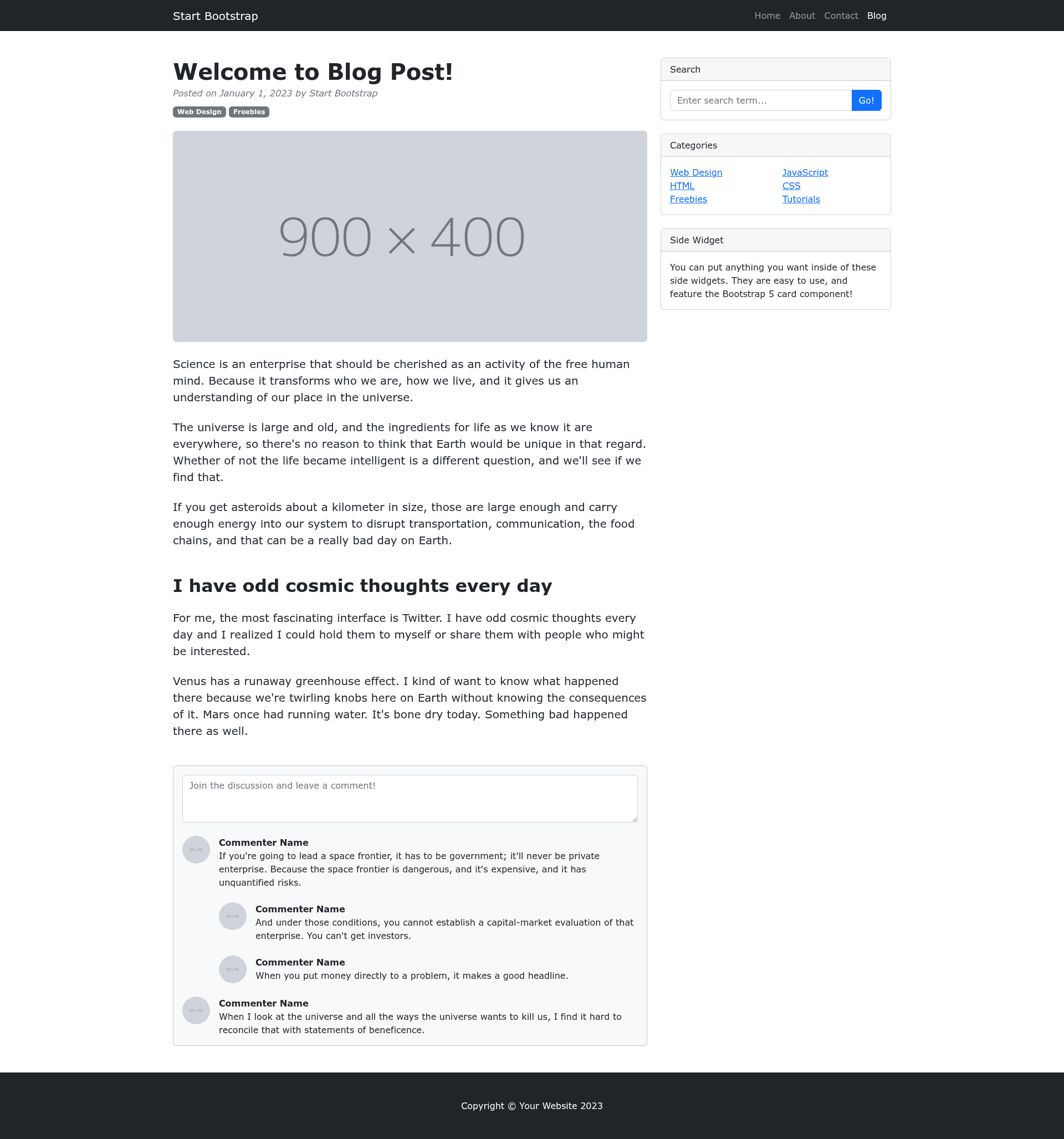
Start Bootstrap - Blog Post is a free, open-source HTML starter template for building individual blog post pages, created by Start Bootstrap and based on the Bootstrap framework. The template provides a complete single-page layout for presenting a full article, including a post title, metadata, body text, and a comments area. It is distributed through multiple channels: a direct download from startbootstrap.com, the npm package startbootstrap-blog-post, and a public GitHub repository. The project is maintained by David Miller and released under the MIT license, so it can be used for personal and commercial projects without restriction.
What is Start Bootstrap - Blog Post?
Start Bootstrap - Blog Post is a minimal HTML template designed to display a single blog article. It takes plain content — title, text, images, and comments — and renders them in a clean, responsive Bootstrap layout. The template runs entirely in the browser; no server-side processing or database is required. It is created by Start Bootstrap, an open source library of free Bootstrap templates, and maintained by David Miller.
Key Features
Key features of the template include the Bootstrap framework, precompiled dist files, Pug and SCSS source code, and a complete npm build system. The following list highlights the concrete details:
- Bootstrap framework — The layout is built on Bootstrap, providing a responsive grid, utility classes, and consistent cross-browser behavior out of the box.
- Precompiled dist files — The
distdirectory contains ready-to-use HTML, CSS, and JavaScript; you can edit them directly and openindex.htmlin any browser. - Pug source templating — The HTML source is written in Pug inside
src/pug/and compiled to static HTML usingnpm run build:pug. - SCSS styling source — CSS is authored in SCSS files in
src/scss/and compiled into the final stylesheet withnpm run build:scss. - Rich npm build system — The
package.jsonincludes scripts such asnpm run build(full build),npm run clean(removesdist), andnpm start(live preview with auto-reload). - Single-page blog post layout — The page includes sections for a featured image, title, metadata (author/date), body content, and visitor comments.
- MIT license — Free to use, modify, and redistribute for any purpose, including commercial projects.
- Open source on GitHub — The source code is available at github.com/StartBootstrap/startbootstrap-blog-post, with an issue tracker for reporting bugs.
Who is it for?
The template fits several user profiles, each with specific tasks in mind:
- Independent bloggers — Create a polished article page by replacing the placeholder content in
dist/index.htmland publishing it directly. - Front-end developers — Use the Pug and SCSS source to rapidly prototype a custom blog design, then rebuild with
npm run build. - Bootstrap learners — Study a compact, well-commented example that combines Bootstrap, Pug, SCSS, and npm scripts.
- Small businesses — Publish company announcements or news articles on a professional, mobile-friendly page without hiring a designer.
What can you do with it?
The template supports a range of typical blog-publishing tasks, including the following:
- Publish an article — Swap in your own headline, text, and image in the
distversion, and upload the files to any static web host. - Customize colors and fonts — Modify the SCSS variables in
src/scss/and runnpm run build:scssto generate a new stylesheet. - Integrate with a CMS — Use the compiled HTML as a template for a static site generator or a CMS theme.
- Learn the build workflow — Explore how Pug and SCSS compile into final assets by running each npm script individually.
How does it work?
The template offers two usage modes. For basic usage, download the release version and edit the HTML and CSS files inside the dist folder, then open index.html in a web browser. For advanced usage, clone the GitHub repository, run npm install to install dependencies, and execute npm start — this opens a live preview in your default browser, watches the source files in src, and reloads automatically when changes are saved.
Pricing
The template is free. Start Bootstrap releases all of its templates under the MIT license, which permits commercial use without payment or attribution. The project's GitHub repository also carries an MIT license badge.
FAQ
Here are answers to common questions about the Blog Post template.
Is Start Bootstrap - Blog Post free?
Yes. The template is free to download and use. It is released under the MIT license, which also allows commercial use, modification, and redistribution.
How do I install the template?
You have three options: download the latest release from Start Bootstrap, install it via npm with the command npm i startbootstrap-blog-post, or clone the repository with git clone https://github.com/StartBootstrap/startbootstrap-blog-post.git.
What files do I need to edit for basic customization?
For a simple edit, modify the compiled files in the dist directory — primarily index.html and css/js files. You can open index.html directly in a browser to preview changes.
Does the template require a build tool?
Only for advanced source development. The provided npm start script launches a live preview and rebuilds assets automatically. Basic users can ignore the source files and work directly with the contents of dist.
What is the license?
The template is licensed under the MIT License, as stated in the GitHub LICENSE file. This gives you the freedom to use the template in any project, including commercial ones, without paying fees.