Template details
whiteglass
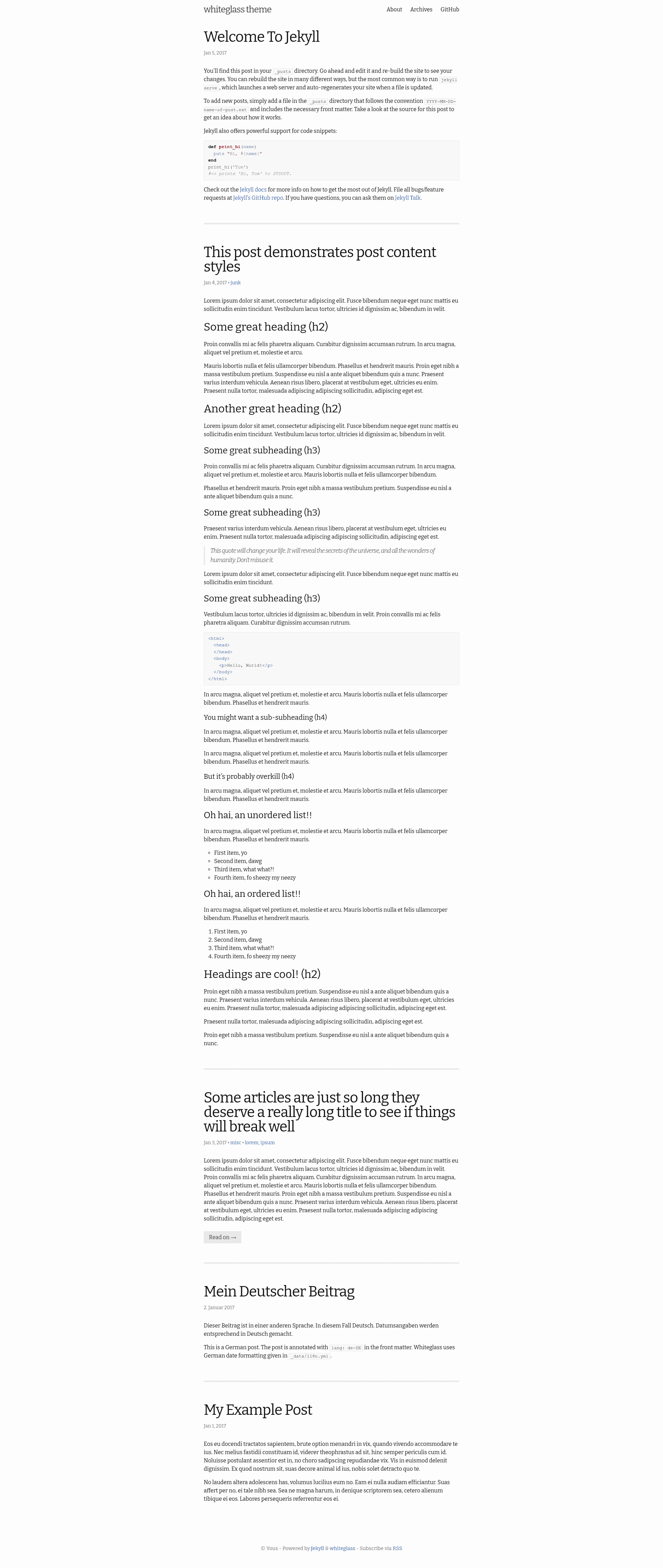
Minimal, responsive Jekyll theme for hackers with category/tag archives, i18n support, SEO metadata, and an Atom feed.
About this template
whiteglass is a minimal, responsive Jekyll theme built for hackers, distributed as the jekyll-whiteglass Ruby gem and installable by adding one line to a site's Gemfile and _config.yml.
What is whiteglass?
whiteglass is an open-source Jekyll theme from the GitHub repository yous/whiteglass, licensed under the MIT License. It takes a standard Jekyll site — Markdown posts with YAML front matter and configuration in _config.yml — and produces a static, responsive blog with category and tag archive pages, an Atom feed, and per-post SEO metadata. The theme ships as a gem, so sites reference it with theme: jekyll-whiteglass and install it through Bundler.
Key Features
Whiteglass bundles the essentials of a self-hosted blog into one gem: archives, feeds, SEO tags, and multilingual support, all driven by _config.yml and post front matter.
- Category and tag archives — Built on the
jekyll-archivesplugin, whiteglass generates archive pages at/categories/:name/and/tags/:name/, with post lists paginated byjekyll-paginateat/posts/:num/(5 posts per page by default). - Internationalization —
site.langsets the HTML lang attribute, individual posts can declare their ownlang(for examplelang: ko), and date formats plus fixed strings are translated through_data/i18n.yml; missing languages are accepted as pull requests. - SEO metadata — Per-post
descriptionandkeywordsfront matter feed meta descriptions, and Twitter Card plus Facebook Open Graph tags (includingtwitter:image,og:image,fb:admins, andarticle:author) can be set site-wide or per page. - Atom feed — A
feed.xmlpage usinglayout: feedproduces the blog's Atom feed, and a custom feed path can be configured withfeed: pathin_config.yml(for exampleatom.xml). - External post URLs — The
external-urlfront-matter attribute turns a post title into a link (rendered with a trailing arrow) both on the site and in the feed. - Comment system hook — Overriding
_includes/custom_comments_provider.htmlplugs in a comment service such as Disqus or Isso; comments are enabled withcomments: trueand disabled per post withcomments: false. - Google Analytics — The
google_analyticsconfig key accepts both Universal Analytics IDs (UA-NNNNNNNN-N) and Google Analytics 4 IDs (G-NNNNNNNNNN). - Customizable styling — The default stylesheet lives in the gem's
assets/main.scss; overriding it means creating amain.scssat the site source, copying the file from the repo, or copying the gem'sassets/folder.
Who is it for?
Whiteglass suits bloggers who want a minimal Jekyll site with no JavaScript framework to maintain and who accept CI-based deployment when they need full archive pages.
- Hackers and developers — the theme's stated audience — who want a clean, responsive blog with simple typography and no build tooling beyond Jekyll and Bundler.
- Jekyll users deploying through CI — because
jekyll-archivesis not supported by GitHub Pages, bloggers who want category and tag archive pages can copy the included.travis.ymland deploy togh-pagesvia Travis CI. - Multilingual bloggers — writers who publish posts in multiple languages can declare a
langfor each post and extend_data/i18n.ymlwith their own translations. - GitHub-templating beginners — people who want a one-click start can use the
yous/whiteglass-templaterepository's "Use this template" button, edit_config.yml, and let GitHub Actions build the site.
What can you do with whiteglass?
With whiteglass you can launch a blog either from the one-click GitHub template or from a manual jekyll new setup, then control posts, language, navigation, and sharing metadata through front matter and data files.
- Quick blog setup: click "Use this template" on the
yous/whiteglass-templaterepository, create a repository, change the options in_config.yml, and push content — GitHub Actions generates the site automatically. - Manual Jekyll blog: run
jekyll new blog --skip-bundle, add thejekyll-whiteglassgem plusjekyll-archives,jekyll-paginate, andjekyll-sitemap, copy the theme's sample files (index.html,about.md,archives.md,feed.xml,robots.txt,_data/i18n.yml,_data/navigation.yml), and serve locally withbundle exec jekyll serveathttp://127.0.0.1:4000. - Mixed-language posting: write a post in another language by setting
langin its front matter, so for example a Korean post can sit inside an English-language site. - Social sharing control: define Twitter Card and Facebook Open Graph metadata per post to decide exactly how shared links preview on social networks.
How does whiteglass work?
Whiteglass is a standard Jekyll theme gem: Jekyll reads the site's _config.yml, renders Markdown posts through the theme's layouts, and outputs a static site to serve or deploy. The quick start path points at the whiteglass-template repository so GitHub Actions performs the build, while the manual path requires installing the gem, enabling the three plugins, and copying the theme's sample pages into the site root. Customization follows Jekyll's standard override model — a file with the same name in the site source replaces the theme's version.
Pros and cons
The main trade-off to know before adopting whiteglass is its CI dependency for archive pages.
- Pros: Open source under the MIT License; minimal and responsive by default; multi-language support; pure static output with no client-side JavaScript.
- Cons: The
jekyll-archivesdependency is not supported by GitHub Pages, so full category and tag archive pages require Travis CI or another CI service rather than a default Pages build.
Pricing
Free — whiteglass is released as open source under the terms of the MIT License, and the jekyll-whiteglass gem can be installed directly from RubyGems.
Alternatives
Other Jekyll themes cover similar ground if whiteglass's minimal feature set is not enough.
- Minimal Mistakes — a much larger Jekyll theme with extensive layout and configuration options.
- Chirpy — another Jekyll blog theme.
FAQ
Is whiteglass free?
Yes. The theme is open source under the MIT License, and the jekyll-whiteglass gem is free to install with gem install jekyll-whiteglass or through Bundler.
Does whiteglass work with GitHub Pages?
The theme itself works on GitHub Pages, but its category and tag archives depend on the jekyll-archives gem, which GitHub Pages does not support. The README recommends Travis CI for full functionality and includes a .travis.yml for that purpose.
How do I install whiteglass?
Add gem "jekyll-whiteglass" to your Gemfile and theme: jekyll-whiteglass to _config.yml, then run bundle. You must also enable the jekyll-archives, jekyll-paginate, and jekyll-sitemap plugins and copy the theme's sample files. Alternatively, use the whiteglass-template repository and click "Use this template".
How do I write a post in another language?
Set the lang attribute in the post's front matter, such as lang: ko. This overrides site.lang for that page. Fixed strings and date formats come from _data/i18n.yml; if your language is missing there, you can submit it as a pull request.
Can I add comments to whiteglass?
Yes. Overwrite _includes/custom_comments_provider.html with your provider of choice (Disqus and Isso are suggested in the README), set comments: true in _config.yml, and disable comments on individual pages or posts with comments: false in their front matter.