Template details
Vintage Web Hugo Theme
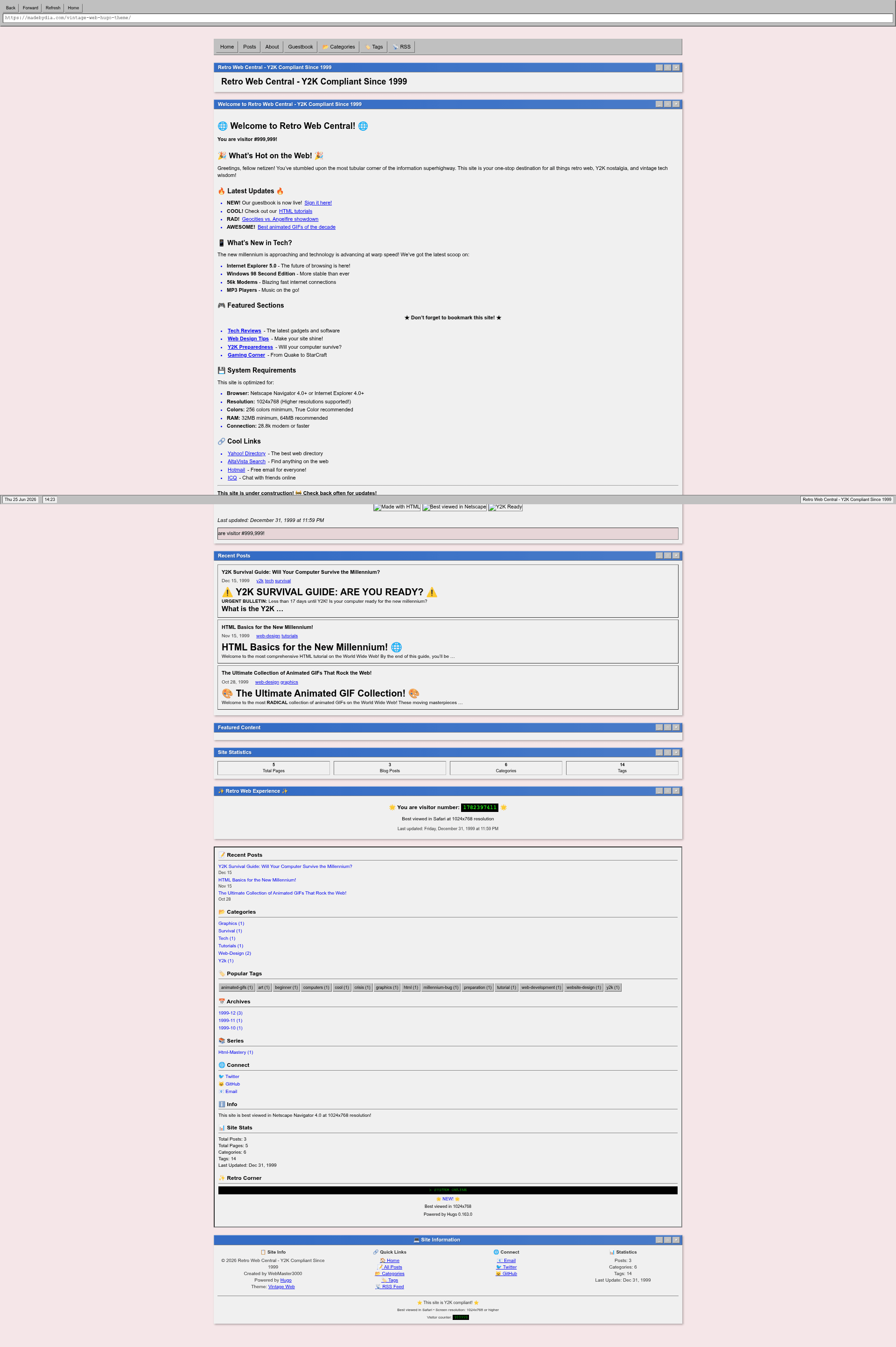
A nostalgic Hugo theme inspired by late 90s/early 2000s web design with a retro windowed interface.
About this template
Vintage Web Hugo Theme is a Hugo theme that recreates the look and interaction of late-90s/early-2000s web pages with a windowed desktop interface, built for static blogs and personal sites. It is developed by designer madebydia and released under the MIT License.
What is Vintage Web Hugo Theme?
Vintage Web Hugo Theme is a theme for the Hugo static site generator that turns content written in Markdown into a retro-styled website with draggable windows, title bars, status bars, and classic browser chrome. It takes standard Hugo content (posts, pages, taxonomies) as input and outputs a fully responsive static site with SEO metadata, RSS feeds, and client-side interactions. The theme is authored by madebydia and distributed as a GitHub repository with 33 stars at the time of this writing.
What makes it stand out?
- Retro window interface — Classic OS-style windows with functional minimize, maximize, and close controls, plus title bars and status bars, all styled with a 90s color palette and typography.
- Konami code easter egg — Pressing the classic ↑↑↓↓←→←→BA sequence triggers a hidden interaction on the site.
- Content display options — Multiple post list views including list, grid, and archive layouts, with support for featured images, categories, tags, and series.
- Code and media support — Full Markdown rendering, syntax highlighting for fenced code blocks, image galleries with lightbox, and a generated table of contents per post.
- SEO and performance — Structured data, Google Analytics integration, image lazy loading, minified assets, and a semantic HTML structure.
- Customization system — Site-wide parameters control browser chrome, status bar, sidebar, welcome message, footer, and build info, while CSS custom properties in
:rootlet you change the entire color scheme. - Extras — Keyboard navigation shortcuts, copy-to-clipboard buttons on code blocks, RSS feeds, social sharing, and a configurable sidebar with stats.
Who should use it?
- Nostalgic bloggers who want a personal blog or journal with an authentic late-90s aesthetic and modern responsiveness.
- Hugo developers looking for a themed starting point that demonstrates advanced template features like multiple list views, taxonomies, and parameter-driven layouts.
- Creative portfolio owners who want to showcase media galleries and interactive elements with a retro desktop metaphor.
What can you do with it?
- Launch a retro-style blog — Write posts in Markdown with front matter for descriptions, featured images, categories, tags, and series, and the theme handles all output and navigation.
- Create a Y2K-themed microsite — The included exampleSite ships with a Y2K survival guide, an HTML tutorial post, an animated GIF collection, an about page, and a guestbook with sample entries to demonstrate every feature.
- Customize the entire look without touching templates — Override CSS variables in your site's own stylesheet or via
custom_cssandcustom_jsparameters in the Hugo config file to change fonts, colors, and behavior.
How does it work?
Install the theme by adding it as a git submodule, clone, or download, then set theme = "vintage-web-hugo-theme" in your Hugo config file. Content lives in the content/posts and content directories with standard front matter; the exampleSite in the repository can be served locally with hugo server for previewing all features. Production builds use hugo --minify to output optimized static files.
Pros and cons
- Pros: Free and open source under MIT; includes a full exampleSite with period-appropriate content; supports modern SEO and accessibility practices; offers granular visual parameters without requiring code edits.
- Cons: The theme's niche aesthetic deliberately sacrifices contemporary flat-design norms; browser support is not guaranteed for very old browsers, though graceful degradation is mentioned.
FAQ
Is Vintage Web Hugo Theme free?
Yes, the theme is released under the MIT License, so you can use, modify, and redistribute it freely, including in commercial projects. The repository is public on GitHub and has received 33 stars.
How do I install Vintage Web Hugo Theme?
You can add the theme as a git submodule with git submodule add https://github.com/madebydia/vintage-web-hugo-theme.git themes/vintage-web-hugo-theme, clone it directly, or download a release. Then set the theme name in your Hugo configuration.
Does the theme work on mobile?
Yes, the theme is fully responsive. The retro window layout adapts to smaller screens, and the documentation states it supports modern browsers with mobile responsive design and progressive enhancement.
What content types does it support?
Beyond standard posts and pages, the theme supports galleries, syntax-highlighted code blocks, tables, lists, and interactive elements like forms and buttons. Front matter options include featured images, categories, tags, series, and automatic table of contents.
Can I change the color scheme?
Yes, all colors are defined as CSS custom properties in :root, and you can override them in your site's own CSS or through the custom_css param in your Hugo config. The default palette includes a pinkish background and blue link colors.