Template details
Steve - Free HTML5 Portfolio Website Template
Free multi-page Bootstrap 4 portfolio website template for creators with hero header, portfolio grid, and contact form.
About this template
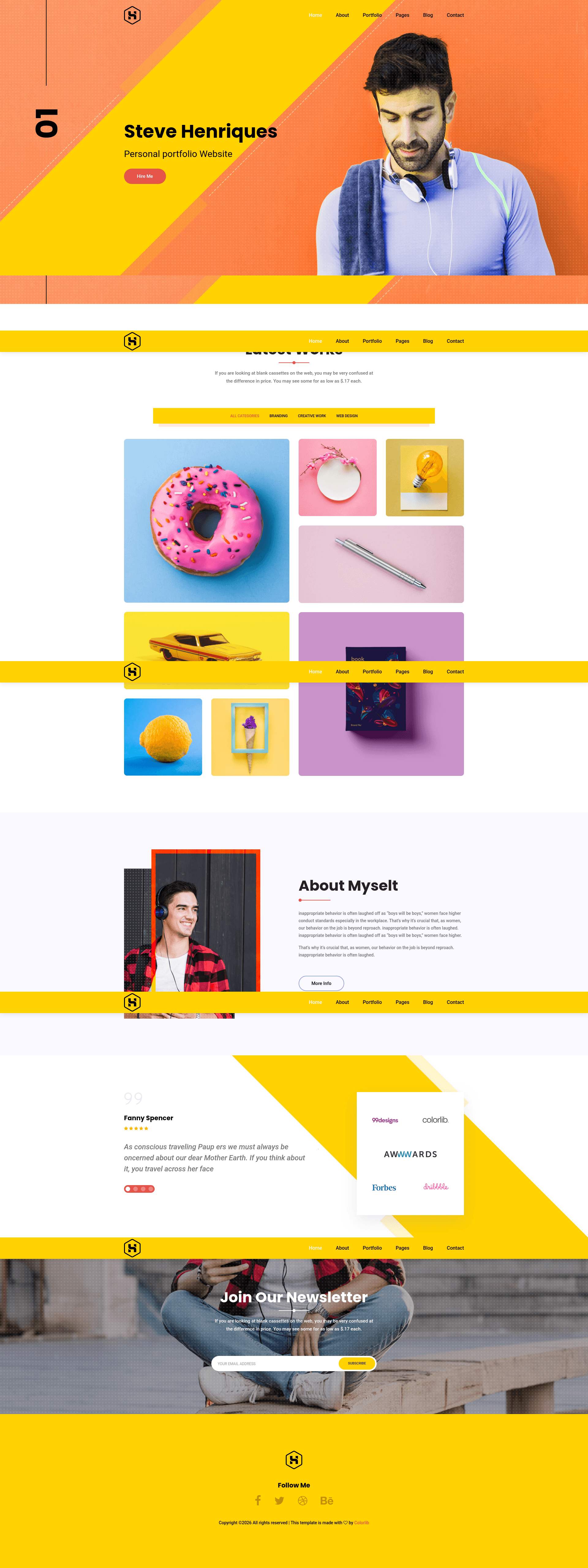
Steve is a free, multi-page HTML5 portfolio website template built on Bootstrap 4.1.3, designed for professionals such as web designers, web developers, digital marketers, and graphic designers to present their work online.
What is Steve?
Steve is a free, responsive, multi-page HTML5 portfolio template built on Bootstrap v4.1.3 and distributed by ThemeWagon, with Colorlib as the original author. The template takes demo images, SCSS and CSS source files, and JavaScript plugins, and produces a complete portfolio site consisting of 8 HTML pages plus a PHP file for the contact form. It runs in any static web host and is compatible with Chrome, Edge, Firefox, Safari, Opera, and mobile browsers. Steve's package includes all demo images, font icons, library and plugin files, and extensive documentation for setup and customization.
Key Features
- Bootstrap v4.1.3 foundation — Layout, grid system, and components are built on Bootstrap v4.1.3, with both CSS and SCSS source files included for theme customization.
- Multi-page layout with 8 HTML files — The template ships with 8 separate HTML pages plus 1 PHP file for the contact form, covering home, portfolio, blog, and content pages.
- Hero header and full-screen slider — The homepage leads with a hero header and an optional full-screen slider to showcase key visuals.
- Portfolio grid with hover effects — A responsive portfolio grid presents project images and links for easy work display.
- Testimonial carousel via Owl Carousel — Client testimonials rotate in a carousel powered by the Owl Carousel plugin.
- Sticky navigation with dropdown menu — The top navigation bar sticks to the viewport on scroll and includes drop-down menus and a call-to-action button.
- Contact form with custom JavaScript validation — A contact form template validates input in the browser and connects to the included PHP file for server-side handling.
- Newsletter and icon integrations — An Ajax Mailchimp-powered newsletter subscription form collects emails without reload, while FontAwesome and Linear Icons provide icon visuals.
- Additional UI elements — 10+ ready-to-use UI elements, breadcrumbs, pagination UI, Google Maps embed, and a comment form UI are included for building out inner pages.
Who is it for?
- Web designers and web developers — can quickly assemble a personal portfolio site with project grids and code samples without building from scratch.
- Digital marketers — can showcase campaign case studies, client testimonials, and a newsletter signup form to grow an audience.
- Graphic designers — can display a visual portfolio grid with full-screen hero visuals and portfolio items.
- Freelancers and small agencies — can create a multi-page business presence with a contact form, blog section, and Google Maps embed.
What can you do with Steve?
- Launch a personal portfolio site — Replace the demo images and text with your own work, then deploy the static HTML files to any web host.
- Add a working contact and newsletter system — Use the built-in contact form with PHP validation and the Ajax Mailchimp subscription form to capture leads.
- Write and publish a blog — The template includes a blog section with pagination UI and a comment form UI for posting articles.
- Map your office or location — Embed Google Maps on the contact page so visitors can find you easily.
Alternatives
- Devfolio — another free Bootstrap 4 portfolio template from ThemeWagon, oriented to developers.
- Ronald — a free Bootstrap 4 digital agency template also available on ThemeWagon.
- MeetMe — a free HTML5 Bootstrap personal portfolio template from the same marketplace.
FAQ
Is Steve really free to use?
Yes, Steve is a free download from ThemeWagon. The license allows open-source use and commercial projects, and includes lifetime free updates.
What do I get in the download package?
The package contains 8 HTML files, 1 PHP file, all demo images, CSS and SCSS files, font icons, library and plugin files, and extensive documentation.
Which browsers are supported?
Steve is compatible with Chrome, Edge, Firefox, Safari, Opera, and mobile browsers.
Can I customize the template if I'm a beginner?
The code structure is designed to be simple, and the included documentation explains setup and customization, so even newcomers can adjust the demo content.
How do I get the download link?
You need to enter your email address on the ThemeWagon product page; the download link is then sent to that email inbox.