Template details
Stylish Portfolio
A Jekyll implementation of the Start Bootstrap Stylish Portfolio template with configurable address and Google Maps integration.
About this template
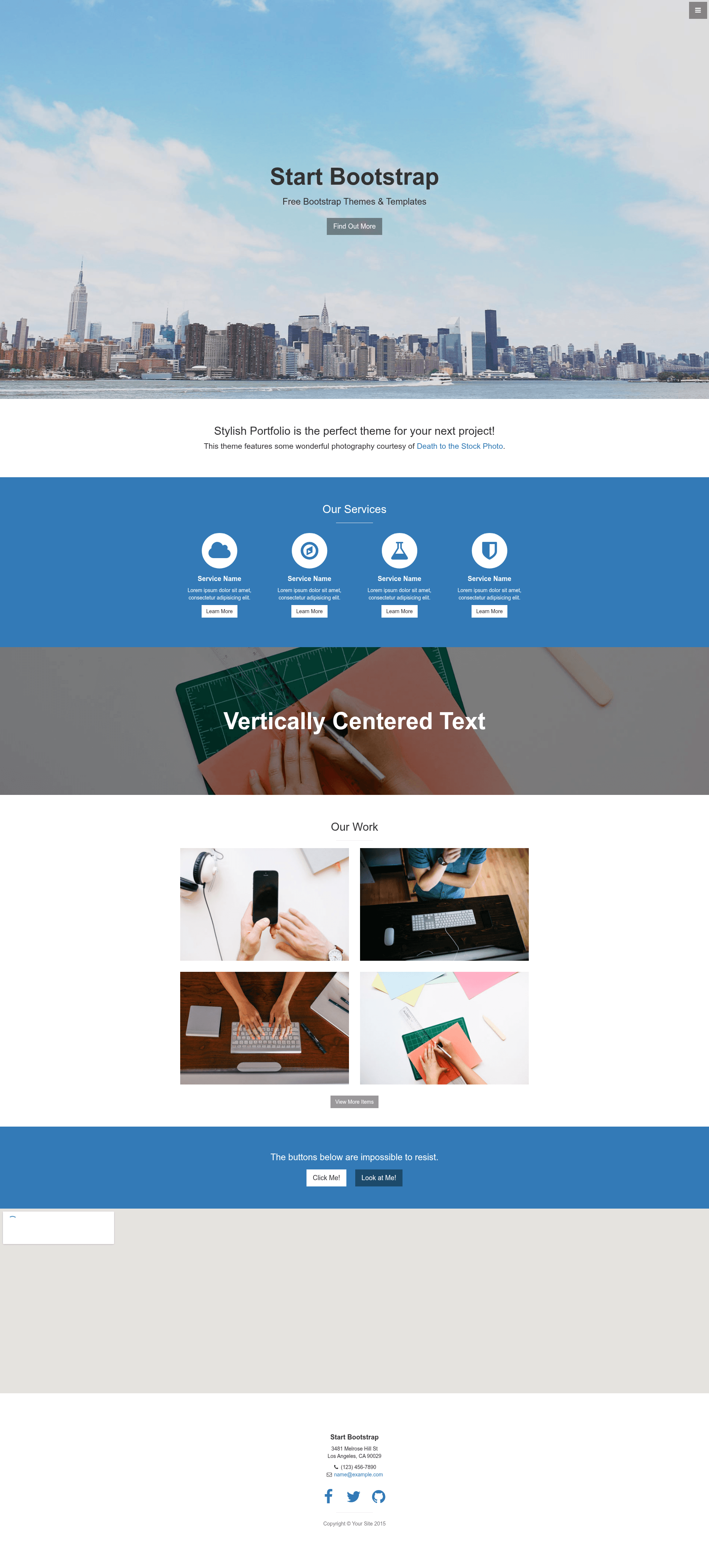
Stylish Portfolio is a Jekyll template that converts the Start Bootstrap Stylish Portfolio one-page theme into a static site with a configurable address and an embedded Google Map.
What is the Stylish Portfolio Jekyll template?
Stylish Portfolio is a Jekyll implementation of the Start Bootstrap Stylish Portfolio template, originally designed by Start Bootstrap. It takes your personal and business details from a configuration file and generates a one-page portfolio website featuring your address and an embedded Google Map. The template runs on Jekyll, a static site generator written in Ruby, and can be hosted on GitHub Pages or any static web host. A live demo is available at https://volny.github.io/stylish-portfolio-jekyll/, and the repository has 235 stars on GitHub.
Key Features
- Jekyll static site — Uses Jekyll to build a lightweight, fast-loading one-page portfolio from your source files; no database or server-side processing is needed.
- Configurable personal info — Add your name, business details, and other information in the
_config.ymlfile to customize the site without touching HTML. - Multiple address lines — Define as many address lines as you want; they are displayed on the page and are also used to show your location on the embedded map.
- Google Maps Embed integration — The included map uses the Google Maps Embed API, which requires you to obtain and configure an API key.
- Flexible section layout — Reorder or remove sections by editing
_layouts/front.html, so you control which parts of the one-page design appear and in what order.
Who is it for?
- Freelance designers and developers — Show off your work in a clean one-page portfolio that also tells visitors where you're based.
- Small businesses — Use the address and Google Map section to help customers find your physical storefront or office.
- Jekyll learners — Study how a Bootstrap-based HTML template can be converted into a data-driven Jekyll site with configuration files for content.
What can you do with it?
- Personal portfolio — Present your profile, services, and selected projects in a single scrolling page with a stylish background and clear call-to-action buttons.
- Business location page — Display your address lines and a live Google Map so visitors can get directions to your location.
- Template experimentation — Modify the layout and section order to see how Jekyll layouts and includes work together in a real project.
How does the template work?
- Start by adding your personal and business information in
_config.yml. - Add as many address lines as you want; this content is used for both display and map location.
- Get a Google Maps Embed API key from the Google Cloud Console and add it to your configuration.
- In
_layouts/front.html, reorder or remove sections to match your preferred layout.
FAQ
Do I need to know Jekyll to use this template?
You need a basic understanding of Jekyll to configure the _config.yml file and to build the site locally or deploy it to GitHub Pages. If you can edit YAML and run Jekyll commands, you can get the site running.
Is a Google Maps API key required?
Yes, the embedded map relies on the Google Maps Embed API. You must obtain an API key from Google Cloud Console and add it to your Jekyll configuration. Without a key, the map section will not display correctly.
Can I reorder or remove sections?
Yes, the page sections are defined in _layouts/front.html. You can delete sections you don't need or change their order by editing this file, then rebuild the site.
Can I test the template before setting up my own content?
Yes, the live demo at https://volny.github.io/stylish-portfolio-jekyll/ shows the template running with sample content. You can also fork the repository and run it locally with Jekyll.