Template details
Tailwind 4 Astro Starter
Free and open-source starter project to help you get started with Astro, Tailwind CSS and Flowbite.
About this template
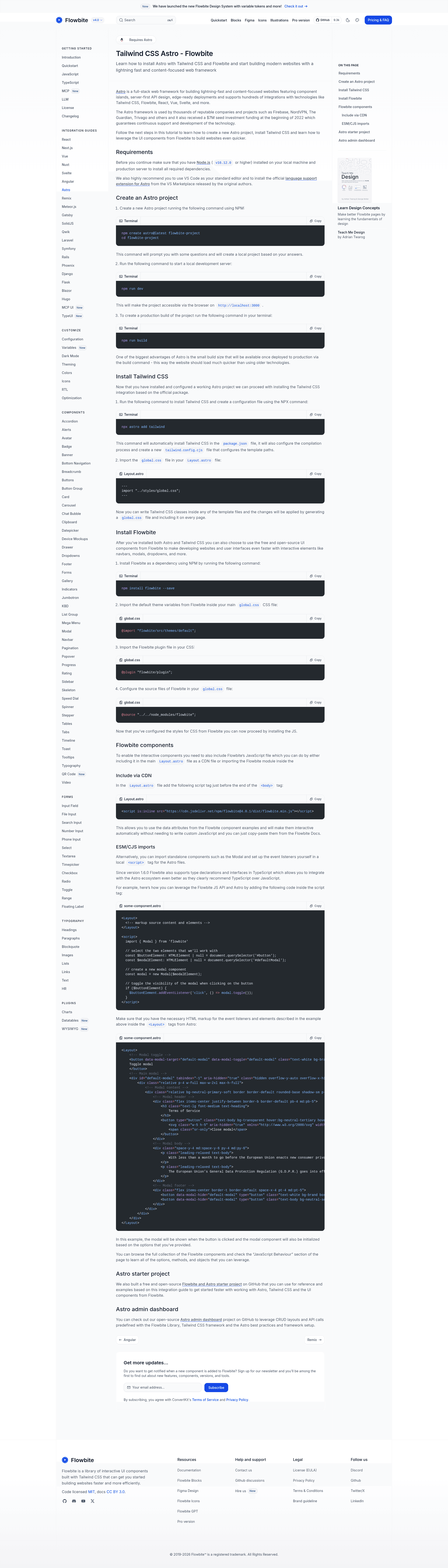
Tailwind 4 Astro Starter is a free, open-source boilerplate from the Flowbite team that wires together the Astro framework, Tailwind CSS, and the Flowbite UI component library so developers can scaffold a fast-loading static site with ready-made interactive components.
What is the Tailwind 4 Astro Starter?
It's a starter project that walks you through creating a new Astro site, installing Tailwind CSS, and adding Flowbite's free UI components such as navbars, modals, and dropdowns. It takes a fresh Node.js environment (version 16.12.0 or higher) and produces a static Astro build with Tailwind styling and Flowbite's JavaScript-powered interactivity. It runs on Astro and is maintained by Flowbite as a companion to their official Astro tutorial.
Key Features
- Astro framework — the project is built on Astro, whose
npm run buildcommand produces small static builds that load faster than older server-rendered approaches. - Tailwind CSS integration — running
npx astro add tailwindinstalls the package, configures the compilation process, and generates atailwind.config.cjsfile for template path configuration. - Flowbite UI components — free, open-source components with interactivity (navbars, modals, dropdowns) driven by data attributes or the Flowbite JS API.
- Two script-install options — Flowbite's JavaScript can be loaded from CDN at version 3.1.2 with an
is:inlinescript tag inLayout.astro, or imported per component via ESM/CJS modules. - TypeScript support — since Flowbite 1.6.0, type declarations and interfaces are included, aligning with Astro's official recommendation to use TypeScript.
- Pre-configured global CSS — setup imports Flowbite's default theme, registers the Flowbite plugin, and points the source at the
flowbitenode module fromglobal.css. - Official tutorial link — the README links to Flowbite's Astro getting-started docs for the full setup path.
Who is it for?
- Developers new to Astro who want a guided setup for combining Astro with Tailwind CSS instead of configuring the integration by hand.
- Frontend teams using Flowbite who want to reuse the library's copy-paste components inside an Astro project without writing custom JavaScript.
- TypeScript-focused developers who want typed access to Flowbite components like the Modal class with
HTMLElementreferences.
What can you do with it?
- Scaffold a project: create a new Astro project with
npm create astro@latest flowbite-project, then runnpm run devfor a local server on port 3000. - Add utility-first styling: write Tailwind CSS classes in any Astro template and get a generated
global.cssincluded on every page. - Build interactive UI: copy-paste Flowbite component markup, then enable behavior either through CDN-loaded data attributes or by importing standalone modules like Modal and wiring click events.
- Ship a production build: run
npm run buildto output a small static bundle suitable for deployment.
How does it work?
The onboarding is a three-stage command-line flow: first create the Astro project and start the dev server, then install Tailwind with npx astro add tailwind, and finally install Flowbite with npm install flowbite --save plus the CSS and script configuration described in the README. After the CSS imports are set up, the last step is adding Flowbite's JavaScript either as a CDN script in Layout.astro or as a module import.
Pros and cons
- Pros: free and open source; small production build sizes; TypeScript support since Flowbite 1.6.0.
- Cons: requires Node.js v16.12.0 or higher, and the
global.cssimport/source configuration is done manually after the package installs.
Pricing
Free and open source. Both the starter project and the Flowbite UI components it installs are free, and the page lists no paid tiers.
Alternatives
Astrowind, another Astro and Tailwind CSS starter that ships additional pre-built page sections.
FAQ
Is the Tailwind 4 Astro Starter free?
Yes — the repository is free and open source, and the Flowbite UI components it installs are also free to use. No paid tier is mentioned on the page.
What Node.js version do I need?
You need Node.js version 16.12.0 or higher installed on both your local machine and production server before running the install commands.
How do I make Flowbite components interactive?
Add the CDN script tag pointing to flowbite@3.1.2 just before the closing body tag of your Layout.astro file, and copy-paste Flowbite's data-attribute markup. Alternatively, import component modules such as Modal and attach event listeners yourself.
Does the starter support TypeScript?
Yes, Flowbite has shipped type declarations and interfaces since version 1.6.0, and Astro officially recommends TypeScript over JavaScript, so the two integrate cleanly.
What does this starter include out of the box?
It doesn't ship pre-built pages; it provides the setup instructions and configuration to combine Astro, Tailwind CSS, and Flowbite. You generate the Astro project, add Tailwind, install Flowbite, and then use the components.