Template details
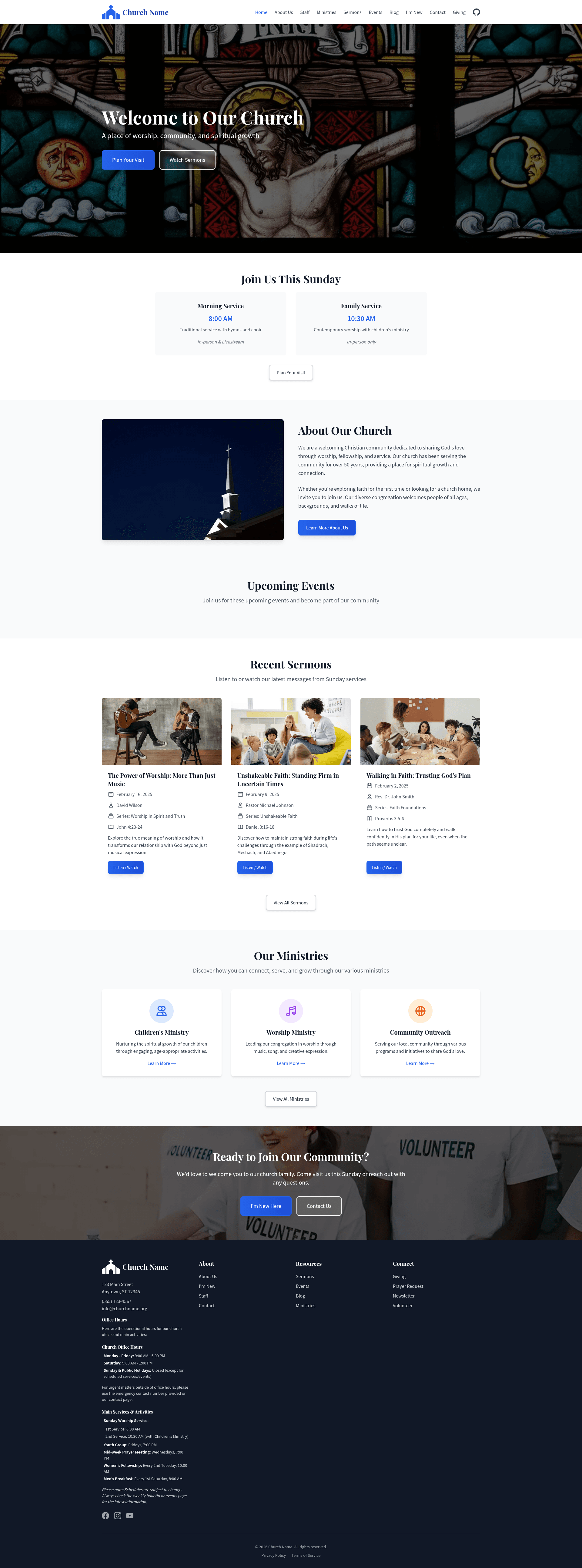
Church Website Starter
An open-source Astro + Tailwind starter for building fast, SEO-ready church websites with Markdown-based content collections.
About this template
The Church Website Starter is an open-source Astro boilerplate that builds a complete, content-driven church website — blog, sermons, events, ministries, staff, and giving pages — as a static site from Markdown content collections. It combines Astro 6.4.8 for static site generation, Tailwind CSS 3.4.1 for a responsive mobile-first design, and Preact 10.29.3 for interactive islands, making it a practical starting point for churches that want a fast, easily deployable site without a database or admin panel.
What is the Church Website Starter?
The Church Website Starter is a free, open-source project created by MauCariApa.com that generates a static church website from Markdown files. It accepts YAML frontmatter in six content collections — blog, sermons, events, ministries, staff, and siteInfo — and outputs a production-ready static site in the dist/ directory. The site runs entirely on static HTML with optional Preact components, so it can be deployed to any static host, including Netlify, Vercel, Cloudflare Pages, or GitHub Pages.
Key Features
- Static site generation — Astro outputs pure HTML and CSS with no server-side runtime, producing fast pages and strong SEO fundamentals.
- Markdown content management — all dynamic content lives in src/content/ as Markdown files with frontmatter, validated by Zod schemas in src/content.config.ts.
- Built-in content collections — blog posts, sermons (with audioUrl and videoUrl fields), events (with registration links), ministries, staff, and siteInfo blocks.
- Filtering and search — blog and sermons listing pages include filter controls and search, implemented as Preact islands.
- Sticky TOC sidebars — dynamic detail pages render a table of contents that stays visible while scrolling long-form content.
- SEO and sitemap — a reusable Seo component inserts meta tags and JSON-LD structured data, while @astrojs/sitemap auto-generates sitemap.xml.
- Tailwind typography plugin — @tailwindcss/typography styles rendered Markdown so sermons, posts, and event descriptions look styled out of the box.
- Ready-made pages — the starter includes homepage, about-us, staff, ministries, sermons, events, blog, im-new, contact, and giving pages, all wired to their content collections.
Who is it for?
- Church web volunteers — edit Markdown files to publish sermons, events, and blog posts without logging into a CMS or touching PHP.
- Web developers — reuse the Astro project structure, content schemas, and Tailwind configuration to deliver church sites quickly.
- Small church staff — publish an informative online presence on free static hosting, keeping running costs near zero.
What can you do with it?
- Publish a sermon archive — add a Markdown file per sermon with speaker, series, scripture reference, and audio or video URL; the sermons page then lists and filters them.
- Announce church events — create event entries with date range, time, location, image, and an optional registration URL, shown on the events listing page.
- Showcase ministries and leadership — ministries entries carry coordinator contact and meeting schedule; staff pages list name, title, photo, email, phone, and bio.
- Welcome first-time visitors — the im-new.astro page acts as a visitor guide, contact.astro provides a contact form, and giving.astro supports donation messaging.
How does it work?
- Clone the repository and run npm install; Node.js 18 or newer is required.
- Replace the placeholder Markdown in src/content/ with your church's sermons, events, ministries, staff, and blog posts.
- Update the church name and contact details in Header.astro, Footer.astro, Seo.astro, and the site URL in astro.config.mjs.
- Run npm run build to generate a static site in dist/, then deploy that folder to Netlify, Vercel, Cloudflare Pages, or GitHub Pages.
Pros and cons
- Free and open source — the README invites customization "freely for your church or organization."
- Host anywhere — pure static output works on any static web host.
- Version-controlled content — Markdown files fit into Git-based workflows.
- No admin interface — editing content requires text-file skills; the repository description notes it is ready to integrate with any CMS, but no CMS adapter ships in the template.
FAQ
Is the Church Website Starter free?
Yes, it is an open-source template made by MauCariApa.com. The README states you may customize it freely for your church or organization, and there is no mention of a commercial license or fee.
What content types are included?
Six collections: blog, sermons, events, ministries, staff, and siteInfo. Each folder in src/content/ holds Markdown files with frontmatter, and content.config.ts defines the allowed fields per collection.
Do I need to know how to code to use it?
Basic comfort with Markdown and text editing is enough to publish content. Customizing the design colors or page components requires working with Tailwind CSS and Astro.
How is search and filtering implemented?
Blog and sermons listing pages filter and search using Preact islands. These interactive widgets are shipped as client-side JavaScript only where needed, keeping the overall site static.
Where can I deploy the built site?
The README lists Netlify, Vercel, Cloudflare Pages, and GitHub Pages. Before deploying, update the site property in astro.config.mjs so links and sitemap use your real domain.