Template details
Tailwind Nextjs Starter Blog I18n
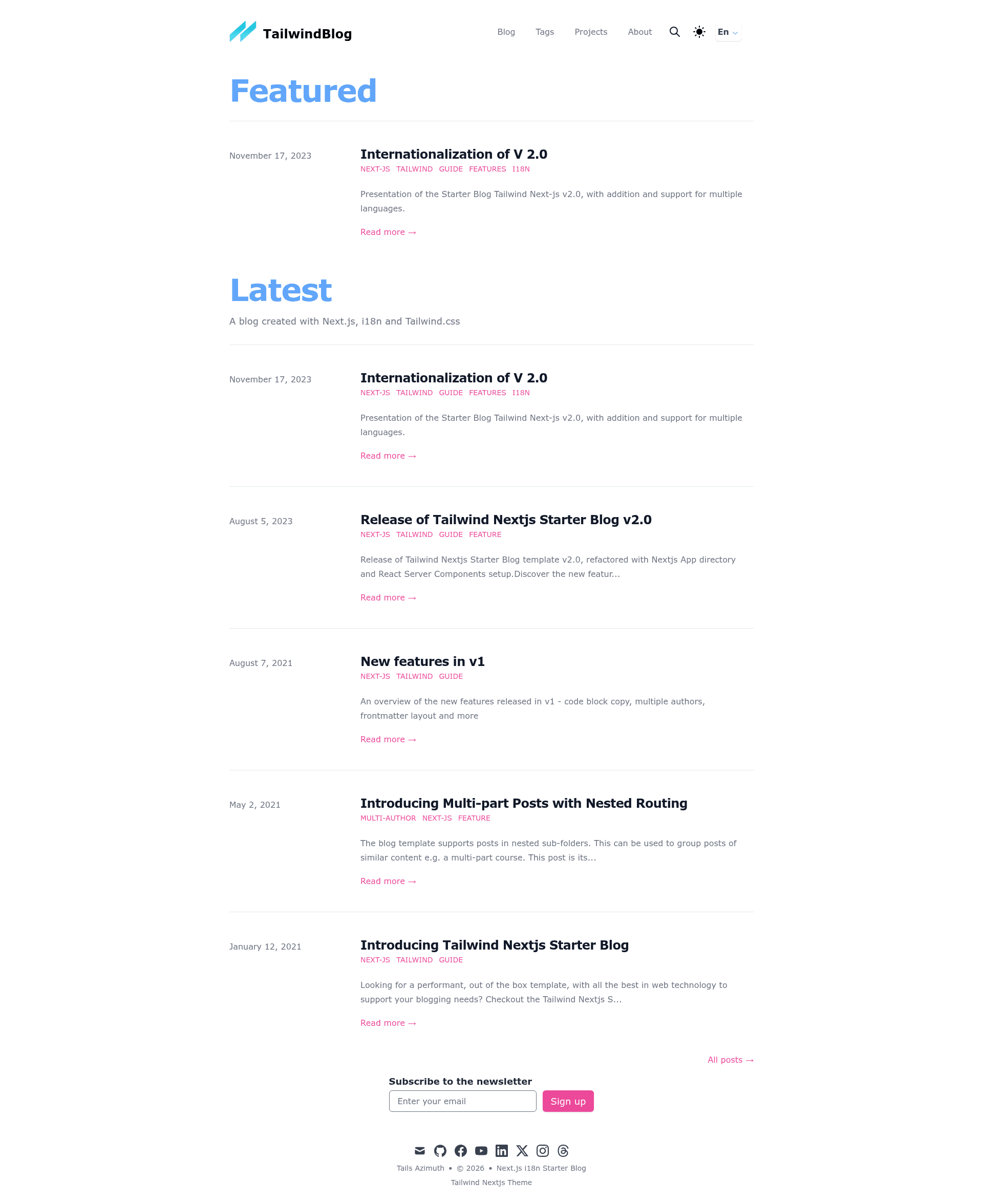
A Next.js, i18n and Tailwind CSS blogging starter template with multi-language support, MDX, and modern features.
About this template
Tailwind Nextjs Starter Blog I18n is a multilingual blogging starter template built on the Next.js App Router and Tailwind CSS, adding complete internationalization to the popular tailwind-nextjs-starter-blog by Timlrx. It uses i18next, react-i18next, i18next-browser-languagedetector, and i18next-resources-to-backend to translate the UI, metadata, posts, tags, authors, and projects. The template takes MDX blog posts as input and outputs a fully localized blog with server-rendered pages, automatic tag pagination, and per-language search. The repository is maintained by PxlSyl and is currently a work in progress, with the author noting that complex server logic for pagination and tags has moved to client-side Zustand components, that sitemap.xml and robots.txt are handled, and that RSS generation still needs fixing.
What is Tailwind Nextjs Starter Blog I18n?
Tailwind Nextjs Starter Blog I18n is a multilingual blogging starter template that adds complete internationalization to the popular tailwind-nextjs-starter-blog by Timlrx. It runs on the Next.js App Router with Tailwind CSS for styling and uses i18next, react-i18next, i18next-browser-languagedetector, and i18next-resources-to-backend for translations. The template takes MDX blog posts as input and produces a fully localized blog with server-rendered pages, automatic tag pagination, and translated metadata. The repository is maintained by PxlSyl and is currently a work in progress, with known limitations around RSS generation and mobile performance.
Key Features
- Multi-language i18n — Supports any number of languages configured in
locales.js, with a default language and fallback; all UI strings, metadata, authors, posts, tags, and projects have per-language folders or JSON files. - Next.js App Router structure — Content lives under
app/[locale], the official Next.js recommended i18n pattern, with a custommiddleware.tsthat rewrites and redirects URLs so the default locale is not prefixed. - Enhanced MDX components — Adds a
WebsiteEmbedcomponent for embedding GitHub demo templates, an audio player powered by react-h5-audio-player for podcasts or music, and an automatic sidebar table of contents via asidetoccomponent. - Multi-author support — Each author can have their own about page accessible from a dropdown on large screens or listed directly on small screens; can be disabled in
siteMetadata.jsby settingmultiauthorstofalse. - Featured posts and tag pagination — Posts with
featured: trueare pinned to a home-page section (maximum two), and each tag automatically generates its own pagination when more than five posts share that tag. - Waline comments — Open-source, Vue-based comment system with built-in i18n; requires deploying a Waline server and setting
iswalinetotrueinsiteMetadata.js. - kbar command palette search — Search posts, navigate pages, and run actions with keyboard shortcuts; includes translated section titles and a workaround for regular translation issues.
- Formspree contact modal — A contact form with anti-spam protection, launched from the mail icon, using a test key placeholder that should be replaced in
components/formspree/index.tsx.
Who is it for?
- Technical bloggers with international audiences — Publish the same post in multiple languages by placing files like
data/blog/en/code-sample.mdxanddata/blog/fr/code-sample.mdx; the template handles slugs and tags per language. - Developers migrating to the Next.js App Router — Learn how to internationalize an app using
[locale]dynamic segments, middleware rewrites, and server/client translation functions. - Content creators building personal sites — Use the built-in projects tab, share buttons for Facebook, Twitter, LinkedIn, WhatsApp, Threads, and Telegram, and the Formspree contact form to engage readers.
- Developers who want a highly customized blog — Extend the template with series support for posts, a Tailwind screen size indicator for responsive development, and Framer Motion-inspired animations (the template transition was removed due to mobile performance issues).
What can you do with Tailwind Nextjs Starter Blog I18n?
- Polyglot authors: Create the same article in multiple languages and have each version appear under its language's URL structure, with per-language tags and search results filtered by locale.
- Podcasters: Embed audio episodes in MDX posts using the included react-h5-audio-player component, keeping content and playback in the blog page.
- Open-source maintainers: Showcase live demos of your GitHub projects using the
WebsiteEmbedcomponent, and link to your project's source. - Portfolio builders: Use the projects tab data file with translated titles and descriptions to present work to international visitors.
How does the template work?
The template organizes translations in app/[locale]/i18n, with client.ts and server.ts exporting hooks for client components and async functions for server components. Blog posts are stored under data/blog/<language>/, and the Contentlayer config defines a required language field for each post and author. A custom middleware.ts checks incoming paths: if the default locale is in the URL it redirects to the unprefixed path, and if a locale is missing it rewrites the request to the default locale. Tag counts are generated into tag-data.json for each locale at build time.
FAQ
Is the template free to use?
The repository is a public GitHub project and does not state a commercial license; the author encourages stars and freelance offers but does not mention paid tiers. As with the original template, it is intended as an open starter for personal and commercial blogs.
What i18n libraries are used?
Instead of the next-translate library used in the earlier V.1 i18n fork, this template uses i18next, react-i18next, i18next-browser-languagedetector, and i18next-resources-to-backend. Translations are stored as per-page JSON files in locales/<lang>/, with a common.json namespace as default.
Does the template support Algolia search?
No. The search bar relies on the kbar library, and Algolia support is not planned. If you need Algolia, you would have to implement it yourself instead of using the included kbar integration.
Can I add a third language?
Yes. Add the language to locales.js, create the corresponding JSON files in each locale folder, and update the tag-count generation logic in contentlayer.config.ts to handle more than two languages. The README notes that the current tag-generation code only supports the default and second language by default.
Are there any known issues?
The repository is a work in progress: RSS generation (rss.mjs) still needs a fix, the Framer Motion page transition was removed due to mobile performance concerns, and the author warns that updating dependencies may break the application because some libraries need fixes.