Template details
Tailwind Starter Template
A free open-source starter template for Tailwind CSS with an npm build pipeline, configurable theme, and PurgeCSS optimization.
About this template
Tailwind Starter Template is an open-source boilerplate from Tailwind Toolbox that scaffolds a Tailwind CSS project with an npm-based build pipeline, producing a ready-to-edit static site in a dist folder.
What is the Tailwind Starter Template?
The Tailwind Starter Template is a minimal project scaffold for Tailwind CSS v1 beta 3, created by Amrit Nagi as part of Tailwind Toolbox. It takes a package.json, a tailwind.config.js, a tailwind.config.css, and an HTML file as inputs, and outputs a generated tailwind.css plus a working static starter page. The template is based on the Tailwind CSS framework by Adam Wathan, Jonathan Reinink, David Hemphill, and Steve Schoger, and is maintained on GitHub under the tailwindtoolbox/StarterTemplate repository.
Key Features
The template stands out by bundling a complete npm workflow and production CSS optimization into a minimal package.
- npm-based build pipeline — Uses npm scripts such as npm install, npm run del:js, npm run create:js, and npm run dev:css to install dependencies, regenerate the Tailwind.js file, and compile your CSS.
- Customizable design tokens — Edit tailwind.config.js to adjust colors, fonts, breakpoints, and spacing; tailwind.config.css lets you add custom CSS layers before compilation.
- PurgeCSS and cssnano integration — The setup includes purgecss to strip unused utility classes and cssnano to minify the final CSS file for production.
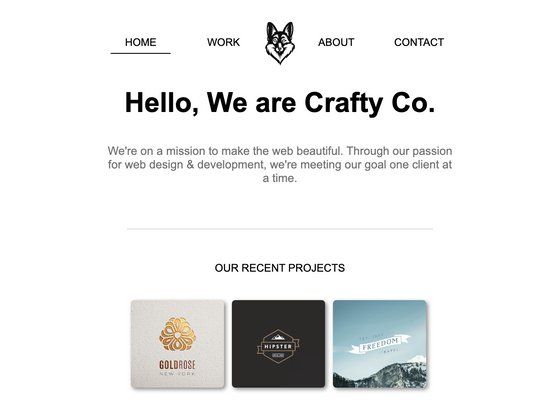
- Starter dist folder — Includes an index.html and a pre-built CSS file so you can open the page directly or edit the source files and recompile.
- Tailwind v1 beta 3 compatibility — Matches the nearly-final v1 release of Tailwind; a separate archive is available for users on v0.7.4.
- MIT licensed open source — The package.json declares an MIT license, and the repository is publicly hosted on GitHub with issue tracking.
Who should use the Tailwind Starter Template?
This template suits anyone who wants to start a Tailwind CSS project with a working build pipeline in minutes.
- New Tailwind users — Get a working Tailwind setup without writing the build configuration from scratch; just edit the config files and run the scripts.
- Front-end developers — Use the purgecss-based build to generate optimized CSS for production static sites.
- Prototypers and designers — Quickly start a local page with utility classes, then tune the theme in tailwind.config.js.
- Teams needing a consistent baseline — Standardize project start on a single template with known npm scripts and config layout.
What can you do with the Tailwind Starter Template?
With the template, you can go from a download to a tailored, optimized Tailwind site by editing a few files and running npm scripts.
- Build a static site: Scaffold the dist folder, add your HTML using Tailwind utilities, and run npm run dev:css to regenerate a production-ready stylesheet.
- Create a custom theme: Adjust tailwind.config.js to define your own color palette, typography, and responsive breakpoints, then recompile.
- Learn Tailwind's npm workflow: Follow the setup guide to understand how Node, npm scripts, and PostCSS-based tools combine in a Tailwind project.
How does the Tailwind Starter Template work?
The template works as a set of npm scripts that compile your configuration into a CSS file. Download the ZIP from the GitHub repository, extract it, and edit package.json to match your project name and metadata. Then run npm install (or npm update) in your terminal to create the node_modules directory. Regenerate the Tailwind.js file with npm run del:js && npm run create:js, and compile your initial CSS with npm run dev:css. After that, edit the files in the dist folder and recompile as needed.
FAQ
Is the Tailwind Starter Template free?
Yes. The template is open-source and its package.json specifies an MIT license, so you can use, modify, and redistribute it freely. It is hosted publicly on GitHub.
Which Tailwind CSS version does it target?
The current template targets Tailwind CSS v1 beta 3, which is described as nearly the final v1. If you still use Tailwind 0.7.4, you can download a separate ZIP archive from the Tailwind Toolbox site.
Do I need to install Node.js to use it?
Yes. The setup requires Node.js and npm to run the provided scripts: npm install for dependencies, plus the custom scripts that rebuild Tailwind.js and generate your CSS file.
How do I remove unused CSS with this template?
The template integrates purgecss and cssnano into its build process. After you edit your HTML and CSS, running the build command will scan your content, remove utilities that aren't used, and minify the resulting stylesheet.
Where can I report bugs or ask questions?
The project uses GitHub issues. Go to the tailwindtoolbox/StarterTemplate repository and open a new issue for bugs, suggestions, or questions.