Template details
Terminal-to-HTML
Go library and CLI that converts ANSI terminal output into styled HTML.
About this template
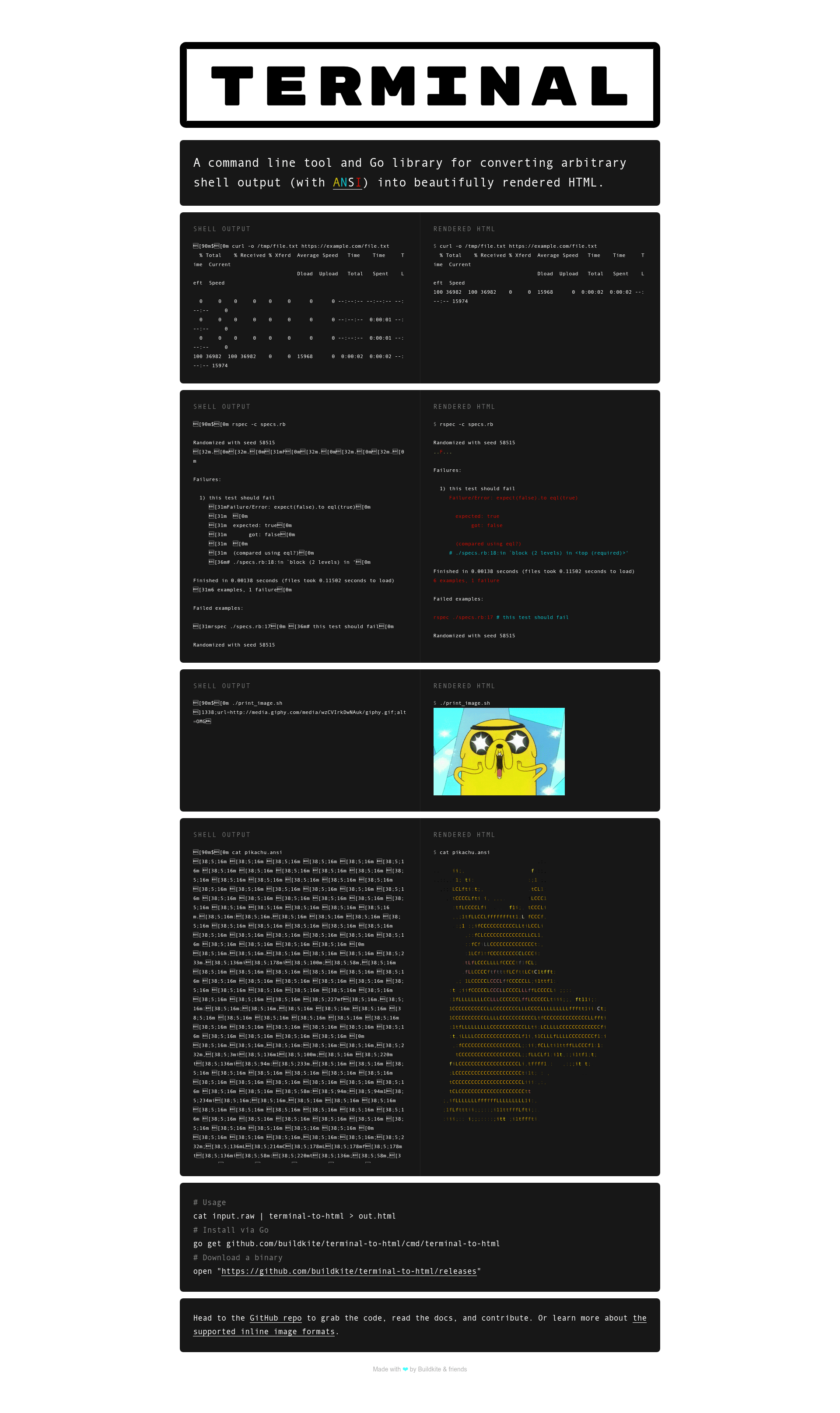
Terminal-to-HTML is a Go library and command-line tool that converts ANSI-encoded shell output into styled HTML, with a single terminal-to-html command and an optional HTTP server.
What is Terminal-to-HTML?
Terminal-to-HTML is a Go library and command-line tool from Buildkite that converts arbitrary shell output containing ANSI escape sequences into rendered HTML. It accepts terminal output via STDIN or HTTP POST and outputs HTML that can be styled with the provided terminal.css stylesheet and wrapped in a term-container class. The project is open source under the MIT License and has collected 719 stars on GitHub.
Key Features
- CLI conversion — The
terminal-to-htmlcommand reads terminal output from STDIN and writes HTML to stdout; the-previewflag is demonstrated in the README withcat fixtures/pikachu.sh.raw | terminal-to-html -preview > out.html. - HTTP server mode — Running
terminal-to-html -http=:6060starts a web server;curl --data-binary "@fixtures/pikachu.sh.raw" http://localhost:6060/terminal > out.htmlconverts a POSTed body and returns HTML. - iTerm2 inline image support — Control sequences for iTerm2 inline images with
inline=1are rendered;preserveAspectRatiois not supported. - URL-based images — The escape code
1338embeds images from a URL withwidth,height, andaltattributes; theimage.shhelper generates this sequence. - Hyperlink rendering — The escape code
1339renders hyperlinks withurlandcontent; thelink.shhelper is provided, and URLs containing semicolons can be quoted. - Go APIs — The package can be imported directly in Go programs (see GoDoc), and installation via
go installworks fromgithub.com/buildkite/terminal-to-html/v3/cmd/terminal-to-html. - Standalone binaries — Pre-built binaries are available on the GitHub releases page, and a Dockerfile supports cross-compilation development.
- MIT licensed — The code is free to use and modify under the MIT License, with copyright held by Keith Pitt, Tim Lucas, and Michael Pearson.
Who is it for?
Terminal-to-HTML is for developers and teams that need to show terminal sessions inside web pages. It is especially useful for build log viewers, CI/CD dashboards, and technical documentation that wants to preserve ANSI color codes in a browser-safe format.
- CI/CD platform developers: convert build logs with ANSI colors into HTML for a web-based pipeline interface.
- Documentation writers: embed command-line sessions in blog posts or docs by piping raw capture files through the tool.
- Tool maintainers: integrate the Go package into a custom terminal recorder, log aggregator, or monitoring UI.
What can you do with Terminal-to-HTML?
- Render build logs: pipe a
.rawterminal capture through the CLI to produce a standalone HTML file with ANSI colors preserved. - Build a web endpoint: run the HTTP server and POST raw terminal text to
/terminalto get back HTML for use in a web app. - Add clickable links: use the
1339escape code to turn URLs in terminal output into hyperlinks in the rendered HTML. - Embed images in output: use the
1338escape code to reference images from the web, with size and alt attributes, inside the terminal flow.
How does Terminal-to-HTML work?
The tool parses ANSI escape codes from the input stream and maps them to equivalent HTML styling. It can operate as a one-shot pipeline reading STDIN or as a persistent HTTP server that converts each POST request body. The README shows both usage modes, and custom escape codes extend iTerm2's inline image format to support remote URLs and hyperlinks.
FAQ
Is Terminal-to-HTML free?
Yes, Terminal-to-HTML is open source under the MIT License. You can install it with go install github.com/buildkite/terminal-to-html/v3/cmd/terminal-to-html or download a standalone binary from the GitHub releases page.
Is Terminal-to-HTML safe for user-generated content?
No. The README explicitly warns that the tool is not hardened against cross-site scripting (XSS) or other attacks. If you run it on user-generated content, pass the HTML output through a sanitizer before displaying it in a browser.
What are the custom escape codes for images and links?
Escape code 1338 embeds URL-based images with width, height, and alt attributes, while 1339 renders hyperlinks. Helper scripts image.sh and link.sh generate these sequences. URLs with semicolons can be surrounded by single or double quotation marks.
How do I install terminal-to-html?
If you have Go installed, run go install github.com/buildkite/terminal-to-html/v3/cmd/terminal-to-html to install the command into $GOPATH/bin. Alternatively, download the standalone binary for your platform from the GitHub releases page.