Template details
UI Bakery
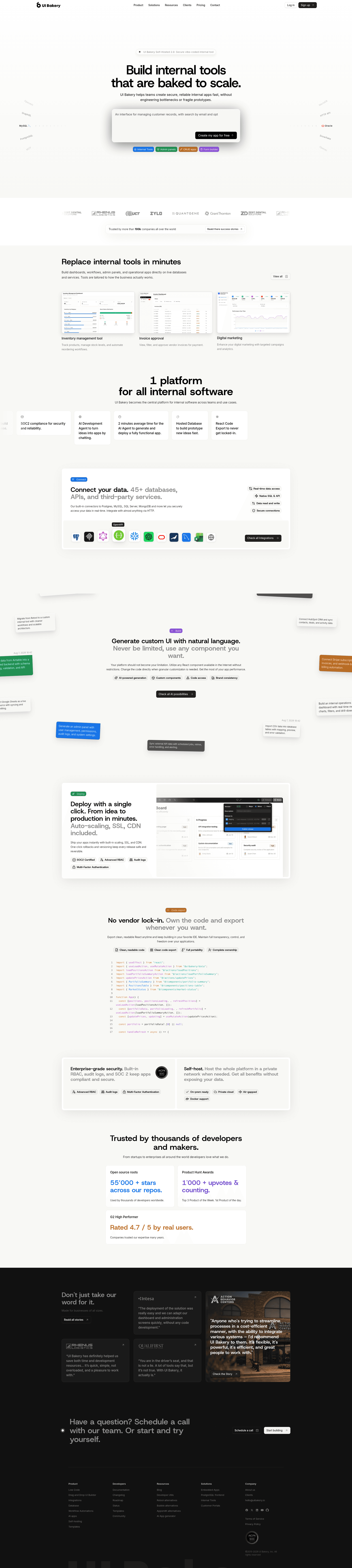
Low-code platform to build internal tools and workflow automations, deployable on-premise via Docker.
About this template
UI Bakery is a low-code platform for building internal tools and workflow automations, and this repository provides its self-hosted, on-premise deployment package.
What is UI Bakery?
UI Bakery is a low-code platform for creating internal apps and automations. This repository contains the self-hosted deployment version, which you run on your own Linux server with Docker and Docker Compose. The platform lets you build admin panels, dashboards, and workflow automations through a visual interface, and it includes database connectivity features such as a SQL GUI. The self-hosted version requires a license key, which you obtain from the UI Bakery website.
Key Features
- Self-hosted deployment — Use the install.sh script to deploy UI Bakery on your own Linux server; the script installs Docker and Docker Compose automatically.
- Custom branding — The on-premise version supports custom branding to match your company identity.
- Custom domain hosting — Host UI Bakery on your own domain instead of a UI Bakery-provided URL.
- OAuth2 SSO — Support for OAuth2 single sign-on for user authentication.
- SAML identity providers — Integrate with SAML-based identity providers for enterprise SSO.
- Data stored on your VPS — All data stays securely within your own private network and VPS.
- Low-code app builder — Build internal tools and automations visually without writing large amounts of code.
- SQL GUI — The repository topics indicate SQL database management capabilities for working directly with your data.
Who is it for?
- IT and operations teams — Deploy internal tools on private networks to manage data that cannot leave their infrastructure.
- Enterprises with SSO requirements — Use OAuth2 or SAML integration so internal tools fit into existing identity management.
- Developers — Quickly build admin dashboards and internal UIs with a low-code interface instead of full custom applications.
- Organizations in regulated industries — Keep sensitive data on their own VPS to meet compliance requirements.
What can you do with UI Bakery?
- Build admin dashboards — Create custom dashboards for managing data from connected databases without writing frontend code.
- Automate workflows — Set up business process automations triggered by data events or scheduled actions.
- Manage databases — Use the SQL GUI to query and interact with your databases from the UI.
- Run behind a firewall — Deploy on-premise to keep all app traffic and data within your private network.
How does the self-hosted deployment work?
Run the provided install command from your Linux home directory to download and execute the install.sh script. During installation, enter your license code, hosting URL, and port (default is http://localhost:3030/). The script checks that Docker version 20.10.11 or later and Docker Compose 1.29.2 or later are available, and it requires access to specific Azure Container Registry domains for pulling images.
Pros and cons
- Pros: Quick setup via one script; custom branding and domain; OAuth2 and SAML SSO; data kept on your own server.
- Cons: The install script may upgrade system dependencies that could break other applications running on the same server; a license key is required for the on-premise version; minimum hardware is 2 vCPUs, 4 GiB RAM, and 20 GiB storage.
FAQ
What are the minimum system requirements for UI Bakery on-premise?
You need a Linux-based OS (such as Ubuntu 18.04), at least 2 vCPUs, 4 GiB of memory, and 20 GiB of storage. You must also have full sudo rights and network access to the Azure Container Registry domains listed in the documentation.
How do I install UI Bakery self-hosted?
Download the install.sh script using the curl command provided in the repository, run it with bash, and follow the prompts to enter your license code, domain, and port. Once finished, open your browser at the configured URL, by default http://localhost:3030/.
Does the install script install Docker?
Yes, the install.sh script installs Docker and Docker Compose automatically. If Docker versions older than the minimum (20.10.11 for Docker and 1.29.2 for Compose) are already installed, the script stops and asks you to update them manually.
Is a license key needed for on-premise UI Bakery?
Yes, the on-premise version requires a license key, which can be obtained from the UI Bakery website. The key is entered during the installation process.
Can I use UI Bakery with OAuth2 or SAML?
Yes, the on-premise version supports both OAuth2 SSO and SAML-based identity providers, allowing you to integrate existing enterprise authentication systems.