Template details
Vermilion
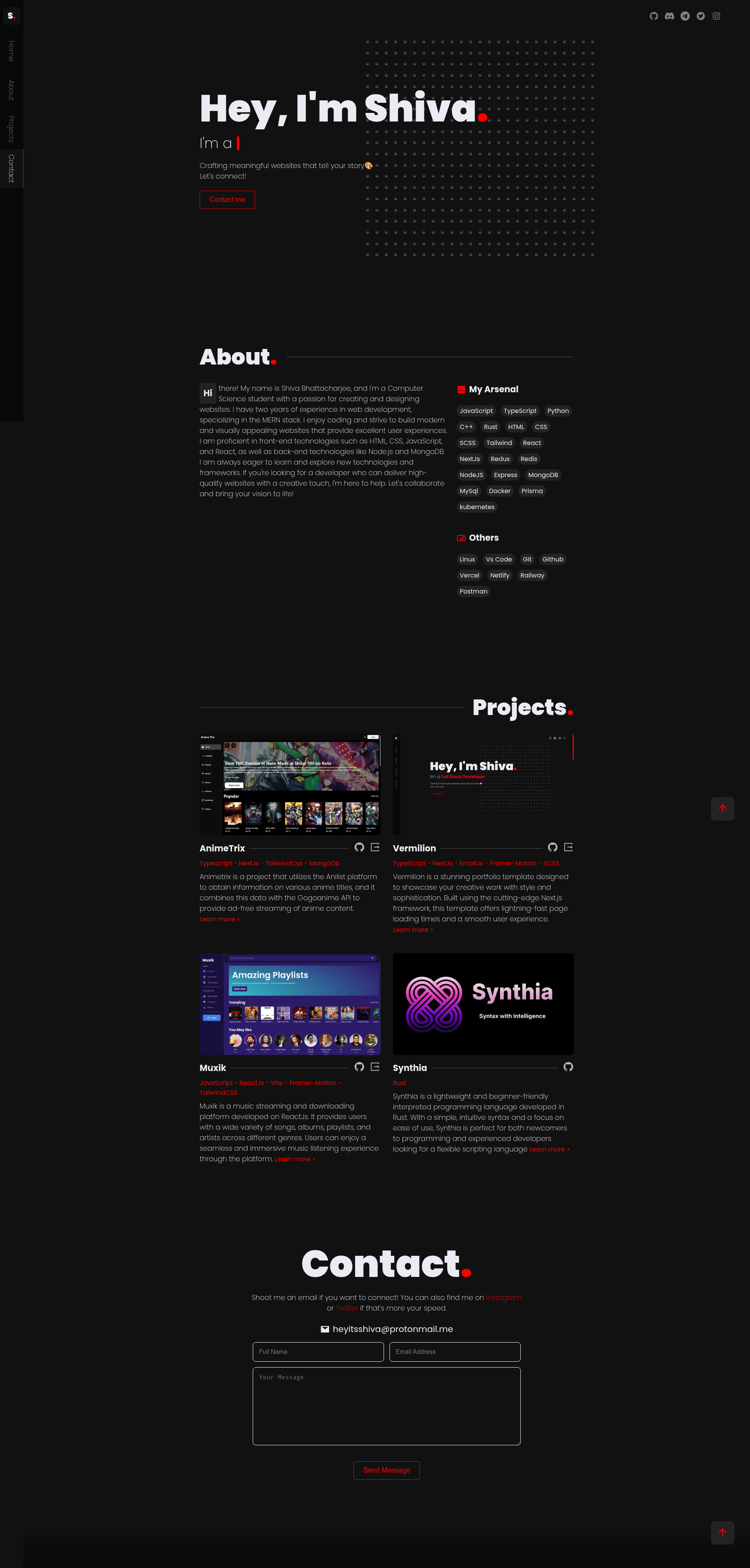
A free, open-source Next.js portfolio template with a black and red theme and Framer Motion animations.
About this template
Vermilion is a free, open-source Next.js portfolio website template that uses a black-and-red color scheme and Framer Motion plus AnimeJS animations to present your projects online. Created by Shiva Bhattacharjee, it is hosted on GitHub and licensed under the MIT License.
What is Vermilion?
Vermilion is a portfolio website template built with Next.js, SCSS, TypeScript, Framer Motion, and AnimeJS. It takes your content—projects, about text, and contact details—and produces a responsive, animated single-page portfolio site. The template runs on the Next.js framework, so it can be deployed to Vercel, Render, or any Node.js hosting service. It includes an EmailJS-powered contact form that works without a backend server.
Key Features
Vermilion packs a modern React stack with two animation libraries, a styled contact form, and one-click hosting deployment.
- Next.js framework — Uses the latest Next.js features for server-side rendering, static generation, and fast page loads.
- SCSS styling — Styles are written in SCSS, giving you variables, nesting, and mixins for clean, maintainable CSS.
- TypeScript — The entire codebase is in TypeScript, which provides type checking and better editor support.
- Framer Motion animations — Smooth entrance, hover, and scroll animations are implemented with Framer Motion.
- AnimeJS library — AnimeJS adds extra motion effects and complements Framer Motion for richer interactions.
- Black and red theme — A distinctive color palette that conveys sophistication and energy, applied consistently across the UI.
- EmailJS contact form — Visitors can send email messages directly from the site; you configure it by adding three environment variables.
- One-click deployment — The repository includes deploy buttons for Vercel and Render, so you can go live with minimal setup.
Who should use Vermilion?
Vermilion suits anyone who needs a polished portfolio site quickly, from developers and designers to freelancers and students.
- Developers — who want a modern portfolio without designing and coding from scratch; they can fork the repo and customize the components.
- Designers — who want a visually striking site with a bold black and red look and animated transitions.
- Freelancers — who need a professional online presence to showcase their work and attract new clients.
- Students — who want to learn how a real Next.js project with Framer Motion and SCSS is structured.
What can you do with Vermilion?
With Vermilion you can present your work, accept contact messages, and deploy a live site in minutes.
- Showcase your projects — Display your portfolio pieces with animated cards and smooth page transitions.
- Collect messages — Use the built-in EmailJS contact form to receive inquiries without setting up a server.
- Deploy globally — Click the Vercel or Render deploy button to publish your site in a couple of minutes.
- Customize the style — Edit the SCSS variables to change colors, spacing, and fonts to match your brand.
How does Vermilion work?
To get started, clone the repository, run npm install, then npm run dev to launch the development server. Before the contact form works, you must create a .env.local file in the root directory with your EmailJS NEXT_PUBLIC_SERVICE_ID, NEXT_PUBLIC_TEMPLATE_ID, and NEXT_PUBLIC_PUBLIC_KEY values, which you can get from the EmailJS website. The template is production-ready and can be deployed via the provided Vercel or Render buttons.
Pricing
Vermilion is free and open source under the MIT License. You can use it for personal or commercial projects, modify it, and redistribute it, as long as you keep the license notice. There is no paid tier for the template itself; the only external requirement is an EmailJS account for the contact form.
FAQ
Is Vermilion free to use?
Yes, Vermilion is released under the MIT License, so it is free to use, modify, and distribute for any purpose, including commercial projects. No payment or attribution is required, though keeping a credit link is appreciated.
How do I set up the contact form?
You need a free EmailJS account. Once registered, create a service, an email template, and get your public key. Then add three lines to a .env.local file: NEXT_PUBLIC_SERVICE_ID, NEXT_PUBLIC_TEMPLATE_ID, and NEXT_PUBLIC_PUBLIC_KEY.
What technologies does Vermilion use?
Vermilion is built with Next.js, SCSS, TypeScript, Framer Motion, and AnimeJS. Next.js handles routing and rendering, SCSS provides the styling, TypeScript adds type safety, and both animation libraries create the motion effects.
Can I deploy Vermilion to Vercel or Render?
Yes. The repository includes one-click deployment buttons for both Vercel and Render. After deploying, you only need to add your EmailJS environment variables in the platform's dashboard to make the contact form work.