Template details
Vibe Coding Platform
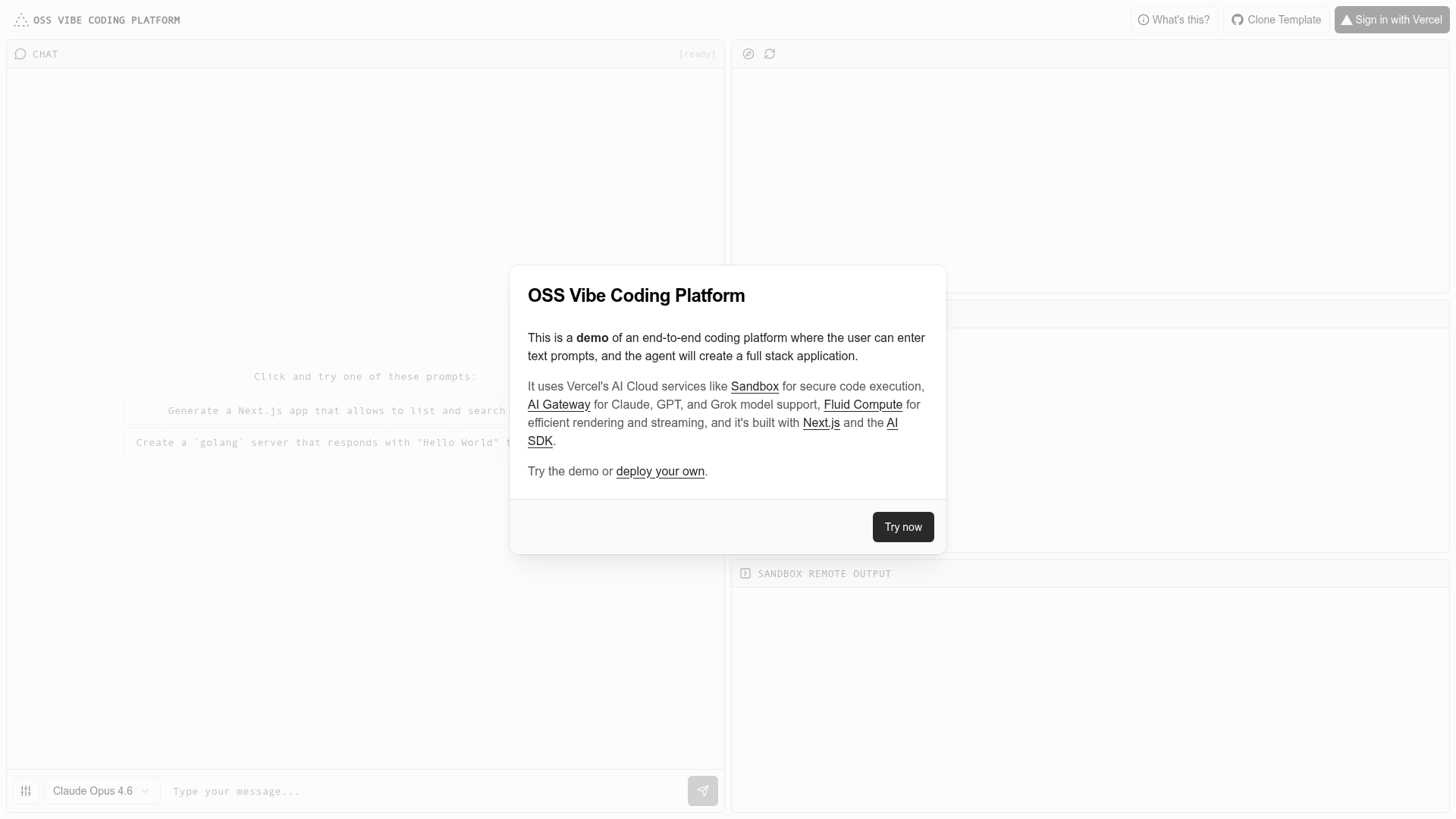
An end-to-end text-to-app coding platform with AI agent, multi-model support, sandboxed execution, and live preview on Vercel.
About this template
Vibe Coding Platform is an open-source, end-to-end text-to-app coding template built on Next.js and Vercel's AI Cloud that turns plain-English prompts into full-stack applications inside a sandboxed environment, complete with a live preview, a file explorer, and command logs.
What is Vibe Coding Platform?
Vibe Coding Platform is a Vercel example application that accepts a natural-language description of an app and returns runnable full-stack code. It runs in the browser on Next.js with Turbopack, uses Vercel's AI SDK v6 for streaming the agent's reasoning, and relies on Vercel's AI Gateway for multi-model routing and Vercel Sandbox for safe code execution. The platform is published as one of the official examples in the Vercel examples repository, meaning it is maintained by Vercel and freely available for developers to clone and customize.
Key Features
- Multi-model support via AI Gateway — Route prompts to Claude Opus 4.6, Claude Sonnet 4.6, GPT-5.3 Codex, or Grok 4.1 Reasoning through Vercel's AI Gateway and switch the active model from the UI.
- Secure code execution with Vercel Sandbox — Generated applications run inside Vercel Sandbox, isolating the code from your local machine and preventing unauthorized system access.
- Real-time live preview — The generated app renders in an embedded preview pane that updates as the AI agent writes and executes files.
- File explorer — A side panel displays the generated project's full file tree, letting you open and inspect each file the agent produced.
- Command logs and error monitoring — A log console shows the shell commands executed during generation and surfaces any errors for debugging.
- One-click deploy to Vercel — The project includes a Deploy with Vercel button that clones the repository and provisions the platform, and you can also deploy via the CLI with
vc deploy. - Tailwind CSS and shadcn/ui interface — The platform's own dashboard is styled with Tailwind CSS and shadcn/ui, so restyling the UI is straightforward.
Who is it for?
- Developers building AI coding tools — Use this template as a reference implementation for combining Vercel AI SDK, AI Gateway, and Sandbox into a production-grade text-to-app product.
- Frontend engineers exploring Next.js — Study how a real Vercel example wires up Next.js with Turbopack, incremental API routes, and streaming responses.
- Prototypers and product managers — Describe an app idea in plain English and get a launchable scaffold with a live preview for early feedback.
- Anyone comparing AI models — Generate the same app with different supported models to observe differences in coding style, speed, and output quality.
Use cases
- Rapid prototyping: Prompt the platform with ideas such as a "markdown notes app" or a "weather dashboard" and receive complete source code plus a working preview in one session.
- Learning AI SDK integration: Trace how the prompt is sent through the AI SDK, routed via the AI Gateway, and streamed back to the UI, making it a hands-on example for the Vercel AI stack.
- Model evaluation: Re-run identical prompts under Claude Sonnet 4.6, GPT-5.3 Codex, and Grok 4.1 Reasoning to compare which model best suits your coding tasks.
- Open-source experimentation: Fork the repository, change the system prompt or model list, and deploy your own variant to Vercel in minutes.
How does Vibe Coding Platform work?
You type a text prompt into the input field, select a model, and click generate. The AI agent starts by planning the project, then writes files into the sandbox, executes commands, and streams logs and the live preview back to the browser. Once the app is ready, you can inspect the file explorer or deploy the result to Vercel with the deploy button.
FAQ
What models does Vibe Coding Platform support?
The platform supports Claude Opus 4.6, Claude Sonnet 4.6, GPT-5.3 Codex, and Grok 4.1 Reasoning. Model availability is managed through Vercel's AI Gateway, so you can change the selection without code changes.
How do I run Vibe Coding Platform locally?
Clone the repository from the Vercel examples repo, install dependencies with pnpm install, then start the development server with pnpm dev. The app will be available at http://localhost:3000.
How do I deploy Vibe Coding Platform?
Use the Deploy with Vercel button to automatically clone the repository and set up the project on Vercel. Alternatively, run vc deploy from the command line after linking your Vercel account.
Where is the source code hosted?
The source code lives in the Vercel examples repository on GitHub, under the apps/vibe-coding-platform directory. The repository is publicly accessible and open for contributions.