Template details
Vue Light Bootstrap Dashboard
Free Bootstrap 4 + Vue.js admin dashboard template with components, charts, and maps.
About this template
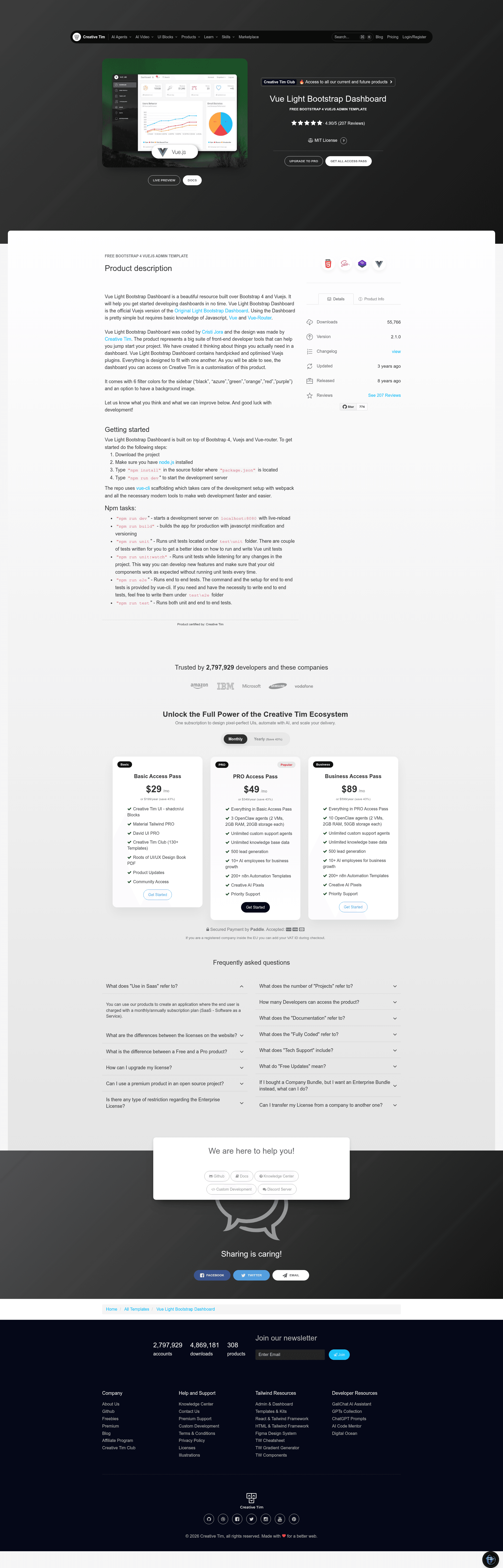
Vue Light Bootstrap Dashboard is a free admin dashboard template by Creative Tim that ports Bootstrap 4's UI to a Vue.js single-page application using vue-router for navigation.
What is Vue Light Bootstrap Dashboard?
Vue Light Bootstrap Dashboard is a Vue.js port of Creative Tim's Light Bootstrap Dashboard UI template, built specifically for admin panels and back-office interfaces. It takes a Vue single-page app and outputs a ready-to-run dashboard with a sidebar, top navbar, charts, tables, and map views. The project is maintained by Creative Tim, and the current version is 2.1.0 with an MIT license.
Key Features
- Bootstrap 4 styling — The dashboard uses Bootstrap 4 for layout, grid, forms, buttons, and cards, so existing Bootstrap knowledge transfers directly.
- vue-router integration — Navigation between dashboard pages (overview, stats, tables, maps) is handled by vue-router, making it a true single-page application.
- Chartist.js charts — Pre-built chart components for line, bar, and pie charts are included for data visualization.
- Google Maps component — A map plugin is bundled, letting you embed and configure Google Maps inside the dashboard.
- vue-cli / webpack tooling — The repo uses vue-cli scaffolding with webpack, offering hot-reload development at localhost:8000 and production builds via
npm run build. - Unit test setup —
npm run unitandnpm run unit:watchcommands run unit tests via the included test runner. - Free and open source — Released under the MIT license, so you can use it for personal and commercial projects without paying licensing fees.
- One-click deployment — A Genezio deploy button is included in the README, allowing you to deploy the template to Genezio with a single click.
Who is it for?
- Frontend developers — who need a pre-built admin shell to start a Vue project without building navigation, layout, and charts from scratch.
- Freelancers and agencies — delivering internal dashboards or admin panels to clients can use the template as the base and customize components.
- Startups prototyping — teams that want a functional dashboard with sample charts and maps to validate a product idea quickly.
- Vue learners — developers who want to study how a larger Vue application organizes routes, components, and styling with vue-router and Bootstrap 4.
What can you do with Vue Light Bootstrap Dashboard?
- Build an admin panel — wire the included sidebar, navbar, table/card components, and chart components into a custom dashboard for users, orders, or analytics.
- Embed charts and maps — use the pre-wired Chartist and Google Maps components to display live data or location-based metrics without writing chart code from scratch.
- Create documentation sites — the project includes a documentation route (see the Documentation link) that shows how buttons, tables, and other elements behave, so you can adapt it for component documentation.
- Test and deploy — with unit test commands and a production build script, you can run tests, verify the build, and deploy to Genezio with one click.
How does Vue Light Bootstrap Dashboard work?
Once you download or clone the repository, you install dependencies with npm install, start the development server with npm run dev, and view the dashboard at localhost:8000. The codebase is organized around vue-cli's webpack template, so components live in src, routes are defined with vue-router, and global styles use Bootstrap 4.
Pricing
Vue Light Bootstrap Dashboard is free and released under the MIT license. You can use it for personal and commercial projects without cost, and there are no paid tiers mentioned in the repository.
FAQ
Is Vue Light Bootstrap Dashboard free?
Yes, the template is free and open source under the MIT license. The README includes an MIT license badge and the repository states "FREE BOOTSTRAP 4 VUEJS ADMIN TEMPLATE", so you can use it in personal and commercial projects without paying.
What version is Vue Light Bootstrap Dashboard?
The current version shown in the README is 2.1.0, indicated by the version badge. The template is a Vue.js port of Creative Tim's Light Bootstrap Dashboard.
Does Vue Light Bootstrap Dashboard use jQuery?
No. The contribution guide explicitly says not to use jQuery or jQuery-based plugins because there are pure Vue alternatives. The dashboard is built with Vue.js, vue-router, Bootstrap 4, and Chartist.
What Node.js commands does it use?
The build setup includes npm install, npm run dev for hot-reload development at localhost:8000, npm run build for production minification, and npm run unit plus npm run unit:watch for unit tests.