Template details
zBoard
Open-source DevOps dashboard template for visualizing CI/CD status, tickets, and project timelines.
About this template
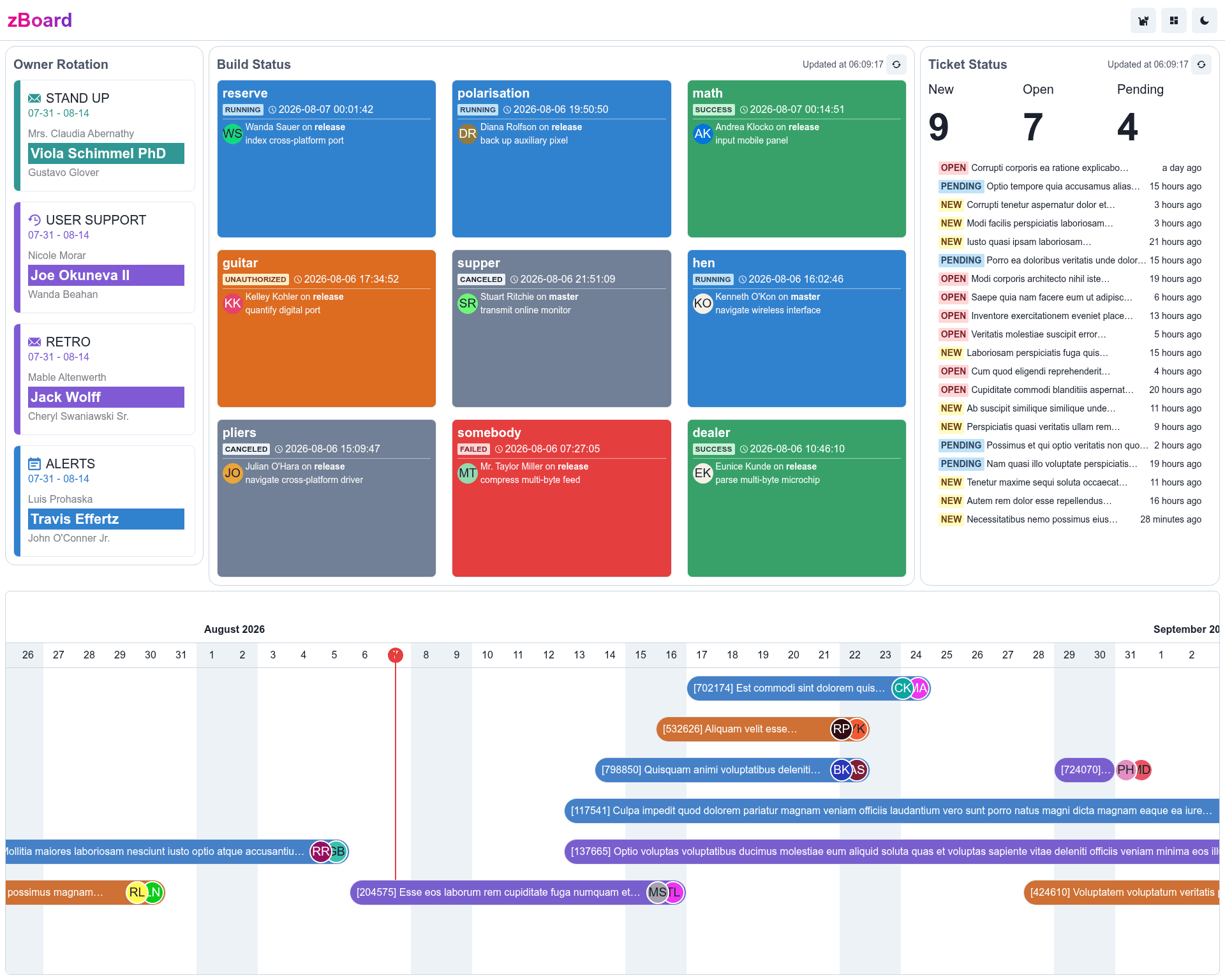
zBoard is an open-source, MIT-licensed dashboard template for DevOps and agile teams that turns a large monitor into a live operations screen for CI/CD build status, support tickets, and delivery timelines. It is built with Next.js, TypeScript, and Chakra UI, and deploys to Vercel with no database required.
What is zBoard?
zBoard is a self-hostable dashboard that aggregates information from developer tools into a single, visual display. It takes API tokens from CircleCI, GitHub Actions, Zendesk, Kanbanize, and ApiTable as input, and produces a grid of draggable, resizable widgets showing build health, ticket volume, project progress, and owner rotation. The project is maintained by developer Cyronlee and is available on GitHub under the MIT license.
Key Features
The dashboard ships with five built-in widgets and a layout builder, with all integrations driven by environment variables.
- CI/CD build monitoring — Pulls pipeline status from CircleCI using a CIRCLE_CI_API_TOKEN and from GitHub Actions using a GITHUB_API_TOKEN, displayed as per-repo build cards.
- Zendesk ticket status — Connects to Zendesk via ZENDESK_API_TOKEN, ZENDESK_USER_EMAIL, and ZENDESK_BASE_URL to show open ticket counts and ticket lists.
- Kanbanize project timeline — Uses KANBANIZE_BASE_URL and KANBANIZE_API_KEY to render a delivery timeline or Kanban-style progress view.
- Owner rotation indicator — Loads on-call or owner rotation data from ApiTable using API_TABLE_API_KEY, displayed in a dedicated widget.
- Resizeable and draggable layout — Each widget can be freely rearranged, and a builder page at /builder lets users define widget initial props.
- Security-first design — A site-wide password can be enabled via SITE_PASSWORD, and all API tokens stay in backend environment variables, never transmitted to the browser.
- No database needed — All data is fetched live from the configured APIs and rendered on page load, so there's nothing to store or maintain.
- Extensible widget system — New widgets can be added by dropping a folder under ./src/widgets with an index.tsx export and preview.png thumbnail.
Who should use zBoard?
zBoard is made for teams that want a real-time operational picture without building a custom dashboard from scratch.
- DevOps engineers — Put build pipelines from CircleCI and GitHub Actions on a wall-mounted screen so the team sees failed builds instantly.
- Support team leads — Monitor Zendesk ticket volume and queues in real time, without opening the Zendesk agent interface.
- Agile delivery managers — Track project timelines from Kanbanize and know who is the current owner/on-call from the rotation widget.
- Startups and small teams — Get a self-hosted or Vercel-deployed operations dashboard in a few hours by editing config files and setting env vars.
What can you do with zBoard?
With zBoard you can turn any spare monitor into a live operations command center. Common uses include:
- Ops room screen: Set up an always-on display in the office showing CI status, tickets, and delivery progress on one screen — all widgets resizeable to fit any layout.
- Remote team transparency: Share the deployed Vercel URL so distributed team members can glance at pipeline health and ticket backlog without asking in Slack.
- Custom widget experimentation: Fork the repo, add a new widget under ./src/widgets, and use the builder page to place it into the dashboard before writing any backend code.
How does zBoard work?
Deploy by forking the repository, customizing five config files (site.config.js, build_status.config.js, ticket_status.config.js, project_timeline.config.js, owner_rotation.config.js), and pushing to Vercel. Set environment variables such as CIRCLE_CI_API_TOKEN, ZENDESK_API_TOKEN, GITHUB_API_TOKEN, KANBANIZE_API_KEY, and API_TABLE_API_KEY in the Vercel dashboard; if no token is set, the dashboard displays fake sample data. Locally, clone the repo, install Node.js 18, copy .env.example to .env, and run npm run dev.
FAQ
This section answers the most common questions about setting up and using zBoard.
Does zBoard require a database?
No. The project is designed to be "all in one, no database needed" — it fetches fresh data from the configured APIs on each request and renders it directly in the widgets.
How do I protect my dashboard with a password?
Set the SITE_PASSWORD environment variable during deployment. If filled, the site will require a login before showing any dashboard content; if left empty, the dashboard is public.
Which services can I connect?
zBoard currently ships with integrations for CircleCI, GitHub Actions, Zendesk, Kanbanize, and ApiTable (for owner rotation). The roadmap lists plans to integrate more products.
Can I customize the layout?
Yes. Each widget is resizeable and draggable, and a dedicated builder page at /builder lets you drag or resize widgets to build a custom layout. Widget initial props are defined in ./src/widgets/index.tsx.
What is the license?
zBoard is released under the MIT License, so you can use, modify, and redistribute it freely.