Template details
Algolia × Supabase × Vercel Starter
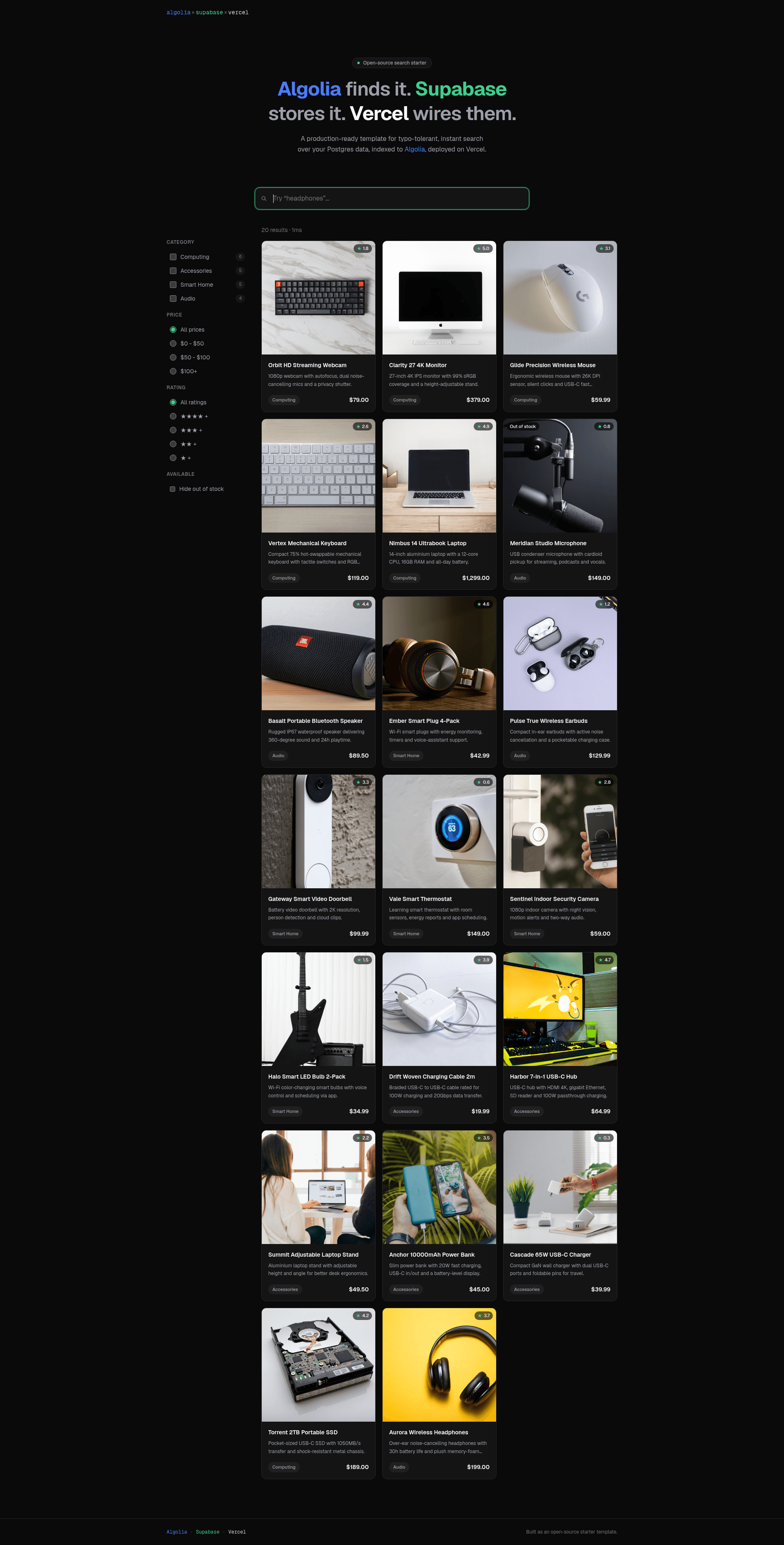
Instant, typo-tolerant Algolia search over Supabase Postgres data, deployed on Vercel — zero indexing code.
About this template
The Algolia × Supabase × Vercel Starter is a minimal Next.js boilerplate that wires instant, typo-tolerant search over Postgres data using Algolia's managed index and the official Supabase connector — no sync code in the application.
What is the Algolia × Supabase × Vercel Starter?
The Algolia × Supabase × Vercel Starter is a minimal Next.js template that connects a Supabase Postgres database to an Algolia search index through the official Algolia connector, delivering instant, typo-tolerant search with zero indexing code in the app. It takes a seeded products table in Supabase as input and produces a deployed search experience on Vercel: a landing page with faceted search and dynamic product detail pages served from Postgres. The template is published by Algolia and released under the MIT license.
Key Features
- One-click deployment — The Vercel Deploy button provisions both Supabase (Postgres database) and Algolia (search application) integrations and injects their environment variables into the project, so no manual configuration is needed to get a working project.
- Zero sync code — The Algolia Supabase connector (from the Algolia dashboard) keeps the search index synchronized with the database through scheduled tasks; the application itself contains no indexing logic.
- Typo-tolerant instant search — The frontend uses Algolia InstantSearch with the lite client, giving typo tolerance and instant results with no custom backend logic.
- Data transformation pipeline — A
demo/transform.jsfile mapsidtoobjectID, strips internal-only fields (cost_price,supplier_id,internal_notes,stock_location), and derives anin_stockboolean fromquantityduring indexing. - Faceted filtering — The sidebar supports category, price, and rating facets plus a filter-only
in_stocktoggle that hides out-of-stock items. - Server-side product pages —
/app/products/[id]/page.tsxfetches product details from Supabase usingPOSTGRES_URL, showing database-only fields on each product page. - Environment variable mapping —
next.config.tsmaps both bare andNEXT_PUBLIC_-prefixed Algolia variable names so either integration shape works; only the App ID and Search API key reach the browser. - MIT licensed — The repository is open source under the MIT license, so it can be adapted and embedded in commercial projects.
Who is it for?
- Next.js developers who want a working reference for wiring Algolia and Supabase together, from database schema to deployed search UI, without writing connector glue.
- E-commerce teams that need instant product search with faceted filters over a Postgres catalog and want a starting point to extend with auth and write operations.
- Platform/integration engineers evaluating the Algolia Supabase connector who need a runnable example that demonstrates transformations, full reindexes, and scheduled syncs.
What can you do with it?
- Build a searchable storefront catalog: Seed the provided
productstable, run the connector, and get a faceted product search UI with category, price, and rating filters plus a "Hide out of stock" toggle. - Test the Supabase connector: Use the walkthrough to create a connector from the Algolia dashboard, paste a transformation, preview the output, and run a full reindex — all without touching app code.
- Learn secure env var handling: See exactly which Algolia variables are browser-safe (
NEXT_PUBLIC_ALGOLIA_APP_ID,NEXT_PUBLIC_ALGOLIA_SEARCH_API_KEY) and which must stay server-side (POSTGRES_URL), including the warning thatNEXT_PUBLIC_ALGOLIA_WRITE_API_KEYmust never be referenced in client code.
How does the template work?
Deploying to Vercel with the "Deploy your own" button creates the Supabase and Algolia resources and injects environment variables. After deployment, you paste demo/seed.sql into the Supabase SQL Editor to create and fill the products table, then connect the Supabase connector in the Algolia dashboard: choose Supabase, paste demo/transform.js into the transformation editor, set the destination index to products, and run a full reindex. The connector keeps the index in sync from the dashboard, and reloading the site shows search results.
FAQ
Is the Algolia × Supabase × Vercel Starter free?
The template is open source under the MIT license, so it costs nothing to use. Running it requires Supabase, Algolia, and Vercel accounts, which have their own pricing. The repository itself imposes no fees.
Do I have to write indexing code?
No. The Algolia Supabase connector performs indexing from the Algolia dashboard. The only code involved is the optional transformation script (demo/transform.js) that shapes records before they are indexed.
What database schema does the demo use?
The demo/seed.sql file creates a 12-column products table that combines searchable fields (name, description, category, price, rating) with internal-only fields (cost price, supplier ID, internal notes, stock location). The connector transformation strips the internal fields before indexing.
Which Algolia environment variables are exposed to the browser?
Only NEXT_PUBLIC_ALGOLIA_APP_ID and NEXT_PUBLIC_ALGOLIA_SEARCH_API_KEY are browser-safe. POSTGRES_URL is server-side, and NEXT_PUBLIC_ALGOLIA_WRITE_API_KEY must never be referenced in client code because the prefix would inline it into the bundle.
What should I add before going to production?
The template is read-only; add authentication before exposing any write path. Enable incremental sync with a soft-delete column so removals propagate to the index, and consider triggering the connector task via the Algolia Ingestion API instead of the dashboard schedule.