Template details
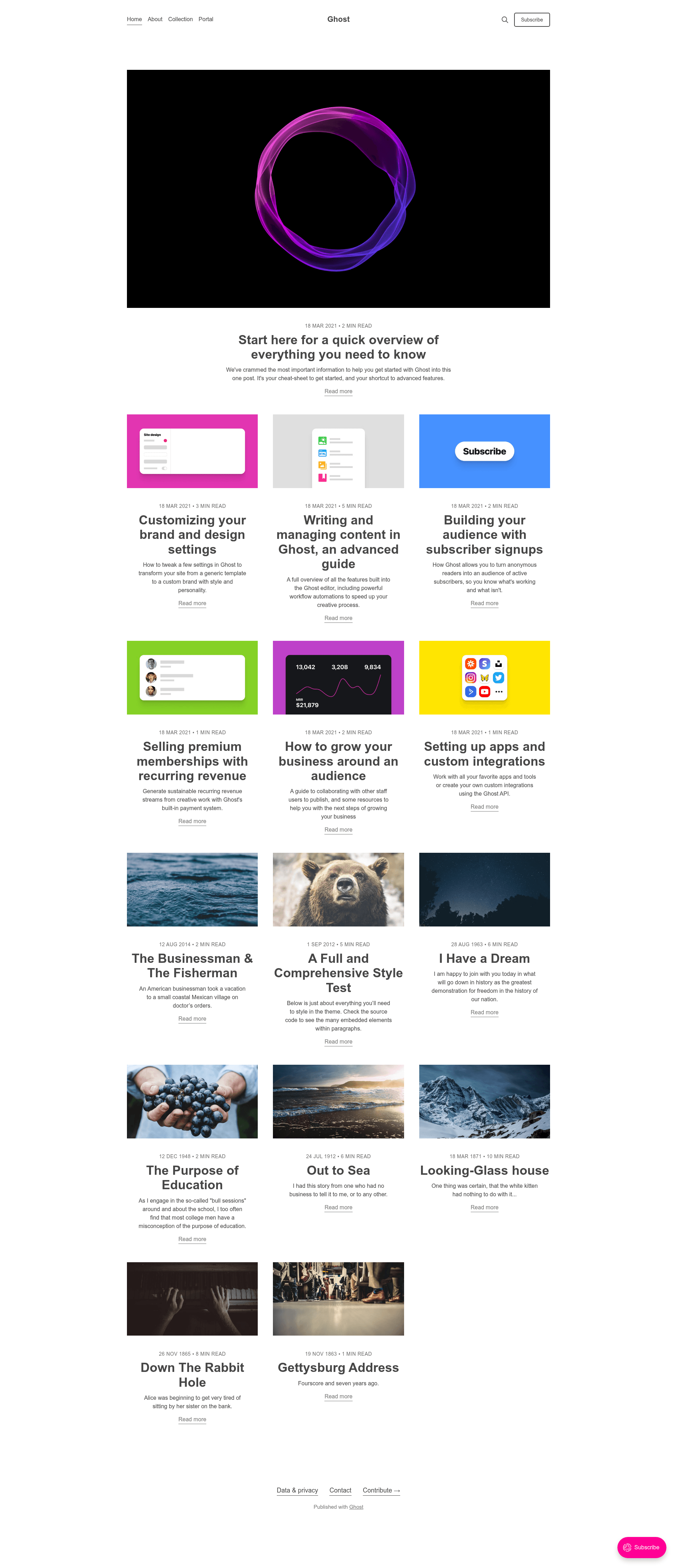
Ghost Starter Theme
A development starter theme for Ghost with Handlebars templates, Rollup/PostCSS build tools, and live reload.
About this template
Ghost Starter Theme is a development starter framework for building custom Ghost themes, maintained by the Ghost Foundation and released under the MIT license. It pairs the Ghost templating system (Handlebars) with a modern build pipeline (Rollup and PostCSS) so you can start a new theme with live-reload, optimized assets, and deploy automation out of the box.
What is the Ghost Starter Theme?
The Ghost Starter Theme is a boilerplate repository for creating custom themes for the Ghost publishing platform. It contains the core Handlebars template files (default.hbs, index.hbs, post.hbs, page.hbs, tag.hbs, author.hbs) plus a Rollup-based build system that transpiles and minifies JavaScript and CSS. As input, you edit the templates and assets; as output, the tooling compiles them into a built folder ready to zip and upload or deploy via GitHub Actions. The project is maintained by the Ghost Foundation, the same team behind Ghost itself.
Key Features
- Live reload by default — Saving any file triggers an instant browser refresh during development, so you see changes immediately.
- Optimized for VS Code — The repository layout and file names are organized to make navigation faster in the VS Code editor, with comments throughout the code.
- Modern JavaScript with ESM — You can write ES modules out of the box without extra configuration, for cleaner and more maintainable code.
- Automatic asset optimization — JavaScript and CSS are minified and transpiled automatically, so production output is lean without extra steps.
- Fast compile times with Rollup — The build is powered by Rollup, known for quick bundling, and can be extended with any of the many Rollup plugins.
- PostCSS for next-gen CSS — Write modern CSS using PostCSS, and add your preferred PostCSS plugins directly in the rollup.config.js file.
- Ghost GitHub Deploy Action included — A ready-to-use GitHub workflow (deploy-theme.yml) is part of the repo so you can automate theme deployment to Ghost.
- Custom template routing shortcut — Create template files named after a page, tag, or author slug (for example, page-about.hbs) to apply a unique layout to that specific content.
Who should use the Ghost Starter Theme?
This theme is for developers who build custom Ghost themes, whether for their own blog, a client, or a commercial product. If you are new to Ghost theming, the heavily commented code and the starter structure give you a guided starting point. If you are an experienced theme developer, the preconfigured Rollup/PostCSS pipeline saves you setup time so you can focus on the unique parts of your design.
What can you do with the Ghost Starter Theme?
- Build a custom blog theme from scratch — Use the base templates and Handlebars helpers to create a unique look for a Ghost publication, then zip and upload it via Ghost's admin.
- Create per-content layouts — Drop in a file named like page-about.hbs or tag-news.hbs to give specific pages, tags, or authors their own layout without duplicating the whole theme.
- Automate deployment — Push changes to GitHub and let the included GitHub Action deploy the theme to your Ghost host automatically.
- Learn Ghost theme development — Read the annotated starter code alongside Ghost's official theme docs to understand how themes are structured.
How does the Ghost Starter Theme work?
Start by symlinking the theme folder into your local Ghost install's content/themes directory, restart Ghost, and select the Starter theme from Settings. Install dependencies with pnpm install, then run pnpm dev to start development mode with live reload. When you're ready to ship, run pnpm build to compile production assets, pnpm zip to create an archive, and pnpm test to run gscan compatibility checks.
Pricing
The Ghost Starter Theme is free and open source under the MIT license, so you can use it for personal or commercial themes without licensing fees.
FAQ
Is the Ghost Starter Theme free?
Yes, the theme is open source and released under the MIT license by the Ghost Foundation. That means you can use and modify it freely, including in commercial projects, without any license fee.
What templating language do Ghost themes use?
Ghost themes use Handlebars, a logic-light templating language. The starter theme includes the standard Handlebars files such as default.hbs, index.hbs, post.hbs, and page.hbs, so you can start editing right away.
Do I need Node.js to use the starter theme?
Yes, Node.js is required to install dependencies and run the build and development commands. The project recommends following the official Node installation guide if Node is not installed.
How can I see my changes in the browser?
Run pnpm dev from the theme root. This starts a development server with livereload, so CSS, JavaScript, and Handlebars changes appear in the browser automatically. Press Ctrl+C to stop dev mode.
Does the starter theme include deployment automation?
Yes, the repository includes a GitHub Action (deploy-theme.yml) that deploys your theme to Ghost automatically when you push. You can learn more from the action-deploy-theme repository.