Template details
blogdown
Create Blogs and Websites with R Markdown
About this template
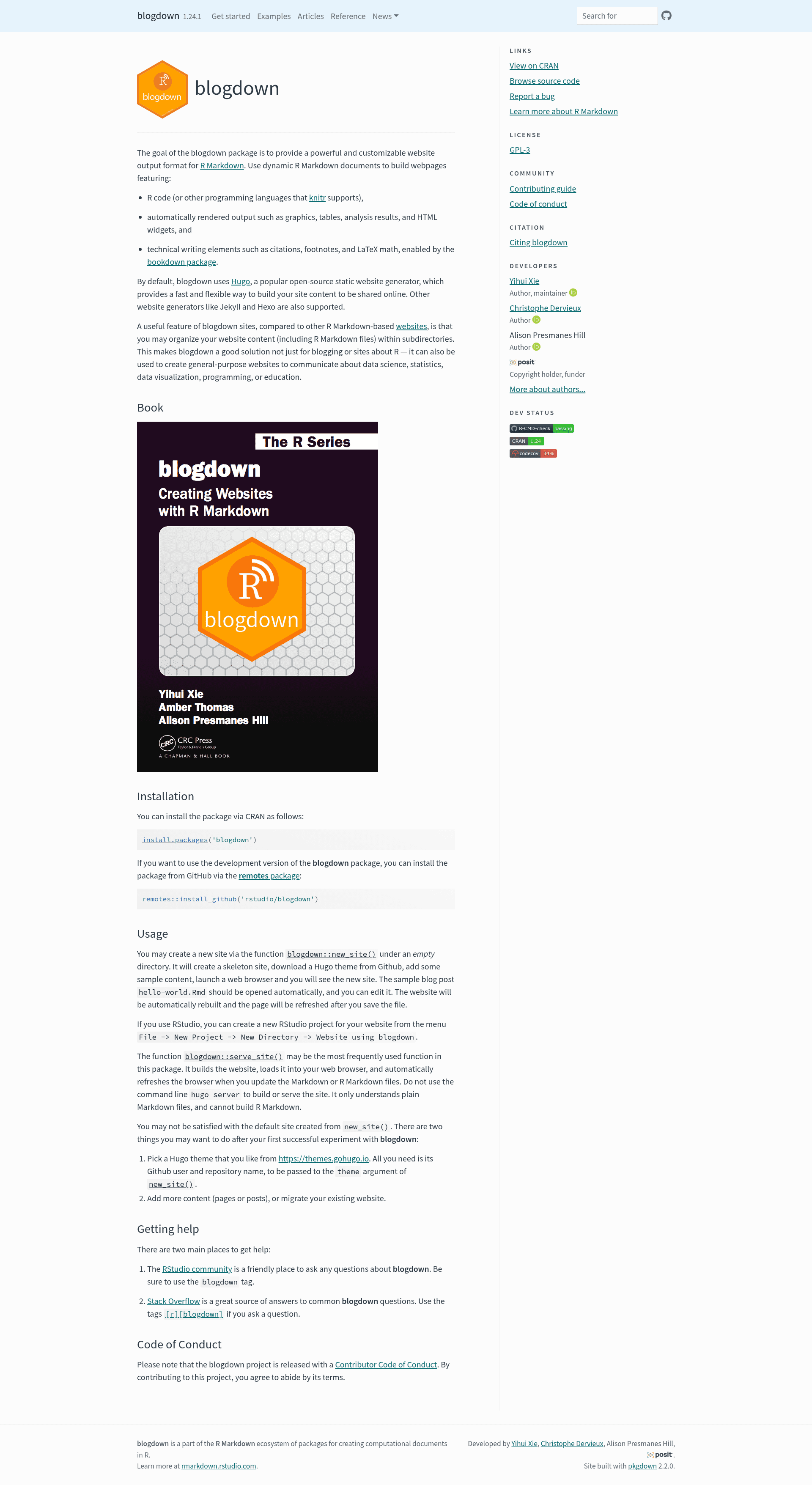
blogdown is an R package that converts R Markdown documents into static websites, using Hugo as the default site generator and supporting Jekyll and Hexo as alternatives.
What is blogdown?
blogdown is an open-source R package developed by RStudio that provides a website output format for R Markdown. It takes R Markdown files — which can embed R code, automatically rendered graphics, tables, analysis results, and HTML widgets, as well as technical writing elements such as citations, footnotes, and LaTeX math — and generates a complete static website. The package defaults to Hugo, a fast open-source static site generator, but also works with Jekyll and Hexo. It is installed from CRAN with install.packages('blogdown').
Key Features
- R Markdown integration — Write pages and posts in R Markdown; knitr executes R code and renders plots, tables, and HTML widgets directly into the site output.
- Hugo default generator — blogdown uses Hugo by default; you can choose any Hugo theme from themes.gohugo.io by providing its GitHub user and repository name to the
themeargument ofnew_site(). - Subdirectory content organization — Unlike other R Markdown-based websites, blogdown lets you organize content, including R Markdown files, within subdirectories, making it suitable for large and general-purpose sites.
- Live preview with serve_site() — The
serve_site()function builds the site, opens it in a web browser, and automatically refreshes the page whenever you save Markdown or R Markdown files. - RStudio project integration — You can scaffold a website project from RStudio via File -> New Project -> New Directory -> Website using blogdown.
- bookdown-powered technical writing — Citations, footnotes, and LaTeX math are supported through the bookdown package, enabling academic-style content.
- Alternative generators — Beyond Hugo, blogdown supports Jekyll and Hexo as website generators, giving flexibility in hosting and theme ecosystems.
- Easy installation and development version — The stable release installs from CRAN; the development version is available from GitHub via
remotes::install_github('rstudio/blogdown').
Who is it for?
- R users and data scientists who want to build a blog or personal website that showcases live code, charts, and reproducible analysis.
- Technical writers and educators who need to publish content with citations, footnotes, and LaTeX math, using bookdown-compatible features.
- Open-source maintainers and researchers who want a general-purpose website built from a mix of Markdown and R Markdown files, organized in subdirectories.
What can you do with blogdown?
- Data science bloggers — Publish posts that include executable R code and automatically rendered figures and HTML widgets, so readers see the analysis output directly.
- Course and textbook authors — Create educational sites with LaTeX math and footnotes powered by bookdown, suitable for lecture notes or online textbooks.
- Project documentation — Build documentation sites for R packages or data projects, with content organized in subdirectories and updated via live preview.
How does blogdown work?
To get started, run blogdown::new_site() in an empty directory; it creates a skeleton site, downloads a Hugo theme from GitHub, and adds sample content, then opens the site in a browser. Editing the sample hello-world.Rmd file triggers an automatic rebuild and browser refresh. For ongoing development, use blogdown::serve_site() rather than the command-line hugo server, because hugo server only understands plain Markdown and cannot build R Markdown files.
FAQ
How do I install blogdown?
Install the stable version from CRAN by running install.packages('blogdown') in R. The development version can be installed from GitHub with remotes::install_github('rstudio/blogdown'), which requires the remotes package.
Does blogdown only work with Hugo?
No, blogdown uses Hugo by default but also supports Jekyll and Hexo as alternative static site generators. The Hugo integration is the most mature, with automatic theme download and a large theme directory.
Can I use blogdown without RStudio?
Yes, blogdown works without RStudio — you can create a site with new_site() and serve it with serve_site() from any R environment. RStudio only adds a convenient project wizard to set up the site structure.
Why should I avoid hugo server for building the site?
The command-line hugo server cannot process R Markdown files, so it will not render your R-based content. Always use blogdown::serve_site() to build and preview the site, as it triggers knitr and Hugo correctly.