Template details
Antarctica
Stylish and feature-rich Jekyll theme with flexible widgets, NerdFonts icons, and automatic sitemap and SEO generation.
About this template
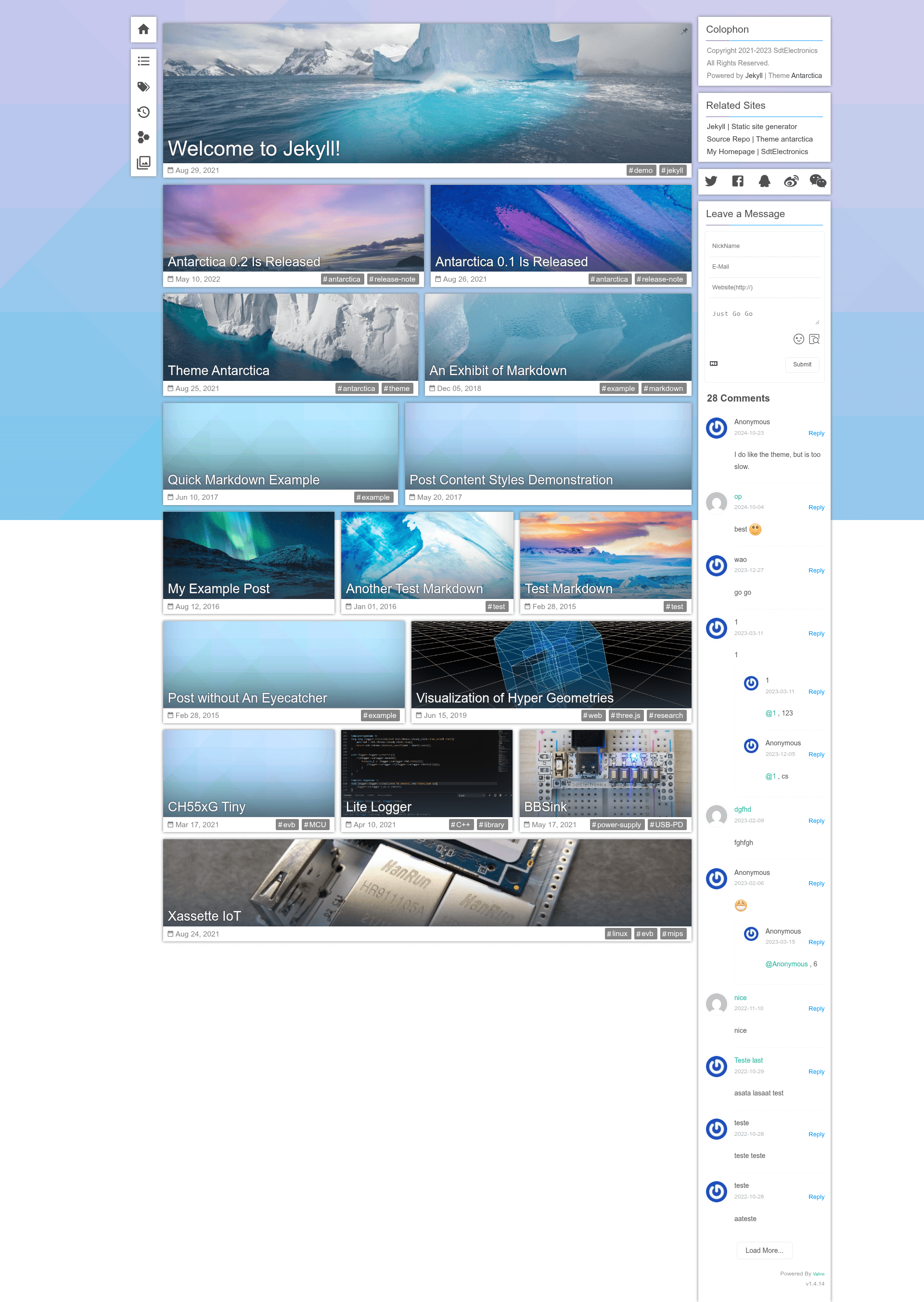
Antarctica is an elegant, feature-rich Jekyll blog theme that renders fully responsive static sites and packs a flexible widget system, automatic sitemap and SEO generation, and 3000+ NerdFonts icons.
What is Antarctica?
Antarctica is an open-source Jekyll theme designed to produce stylish static websites with a focus on elegant design and functional depth across screen sizes. It takes a standard Jekyll site (posts, pages, and configuration) and outputs a fully responsive static site with a modular widget sidebar, integrated icon fonts, and automated SEO/sitemap handling. The theme is distributed under GPLv3 and can be installed as a gem-based theme, a remote theme for GitHub Pages, or by forking the release branch.
Key Features
- Fully responsive layout — The theme adapts to different screen sizes so content reads well on mobile, tablet, and desktop, with a roadmap item for optimizing large-screen views.
- Flexible widget system — Widgets are self-contained HTML cards docked on the right side of the page; included widgets are colophon, comment, post metadata, share this page, related sites, and table of contents.
- NerdFonts integration — Bundled with 3000+ NerdFonts icons to enrich buttons, metadata, and custom elements without external icon libraries.
- Automatic sitemap generation — Uses the Jekyll Sitemap plugin to create sitemaps without configuration.
- Search engine optimization — Integrates Jekyll SEO Tag to add meta tags and structured data with zero setup.
- Minimal JavaScript — The main frame loads no external JavaScript files, reducing load time; only some widgets request external scripts.
Who is it for?
- Jekyll bloggers — Publish a personal blog with a polished, responsive layout and widgets like table of contents and share buttons without writing custom frontend code.
- GitHub Pages users — Deploy the theme as a remote theme directly from the repository, avoiding gem installation and local build steps.
- Developers who customize themes — Extend the widget system by creating self-contained HTML files under
_includes/widgets/and registering them per layout, enabling per-page widget sets.
What can you do with Antarctica?
- Blog authors: Add a table of contents widget to long posts and a "share this page" widget so readers can distribute content on social platforms.
- Site owners: Display related sites and post metadata widgets to keep visitors exploring and present publication dates and tags.
- Community builders: Integrate the comment widget to enable discussions on posts, and use the colophon widget to describe your site's purpose and about information.
How does Antarctica work?
Antarctica follows standard Jekyll theming. After installing (via gem, remote theme, or fork), you configure options in _config.yml. To customize widgets, create a self-contained HTML file under _includes/widgets/ and add its filename to the widgets field in the corresponding layout and in the template section of the config. Each page loads only the widgets registered to it, allowing different widget combinations across pages.
Roadmap
The theme lists planned features in its roadmap: scrollable widget bar, comment widget improvement, related sites widget, table of contents widget, pinned post, and abstract/excerpt in preview were completed in version 0.2; optimizing view on large screens is planned for version 0.3, and an "Arcylic" (acrylic) color scheme is still pending.
FAQ
Is Antarctica free?
Yes, Antarctica is available under the GPLv3 License, so you can use, modify, and distribute it freely as long as derivative works also remain GPLv3.
How do I install Antarctica for GitHub Pages?
You can install Antarctica as a remote theme by following GitHub's instructions for using any theme with GitHub Pages, which avoids local gem installation and works directly with the repository.
Can I add my own widgets?
Yes. Create a self-contained HTML file (including styles and scripts) under _includes/widgets/, then register it by adding its filename to the widgets field in the relevant layout and in the template section of _config.yml.
What plugins does Antarctica use?
Antarctica automatically generates sitemaps via Jekyll Sitemap and adds SEO meta tags via Jekyll SEO Tag; both require no configuration.