Template details
app-landing
A Next.js and Tailwind CSS landing page template for mobile apps with App Store buttons, dark mode, and static export.
About this template
app-landing is a MIT-licensed mobile app landing page template built with Next.js, React, and Tailwind CSS that produces a static, serverless-ready marketing site from a single TypeScript configuration file.
What is app-landing?
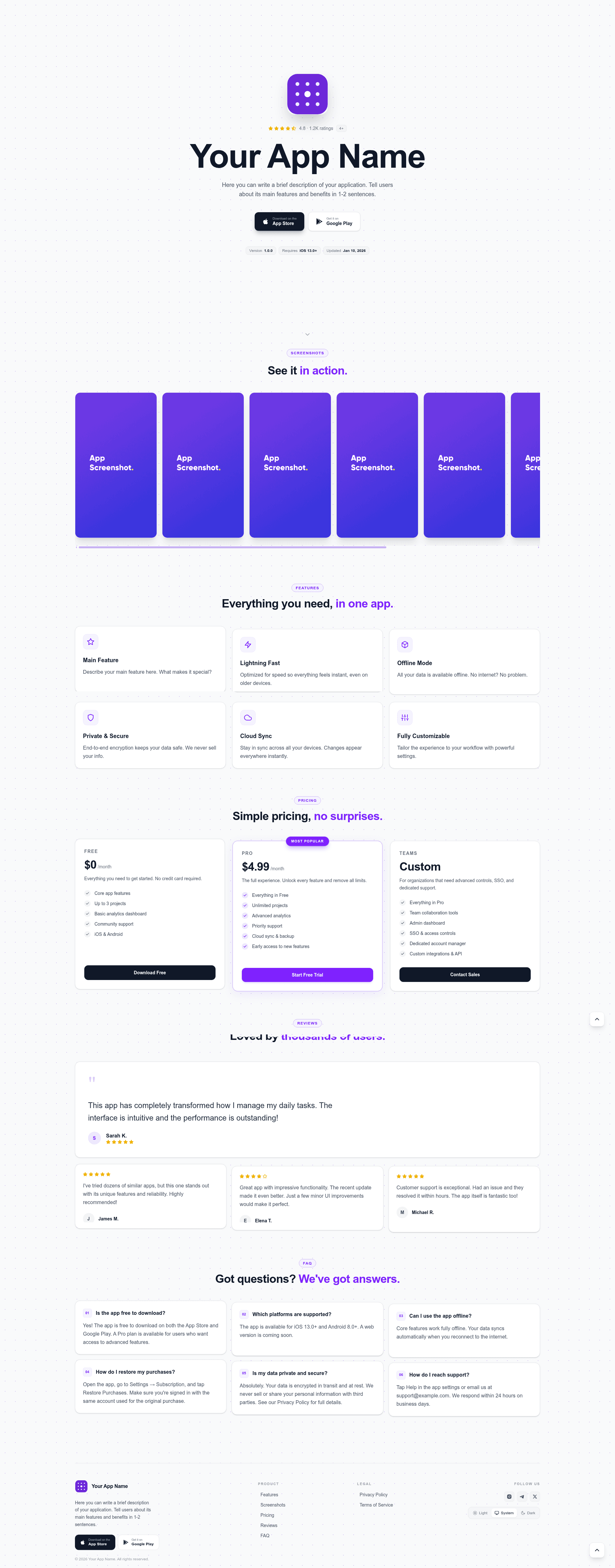
app-landing is a starter template for mobile app product pages. It takes app metadata — name, logo, App Store and Google Play deep links, rating, version, minimum OS, screenshots, pricing tiers, testimonials, and FAQs — defined in src/config.ts, plus Markdown files for legal copy, and outputs a complete landing site with a hero section, screenshot gallery, pricing cards, reviews, FAQ accordion, footer, and separate privacy policy and terms of service pages. The template runs on Next.js with React components styled by Tailwind CSS, and it is authored by GitHub user bohd4nx. Because it is configured for static export via output: 'export', the build produces plain HTML that needs no Node.js server at runtime.
Key Features
- Hero with store badges — Shows App Store and Google Play buttons, along with rating, version, minimum OS, and release date, all sourced from the site config.
- Screenshot gallery — Displays a horizontal scrollable gallery with a violet always-visible scrollbar, fed by an array of image paths under
/public/assets/screenshots/. - Pricing section — Free, Pro, and Teams tiers with a highlighted card enabled by a
highlighted: trueflag on any tier. - Social proof blocks — Feature cards, customer reviews with star ratings, and an FAQ accordion come pre-built and data-driven.
- Theme toggle — Light, Dark, and System modes with the user's choice persisted in localStorage.
- Markdown legal pages — Privacy Policy and Terms of Service render from
src/app/privacy-policy/privacy.mdandsrc/app/terms-of-service/terms.mdrespectively, so no React edits are needed for legal text. - Static export —
pnpm buildoutputs a fully staticout/folder that can be deployed to any static host. - Optional App Store metadata fetch — Set
storeConfig.fetchRealDatato true and provide a numeric App Store ID to pull live app data at build time.
Who is it for?
- Indie mobile app developers who want a polished landing page without writing layout code from scratch — they paste their App Store ID and screenshots into config, then deploy.
- SaaS teams that need to communicate pricing and customer testimonials quickly; the pricing tier and reviews sections map directly to this need.
- Front-end developers who prefer a minimal Next.js codebase to customize — the whole site is driven by one
src/config.tsfile with typed fields, and styling uses Tailwind utility classes. - Hobbyists and open-source maintainers who want a free, MIT-licensed template they can fork and rebrand for side projects.
What can you do with app-landing?
- Launch a pre-release app page — Set the version, OS requirement, release date, and store links, then share the static site before the app is live.
- A/B test pricing and messaging — Because all content is in config, you can tweak pricing tiers, reviews, and FAQ text and rebuild in seconds to compare variants.
- Ship a fast, lightweight site — The static export has no server dependencies, so the final page is a set of static files you can put behind any CDN.
How does app-landing work?
Setup is a three-step flow: clone the repository, run pnpm install, then pnpm dev for local development with live reload. To customize, edit the exported configuration object in src/config.ts — the table in the README documents every key, from site.name to faqs. When ready, run pnpm build to generate the static export in out/, or run pnpm lint for Biome checks. Optionally, enabling the App Store fetch makes the build pull real rating and version data from Apple's App Store at build time.
Pricing
The template is free and open source under the MIT License. There are no paid tiers or locked features; the pricing tiers visible on the page (Free, Pro, Teams) are demo content that you replace with your own app's plan structure.
FAQ
Is app-landing free?
Yes, the template is released under the MIT License, so you can use it for commercial projects, modify it, and redistribute it as long as you preserve the license notice.
What are the system requirements?
You need Node.js 20 or newer and the pnpm package manager. All other dependencies are installed via pnpm install.
Can I deploy app-landing without a Node.js server?
Yes. The build is configured with output: 'export', so pnpm build writes a static out/ directory. This folder can be hosted on any static file host or CDN.
How do I update the Privacy Policy and Terms of Service?
Edit the Markdown files at src/app/privacy-policy/privacy.md and src/app/terms-of-service/terms.md directly. They are rendered onto the pages automatically during the build.
Does app-landing support automatic App Store reviews?
It can fetch live App Store metadata at build time. Enable storeConfig.fetchRealData and set the numeric storeConfig.appStoreAppId; the build will then include real rating and version data.