Template details
Astro Yi
A simple, lightweight content-focused blog theme for Astro with dark mode, i18n, comments, and search.
About this template
Astro Yi is a content-focused Astro blog theme from developer cirry, built to turn markdown files into a fast, static personal blog with comments, search, and internationalization. It is an open-source project hosted on GitHub, and it can be deployed to Vercel, GitHub Pages, or any static web server.
What is Astro Yi?
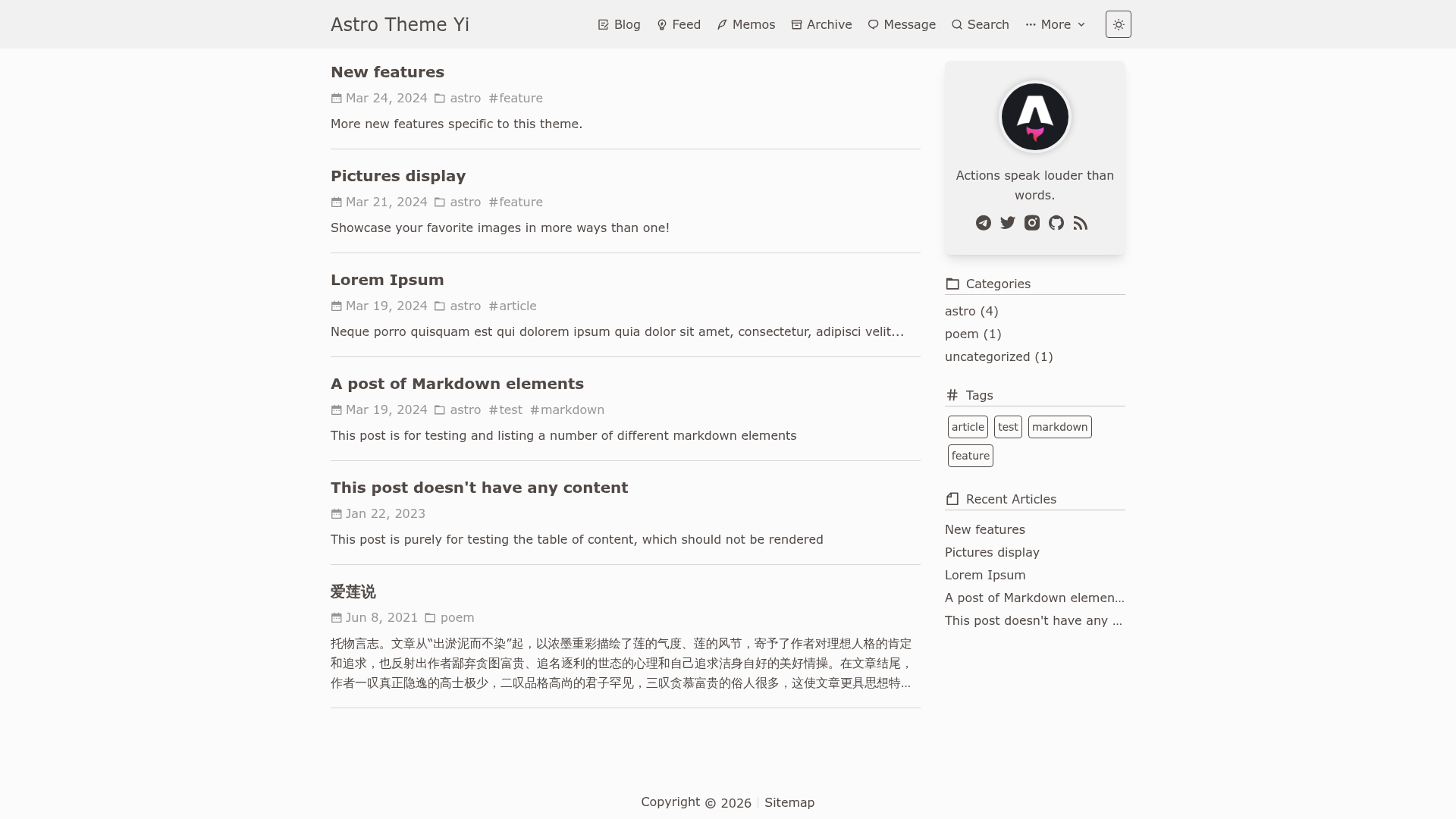
Astro Yi is an open-source blog theme created by developer cirry for the Astro static site generator. It takes markdown files placed in the src/content/blog and src/content/feed directories as input and builds them into a static blog with pages for homepage, blog listing, feed, archive, message board, search, about, and friends links. The theme is configured through a single TypeScript file at src/consts.ts, and it is designed to be fast and concise — the name Yi means "fast and concise" in Chinese. The project's repository lists 153 stars and two topics, astro and blog.
Key Features
- Astro framework — Built on the Astro static site generator, requiring Node.js version 20 or higher and pnpm version 8 or higher to build the project.
- One-file configuration — All global settings (site title, author, avatar, motto, navigation, comment system, analytics, and donation links) are controlled from
src/consts.ts. - Comment system options — Supports both Waline (self-hosted server with pageview counts, emoji reactions, word limits) and Giscus (GitHub Discussions widget) via a
typefield. - Dark mode and responsive layout — Includes a built-in dark mode toggle and layouts that display on desktops, tablets, and mobile devices.
- i18n support — Choose from English, Simplified Chinese, Traditional Chinese, and Czech through the
langsetting in the config file. - SEO and syndication — Generates sitemap and RSS feeds, supports article drafts, fixed permalinks via
slug, MathJax formulas, Mermaid diagrams, and expressive code blocks with folding after 16 lines. - Integrations — Connects to Memos for short notes, Umami and Google Analytics for traffic statistics, Busuanzi for page views, and Remix Icon for the icon set.
- Content types — Distinguishes between long-form blog posts in
src/content/blogand short feed updates insrc/content/feed, each with its own frontmatter rules and page size settings.
Who is it for?
- Independent bloggers who want a content-first layout with lightweight static output and minimal JavaScript overhead.
- Developers familiar with Astro who want a clean, hackable project with centralized TypeScript configuration and markdown content collections.
- Chinese-speaking writers looking for built-in Simplified/Traditional Chinese language support and a
beianfield for Chinese ICP filing. - Technical writers who need to render math via MathJax, Mermaid diagrams, and syntax-highlighted code blocks in their posts.
What can you do with it?
- Launch a personal blog quickly: Write a markdown file with only
titleanddatein the frontmatter and place it insrc/content/blog— the theme handles listing, pagination, and archiving automatically. - Publish short micro-updates: Create a note in
src/content/feedwith just a date to share quick links or thoughts, optionally with a Memos integration. - Add comments and analytics: Activate Waline or Giscus in the comment config, then turn on pageview tracking through Umami, Google Analytics, or Busuanzi from the analytics section.
- Deploy with one click: Use the Vercel import button on the GitHub readme to deploy the template directly, or run
pnpm buildand upload the generateddistfolder to any server.
How does Astro Yi work?
The theme follows Astro's content collection workflow. You create markdown files with YAML frontmatter, and Astro's build process compiles them into static HTML. Global settings are read from src/consts.ts, while astro.config.js must have the site property set so the sitemap is generated correctly; the readme also recommends adding the sitemap location to robots.txt.
Pricing
Astro Yi is free to use and its source is public on GitHub. Costs are limited to hosting, a domain, and optional third-party services you choose such as a Waline server or a comment database.
FAQ
Is Astro Yi free?
Yes, the theme's code is publicly available on GitHub and can be cloned and used without a license fee. You pay only for your hosting and any external services you enable, such as a Waline server or analytics.
What frontmatter fields are supported?
Each blog post supports title, date, description, tags, category, sticky (pin weight), slug (permanent link), mathjax, mermaid, draft, toc, donate, comment, and ogImage cover image. Only title and date are required for a minimal post.
Which comment systems work with Astro Yi?
The theme supports both Waline and Giscus. Waline uses a self-hosted server URL and offers pageview counts, emoji reactions, and word limits. Giscus connects to a GitHub Discussions category using repository, category ID, and standard Giscus mapping settings.
Can I deploy Astro Yi to GitHub Pages?
Yes, GitHub Pages support is a listed feature. You set the site URL and repository name in the baseUrl field inside src/consts.ts, then upload the built dist folder to your GitHub Pages branch. The readme also shows how to set two extra values: url and baseUrl.