Template details
AstroDeck
Open-source Astro.js starter kit with 11 UI components, 16 sections, and 11 pages; AI-friendly with AGENTS.md, shadcn/ui, Tailwind v4, and dark mode.
About this template
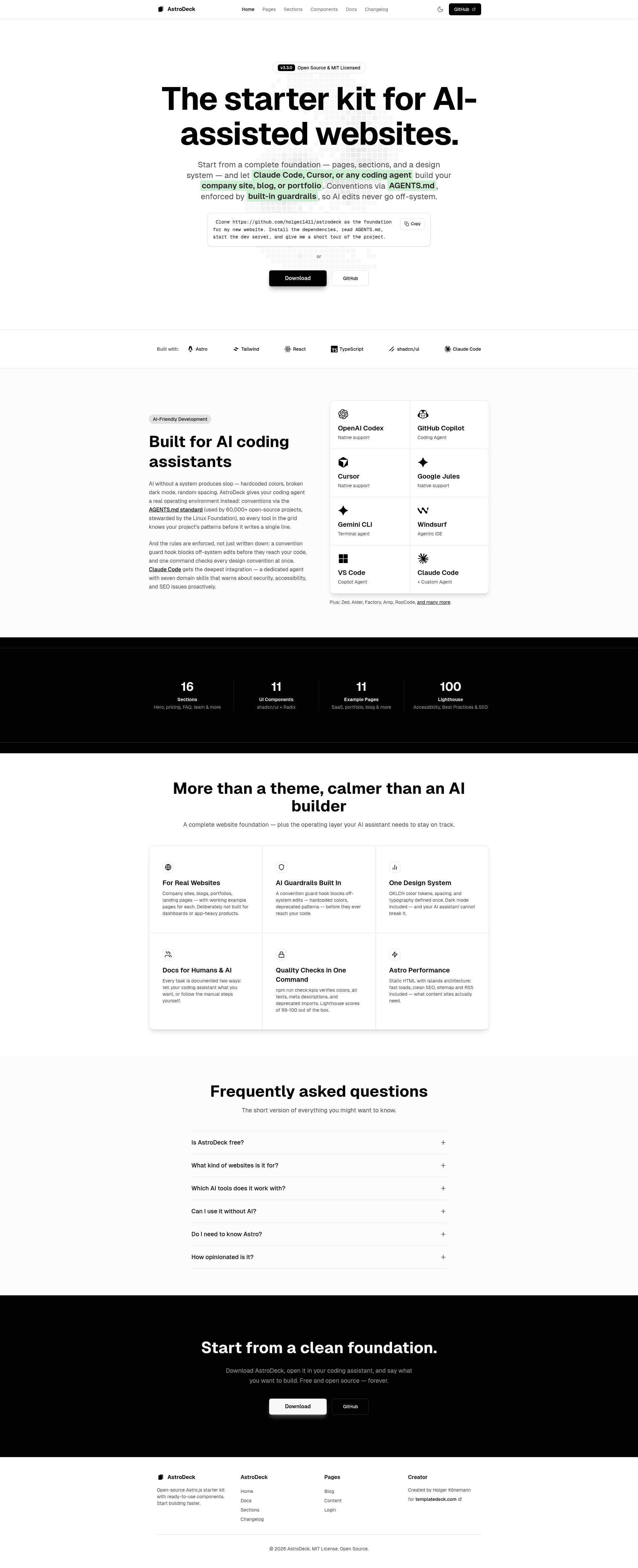
AstroDeck is an open-source, AI-friendly starter kit and component library for building Astro.js websites, organized as a three-tier architecture of components, sections, and pages.
What is AstroDeck?
AstroDeck is a free, MIT-licensed starter kit that provides 11 UI components, 16 page sections, and 11 complete page templates for Astro.js projects. It runs on Astro 6.x with Tailwind CSS v4, includes shadcn/ui React components built on Radix UI, and is distributed through TemplateDeck and GitHub. The project is designed to work with AI coding assistants through AGENTS.md, a Claude Code agent, and deterministic guardrails.
Key Features
- AI-friendly development — Ships AGENTS.md, PROJECT.md, CLAUDE.md, .cursorrules, and a Claude Code agent that supports Claude Code, Cursor, Copilot, Windsurf, and other assistants.
- Three-tier architecture — Separates building blocks into 11 components (
src/components/ui/), 16 sections (src/components/sections/), and 11 pages (src/pages/). - Multiple layout templates — Includes Boxed (max-w-5xl), Full-Width, Minimal, Auth, and Article layouts for different page types.
- Dark mode support — Built-in theme toggle with persistent preferences, configured via CSS variables.
- Tailwind CSS v4 with OKLCH colors — Theme defined in
src/styles/globals.cssusing the OKLCH color format for better perceptual uniformity. - SEO and performance built in — OpenGraph tags, Twitter Cards, sitemap, RSS feed, canonical URLs, and zero-JS default output for fast static sites.
- Quality tooling — TypeScript, ESLint, Prettier, and a KPI check script (
npm run check:kpis) that validates convention compliance. - Deployment-ready — Static build outputs to
dist/, with instructions for Vercel, Netlify, Cloudflare Pages, and GitHub Pages.
Who is it for?
- Developers who want to quickly scaffold a marketing site, SaaS landing page, or portfolio with modern Astro and Tailwind conventions.
- Teams using AI coding assistants who need a codebase with strong documented conventions, guardrails, and slash commands to keep generated code consistent.
- Agencies building client websites that require dark mode, responsive sections, blog/docs pages, and easy white-labeling of colors and fonts.
- Open-source contributors who value MIT licensing and want to customize every component without restrictions.
What can you do with AstroDeck?
- Launch a SaaS landing page — Use the
/templates/saaspage along with Pricing, Features, and Testimonials sections to assemble a conversion-focused page. - Build a blog or docs site — The blog pages and ArticleLayout come with an RSS feed, while the Docs page and Changelog provide a complete content hub.
- Create a portfolio or agency site — Use the portfolio template and Team, Testimonials, and Contact sections to present work.
- Generate pages with AI — Use Claude Code commands like
/new-pageand/new-sectionto create pages while the agent enforces layout, SEO, and styling patterns.
How does AstroDeck work?
AstroDeck is installed with npx degit holger1411/astrodeck my-project, then initialized with npm install and npm run dev. It relies on Astro's file-based routing: each .astro file in src/pages/ becomes a route, and sections are imported into pages with frontmatter props. The development server runs at http://localhost:4321 with hot module replacement.
Pricing
AstroDeck is free and open source under the MIT license. It can be used commercially, modified, distributed, and used privately without attribution, and is available for free download on TemplateDeck.
FAQ
Is AstroDeck free?
Yes. AstroDeck is MIT-licensed, so it is free to use commercially, modify, distribute, and use privately. You can download it for free on TemplateDeck or clone it from GitHub.
What Node.js version do I need?
AstroDeck requires Node.js version 22.0.0 or higher. It uses the latest versions of Astro and Tailwind CSS, so you should run npm install to fetch current versions.
Does AstroDeck support dark mode?
Yes. It includes a built-in theme toggle with persistent preferences. Light and dark mode colors are defined as CSS variables in src/styles/globals.css, and the design system uses the OKLCH color format.
Which AI coding tools are supported?
AstroDeck follows the AGENTS.md standard and includes files for Claude Code, Cursor, GitHub Copilot, Windsurf, OpenAI Codex, and others. Claude Code gets the full feature set with agents, slash commands, skills, and hooks.