Template details
Astrofy
Free open-source personal portfolio template built with Astro and TailwindCSS, featuring blog, CV, projects, store, and RSS feed.
About this template
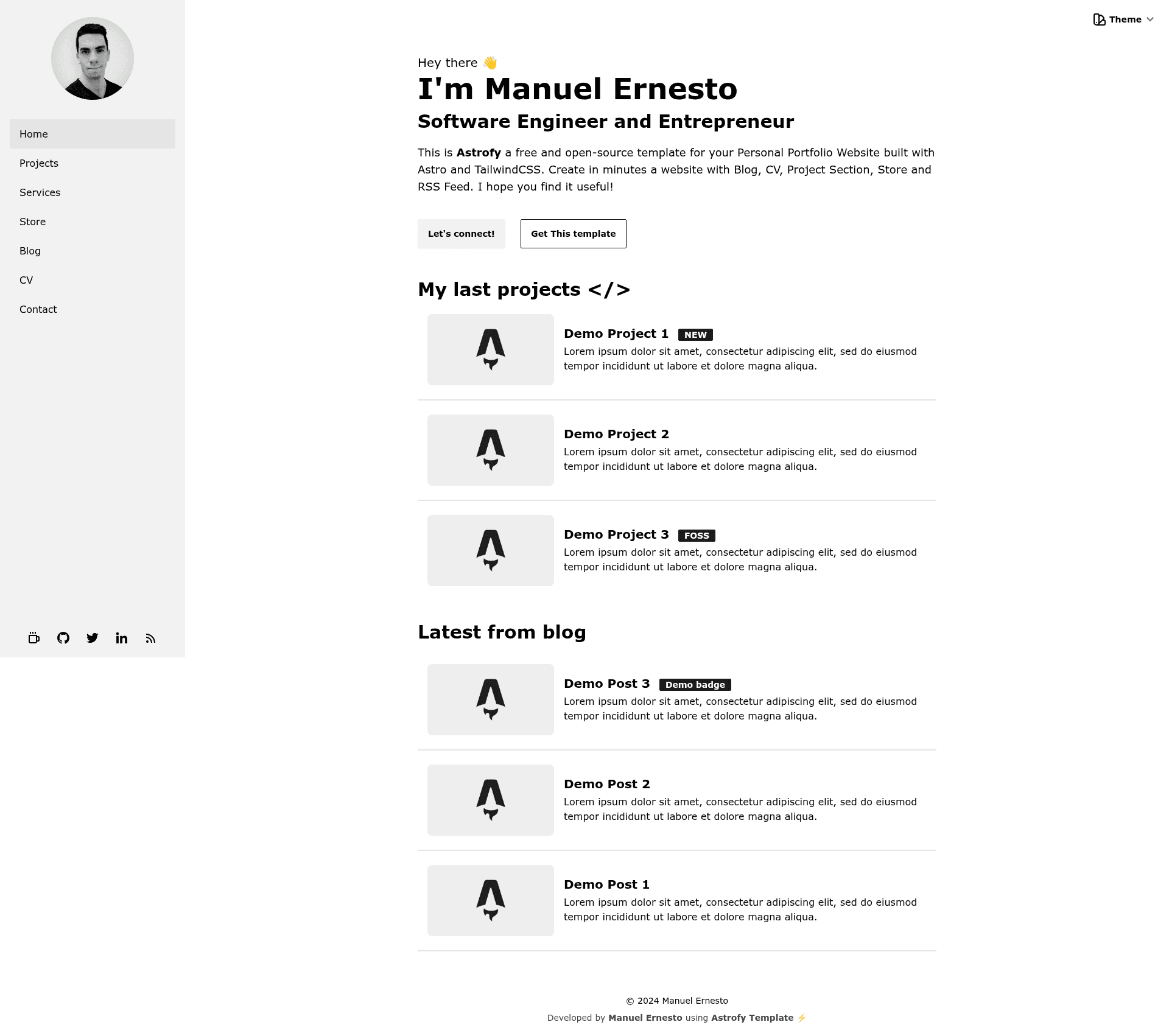
Astrofy is a free and open-source personal portfolio website template built with Astro and TailwindCSS that assembles a blog, CV, project gallery, store, and RSS feed into a single static site.
What is Astrofy?
Astrofy is a static site template for personal portfolios, created by developer manuelernestog and released under the MIT license. It takes markdown files for blog posts and store items as content input and generates a deployable static website with Astro's file-based routing. The template includes pre-built pages for home, blog, CV, projects, and shop, all styled with TailwindCSS and DaisyUI.
What makes Astrofy stand out?
- Complete portfolio sections — Ships with a blog, CV timeline, project grid, and store layout out of the box, so a full personal site is assembled without writing page code.
- Astro + TailwindCSS + DaisyUI stack — Uses Astro for static generation, TailwindCSS for utility styling, and DaisyUI to provide 30 switchable themes by editing the data-theme attribute.
- Markdown content collections — Blog posts and shop items are plain .md files in content folders; the template uses Astro content collections with defined schemas in config.ts.
- RSS feed and sitemap — An RSS feed is generated from blog posts via rss.xml.js, and the sitemap is created automatically at build time in the root domain (requires updating robots.txt).
- Pagination and SEO — The blog and shop lists are paginated with dynamic route
[...page].astro, and BaseHead handles meta tags, with configurable site title and description. - Deployment flexibility — Can be deployed to Vercel, Netlify, GitHub Pages, or any static hosting; note the blog pagination is incompatible with SSR build configs.
- Customizable components — Reusable components like TimeLine, Card, HorizontalCard, and HorizontalShopItem accept props for image, title, description, URL, pricing, badges, and tags.
Who is Astrofy for?
- Job-seeking developers — Create a personal portfolio with a CV timeline and project showcase to present skills and work history.
- Technical bloggers — Publish markdown posts with frontmatter (title, description, pubDate, heroImage) and get a paginated blog with an RSS feed.
- Freelancers and creatives — Use the store section to list digital or physical products with pricing, old pricing, badges, and external checkout links.
- Open-source learners — Study or contribute to an MIT-licensed Astro project using content collections and Tailwind styling.
What can you do with Astrofy?
- Launch a portfolio in minutes — Run pnpm install and pnpm run dev to start the local server, then edit the sidebar, profile picture, and site config to personalise it.
- Publish a blog — Drop a new markdown file with the required frontmatter into the blog content folder; pagination and RSS are handled automatically.
- Sell products from a static site — Add items with pricing, old pricing, and checkoutUrl so buyers are sent to an external store like Gumroad or Shopify.
- Switch the whole visual theme — Change one data-theme attribute in BaseLayout to choose among 30 DaisyUI themes or define a custom one.
How does Astrofy work?
Install dependencies with pnpm install, then run pnpm run dev for local development. The site is built from the src folder, where markdown content in content/blog and pages/shop is queried by Astro and rendered through layouts and components. Production builds generate static HTML, with the sitemap created at build time in the domain root.
Pricing
Astrofy is free and open source under the MIT license. There are no paid tiers or hidden fees; you pay only for your hosting provider.
Alternatives
- AstroPaper — another Astro template focused purely on blogging, whereas Astrofy adds CV, store, and project sections.
- AstroWind — a Tailwind-based Astro template with landing page sections, aimed at business and startup sites rather than personal portfolios.
FAQ
Is Astrofy free?
Yes, Astrofy is free and open-source under the MIT license. You can download it, modify it, and use it for commercial or personal projects without licensing fees.
What tech stack does Astrofy use?
Astrofy is built with Astro as the static site generator, TailwindCSS for styling, and DaisyUI as the component library. The project is written in TypeScript and uses markdown files for content.
How do I add a blog post?
Create a new markdown file in src/content/blog with frontmatter containing title, description, pubDate, and heroImage. The post will automatically appear in the paginated blog list and RSS feed when the site is rebuilt.
Can I deploy Astrofy to Netlify or Vercel?
Yes, Astrofy can be deployed to any static hosting service including Netlify, Vercel, and GitHub Pages. Note that the blog pagination uses dynamic route parameters, which are incompatible with SSR configurations, so use the default static deploy options.
How do I change the theme?
Edit the data-theme attribute on the html tag in BaseLayout.astro. DaisyUI provides 30 pre-built themes to choose from, and you can also create a custom theme.