Template details
Astrogent
A modern, production-ready landing page template for AI and SaaS products.
About this template
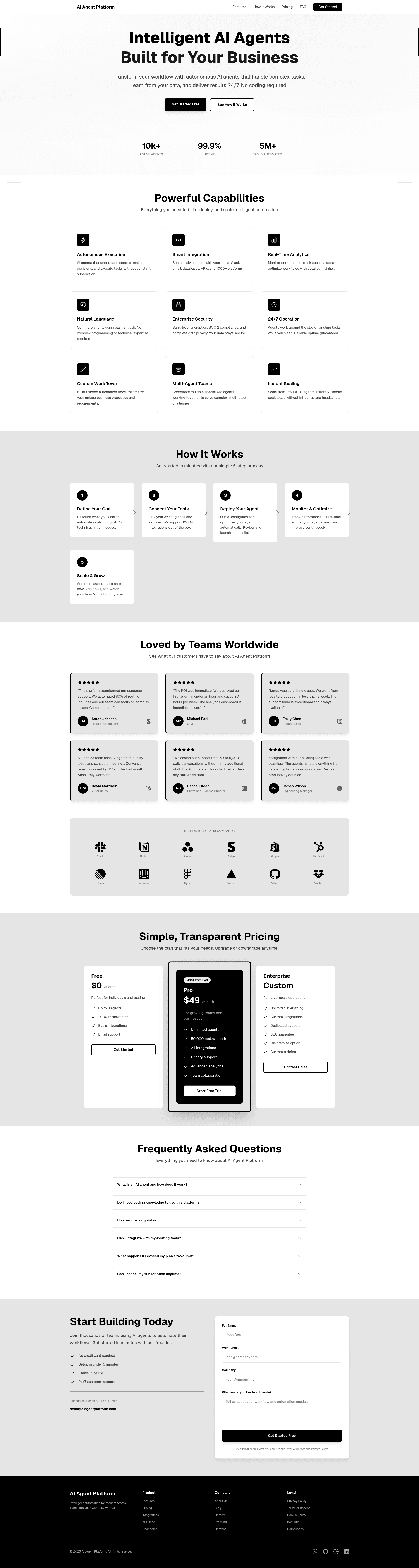
Astrogent is a production-ready landing page template for AI and SaaS products, built on Astro 5 and Tailwind CSS 4, that generates a static marketing site with hero, features, testimonials, pricing, FAQ, and contact sections from editable TypeScript config files.
What is Astrogent?
Astrogent is an open-source template distributed under the MIT license. It takes modular content defined in TypeScript files and produces a fully responsive, accessible landing page for AI and SaaS products. The template is built on Astro 5 for fast static site generation and Tailwind CSS 4 for CSS-first styling, and it outputs static HTML at build time. It includes a hero section with stats, a grid of nine feature cards, a four-step how-it-works section, six testimonial cards with company logos, three pricing tiers, a six-question FAQ accordion, a contact form, and a footer.
Key Features
- Astro 5 — Static site generation with zero-JS-by-default pages; the dev server and production build are both run through npm scripts.
- Tailwind CSS 4 — Styling uses CSS-first configuration; global colors and animations are edited in src/styles/globals.css.
- Fully Responsive — Mobile-first design adapts the layout from small screens to desktop widths.
- Accessible — Semantic HTML and ARIA-compliant markup are baked into the components.
- Smooth Animations — Scroll-triggered effects are included without requiring a third-party animation library.
- SEO Ready — Meta tags and Open Graph data are configured for search visibility and social sharing.
- Modular Components — Each section is a separate component, so you can reorder or remove them easily.
- Customizable Content — Site configuration lives in src/config.ts, while features, testimonials, and FAQ content live in src/content.
Who is it for?
- AI founders — Launch a distraction-free landing page that presents an AI agent or SaaS product with feature cards, pricing, and social proof.
- Developers — Customize the Astro components, Tailwind theme, and TypeScript content files to fit a specific brand.
- Marketers and designers — Edit text, images, and pricing tiers in the content files without touching component code, then rebuild to update the site.
- Open-source contributors — Use the MIT license to fork and adapt the template for any purpose.
What can you do with Astrogent?
- Launch a product page: Replace the default hero copy, stats, and feature grid with your AI tool’s details to create a polished marketing site.
- Showcase testimonials: Add up to six customer quotes with company logos to build credibility.
- Structure pricing: Present three pricing plans (free, pro, enterprise) that visitors can compare at a glance.
- Answer objections: Edit the six FAQ items to address common questions about your product.
- Collect leads: The contact form gives visitors a direct way to reach your team, with no backend required.
How does Astrogent work?
After cloning the repository, run npm install to install dependencies. Use npm run dev to start the local dev server, edit content in src/config.ts and src/content, then run npm run build to generate the static site. The output can be deployed to Vercel, Netlify, Replit, or GitHub Pages.
FAQ
Is Astrogent free?
Yes, Astrogent is released under the MIT license, which permits free use, modification, and distribution for personal and commercial projects.
What versions of Astro and Tailwind does it use?
Astrogent is built with Astro 5 and Tailwind CSS 4. Tailwind uses a CSS-first configuration, so theme colors and custom animations are defined in src/styles/globals.css.
How do I customize the landing page content?
Edit src/config.ts for site-wide settings such as navigation and metadata. Features, testimonials, FAQ items, and pricing are stored in separate TypeScript files under src/content.
Can I deploy Astrogent to Vercel or Netlify?
Yes, the template works on Vercel, Netlify, Replit, and GitHub Pages. A one-click Vercel deploy button is included in the repository.