Template details
Community Agent Template
Open source AI-powered Slack community management bot with a built-in Next.js admin panel. Uses Chat SDK, AI SDK, and Vercel Workflow.
About this template
Community Agent Template is an open-source Next.js boilerplate for deploying an AI-powered Slack community management bot, built by Vercel Labs on Chat SDK, AI SDK, and Vercel Workflow. It ships with a live admin dashboard, channel-aware routing, durable workflows, and optional sandboxed command execution.
What is the Community Agent Template?
The Community Agent Template is a ready-to-fork GitHub repository that turns a Slack workspace into an AI-moderated community. It takes your Slack events as input and produces automated responses — welcoming new members, answering questions, surfacing unanswered threads, and flagging issues to a lead — through a bot that runs on Vercel's serverless platform. The project is maintained by Vercel Labs and licensed under MIT.
The template pairs a Slack bot with a Next.js 16 admin panel, using the App Router with cacheComponents. The bot's behavior is controlled by editable files: the system prompt lives in lib/agent.ts, the channel map in lib/channels.ts, welcome messages in lib/welcome.ts, and agent tools in workflows/agent-workflow/tools.ts. Storage uses Upstash Redis for bot action logs and conversation history, and the one-click deploy on vercel.com/new provisions a Turso database for the admin panel.
Key Features
- AI community manager — routes questions, welcomes members, surfaces unanswered threads, and flags issues to a lead; powered by the AI SDK and configurable system prompt.
- Channel-aware routing — a configurable channel map in
lib/channels.tslets the bot know the workspace layout and direct people to the right Slack channel. - Durable workflows — every LLM call and tool execution is a checkpoint with automatic retries via Vercel Workflow, so long-running agent tasks survive failures.
- Web search — Anthropic's native web search tool, scoped to your community's domains through the
SEARCH_DOMAINSenvironment variable and routed through AI Gateway. - Sandbox execution — optional
bashandbash_batchtools run commands in a sandboxed environment by connecting to a deployed Knowledge Agent Template (Savoir) API viaSAVOIR_API_URL. - Native Slack UI — typing indicators, threaded replies, and DMs are handled through the Chat SDK's Slack adapter.
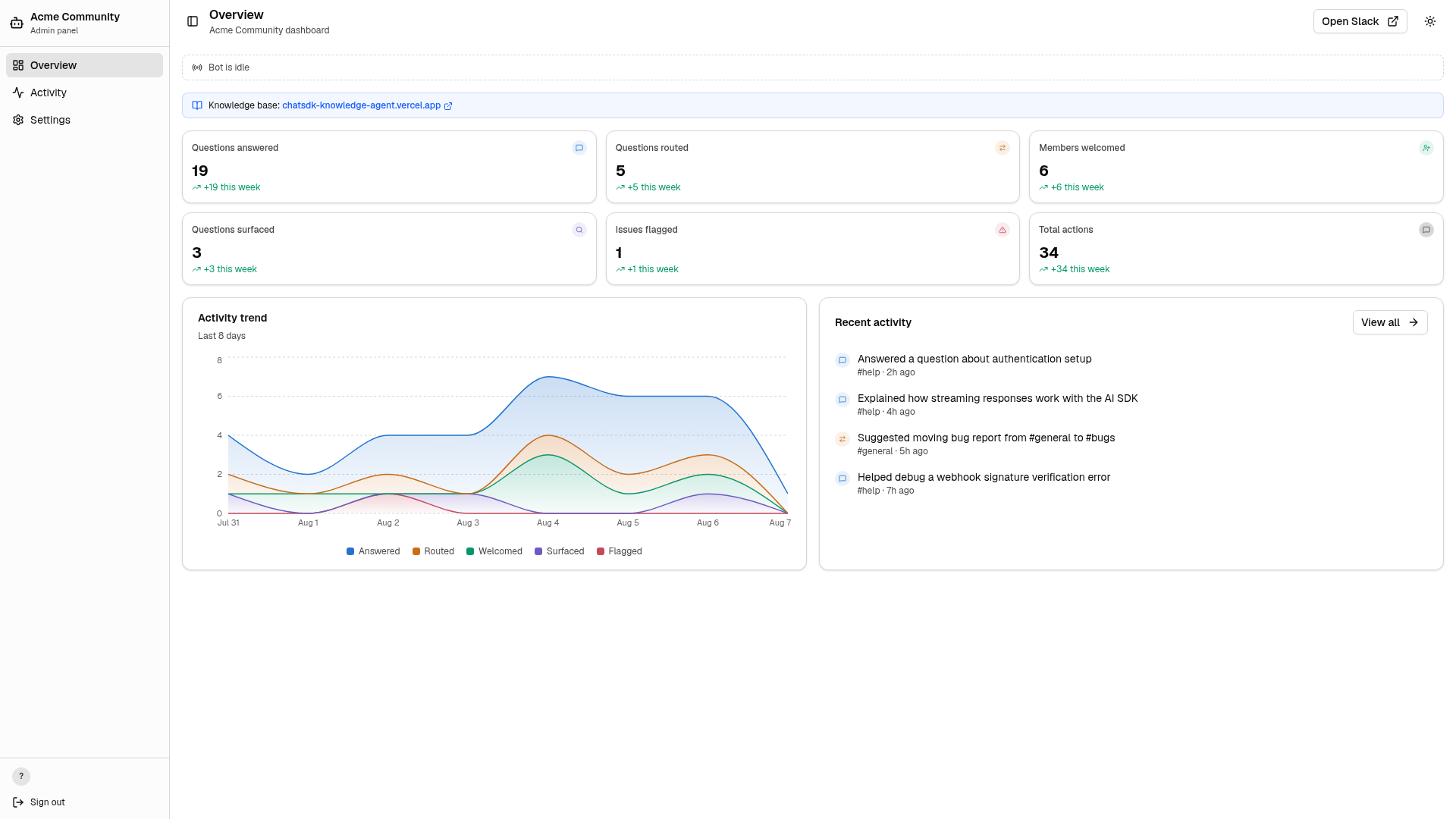
- Admin panel — a Next.js dashboard with live streaming indicators, ViewTransition animations, activity feed, type filters, text search, inline conversation previews, activity trends, and a settings page with channel overview.
- Slack OAuth auth — Better Auth restricts the admin panel to workspace members, and a demo mode (setting
ADMIN_DEMO_MODE=trueandALLOW_ADMIN_DEMO_MODE=true) shows mock data before Slack is connected.
Who is it for?
The template targets developers and community operators who want an open-source alternative to hosted community management bots. Developers can fork the repo, customize the bot personality and tools, and deploy on Vercel without managing servers. Community leads get an automated moderator that answers routine questions and escalates issues to humans. Teams using a knowledge base can connect the Savoir API so the bot can search and read community docs remotely.
What can you do with it?
- Community managers: deploy the template, set
COMMUNITY_NAMEand a channel map, and the bot will greet new members and route questions to the right Slack channels automatically. - Developers: add new agent tools by editing
workflows/agent-workflow/tools.ts, or change the welcome message and bot personality in the corresponding lib files. - Open-source contributors: run the admin panel in demo mode by setting the two demo environment variables, then explore the dashboard with mock activity data before wiring up a real workspace.
- Knowledge-base teams: point the bot at a Savoir backend with
SAVOIR_API_URLto give it searchable access to documentation via sandboxed bash commands.
How does the template work?
The quick start flow is a three-step deploy: import the repo on vercel.com/new, add the required environment variables (COMMUNITY_NAME, BETTER_AUTH_SECRET, SLACK_CLIENT_ID, SLACK_CLIENT_SECRET, SLACK_TEAM_ID), and deploy. For a full Slack bot setup, the repository's docs folder covers creating a Slack app, configuring OAuth, mapping channels, and setting storage. Inside the bot, Vercel Workflow wraps each LLM call and tool execution as a checkpoint with automatic retries, so agent runs are durable across serverless function restarts.