Template details
Avicenna
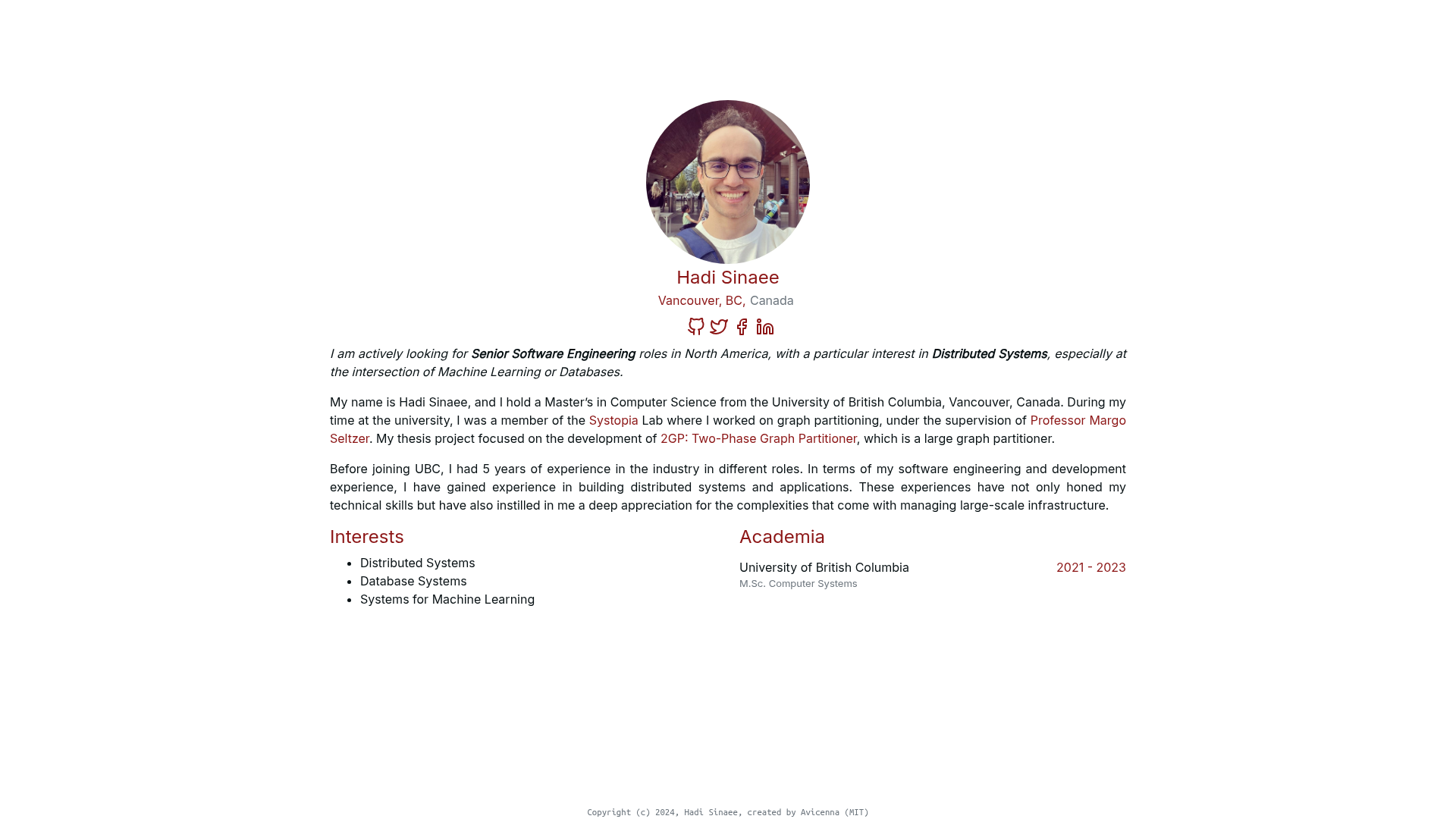
A minimal Hugo theme for academics to publish publications, projects, blog posts, and news on a personal site.
About this template
Avicenna is a minimal, responsive Hugo theme built for academics who want a static personal website to publish their publications, projects, blog posts, and news updates.
What is Avicenna?
Avicenna is a Hugo theme hosted on GitHub that turns Markdown content into a clean academic homepage. It was created by hadisinaee and includes three core content sections — Introduction, Publications, and Projects — along with optional blog and news feed sections. The theme produces static HTML output, so it runs on any web host without a database or server-side processing. You configure the site through a config.toml file and add content as Markdown files.
Key Features
- Minimal responsive layout — The theme is described as minimal, responsive, and clean, adjusting to different screen sizes automatically.
- Publications listing — Drop Markdown files into
content/publicationsto display your papers; new entries can be generated withhugo new publications/your-pub-name.md. - Projects listing — Similarly,
content/projectsholds project descriptions, creating a grid of your work. - Blog post support — The theme now includes a blog section for longer-form writing.
- News feed support — A built-in news feed lets you announce new papers, talks, or awards.
- Google Analytics integration — Set your tracking ID in
config.tomland the theme injects the analytics script. - Social links — The theme supports adding social media links to your profile.
- Easy profile customization — Replace
profile.pngin thestaticfolder to change your photo, and add your CV ascv.pdfin the same directory.
Who is it for?
- Academic researchers and professors — Build a personal homepage that lists publications and projects without writing HTML.
- PhD students and postdocs — Showcase your CV, research, and news in a clean, professional layout.
- Independent scholars — Share your work and updates using a static site that can be hosted anywhere.
What can you do with Avicenna?
- Publish research — Add publications as Markdown files under
content/publications; they appear in a structured list. - Maintain an academic news feed — Post announcements about new papers, conference talks, or awards.
- Present projects — Use the projects section to describe current and past research or side projects.
- Deploy a static site — Run
hugoto generate apublicfolder, then copy its contents to any web host server.
How does Avicenna work?
Avicenna is used in three phases: setup, customization, and build/deploy. During setup, either run the provided automated script (setup_avicenna.sh) or manually clone the theme into your Hugo site. Customization happens by editing config.toml and the Markdown files in the content folder. Finally, run hugo to generate a public folder, which you copy to your hosting server.
- Install Hugo and create a new site using
hugo new site my_cool_page. - Add Avicenna as a theme via the automated script or a git clone.
- Copy the exampleSite content and adjust
config.tomlandcontentfiles. - Run
hugo servefor local preview, thenhugoto build the productionpublicfolder. - Deploy the
publicfolder to your host.
FAQ
Do I need to know HTML to use Avicenna?
No. Avicenna uses Markdown for content and a TOML configuration file for settings, so you don't need to write HTML. The theme generates the HTML for you.
How do I install Avicenna?
There are two methods: an automated script that runs setup_avicenna.sh with your site name, or a step-by-step approach where you manually create a Hugo site, clone the theme, and copy the example content.
How do I change my profile picture?
Place your image in the static folder and name it exactly profile.png. The theme expects that exact filename and extension, so other names won't be picked up automatically.
Can I use a different name for my CV file?
Yes, but if you choose a different name, you must update the reference in your introduction section. The recommended filename is cv.pdf placed directly under the static folder.
How do I deploy Avicenna?
Set your baseURL in config.toml, run hugo to build the site, and then copy the generated public folder to your web server or host.