Template details
BlackDoc
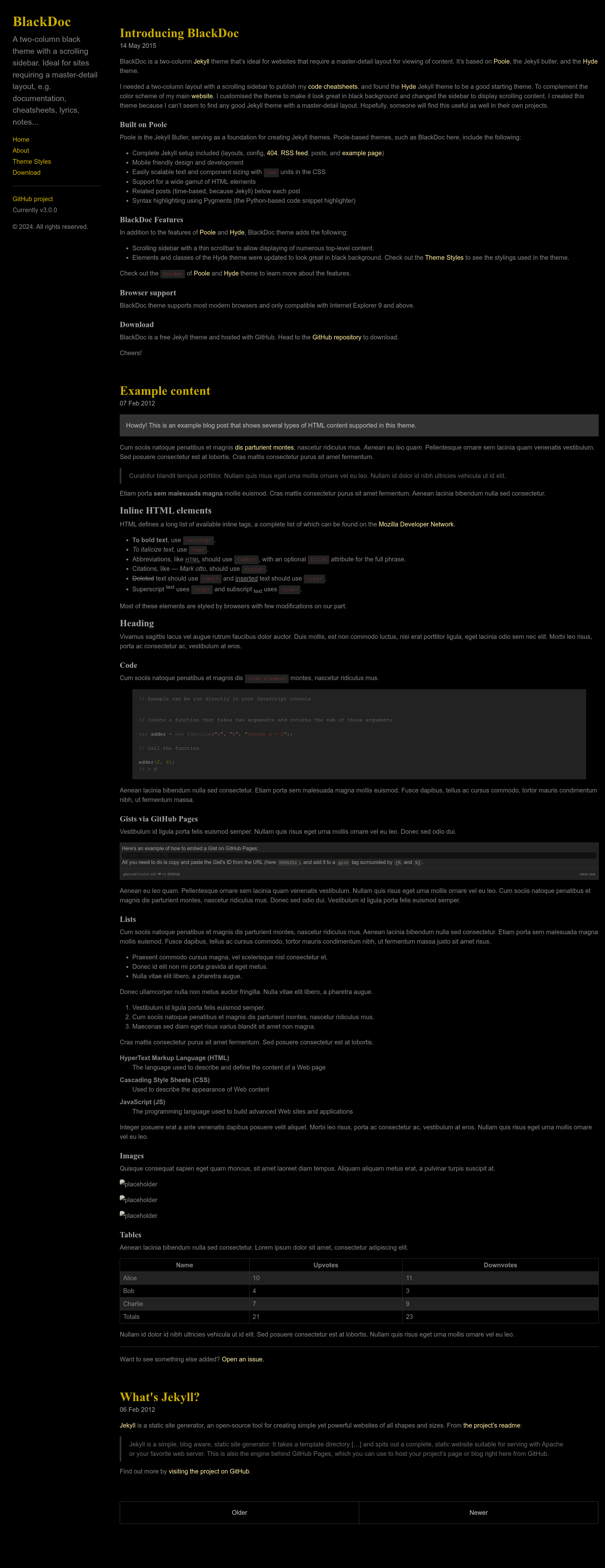
A two-column Jekyll theme built on Poole and Hyde for master-detail content layouts with a scrolling sidebar.
About this template
BlackDoc is a two-column Jekyll theme built on Poole and Hyde that presents content in a master-detail layout with a scrolling sidebar.
What is BlackDoc?
BlackDoc is a free, open-source Jekyll theme by Karlo Espiritu, derived from the Poole starter and the Hyde theme. It takes standard Jekyll content — markdown posts and pages with front-matter — and renders it as a two-column site where the sidebar lists content and the main area shows the selected item. The theme runs on any Jekyll 4.x installation and is distributed as a GitHub repository under the MIT license.
Key Features
- Jekyll 4.x compatible — Updated to work with Jekyll 4.x, with a requirement of Ruby 3.3.0 or higher for local builds.
- Master-detail layout — Two-column design where a scrolling sidebar displays a list of pages or posts and the main column shows the full content, ideal for documentation or reference sites.
- Scrolling sidebar — By default, the sidebar displays all markdown files in alphabetical order and scrolls independently.
- Eight base16 themes — Ships with eight color themes based on the base16 color scheme; apply a theme by adding a class like
theme-base-08to the body element. - Reverse layout — Adding the
layout-reverseclass to the body flips the sidebar and main column orientation. - Sidebar menu via front-matter — Assign the
pagelayout in a page's front-matter to include it in the sidebar nav, ensuring the home link stays first. - MIT licensed — Open source and free to use, modify, and redistribute.
Who is it for?
BlackDoc suits developers and content creators who need a Jekyll-based site with a master-detail browsing pattern. Documentation maintainers can use it to present guides and API references in a sidebar-driven layout. Bloggers who want a two-column archive with a visible list of posts will find the scrolling sidebar useful. Designers can quickly prototype a documentation or portfolio site because theming is done via body classes and the included base16 palettes.
What can you do with BlackDoc?
- Documentation sites: Organize long-form guides into a searchable sidebar list with the main pane showing each topic.
- Personal knowledge base: Publish notes or references as markdown files and let the theme display them alphabetically in the sidebar.
- Portfolio or project sites: Use the reverse layout and base16 themes to create a distinct two-column presentation for projects or case studies.
How does BlackDoc work?
To start, clone the repository or download the zip, install Ruby 3.3.0 or higher, then run gem install bundler and bundle install to fetch dependencies. After that, jekyll serve builds and serves the site locally at the default Jekyll address. Content is written as standard markdown files with front-matter, and Jekyll's page/post system drives the sidebar list.
FAQ
Is BlackDoc free?
Yes, BlackDoc is open source and released under the MIT license, so you can use, modify, and redistribute it freely for personal or commercial projects.
What Ruby version does BlackDoc require?
The theme's quick start instructions call for Ruby 3.3.0 or higher. You can check your version with ruby --version before building the site.
How do I change the sidebar color theme?
Add one of the eight base16 theme classes to the <body> element in the default.html layout, such as theme-base-08. You can also copy an existing theme's CSS and create your own colors.
How do I reverse the layout?
Add the layout-reverse class to the <body> element in the default.html layout. This flips the sidebar and main content columns so the sidebar appears on the right instead of the left.