Template details
Sprucecss Eleventy Documentation Template
A simple documentation template made with Eleventy and Spruce CSS.
About this template
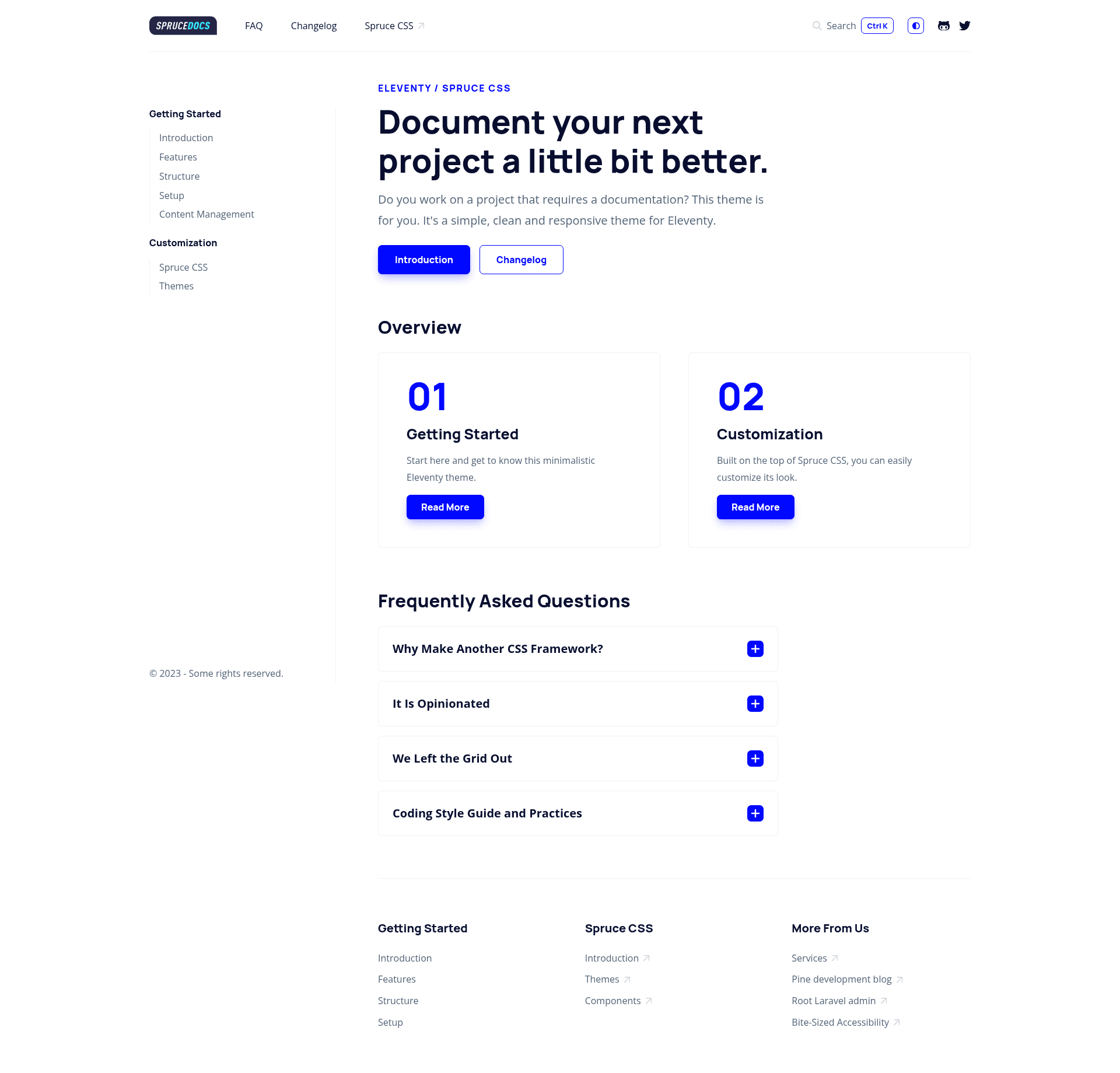
The Sprucecss Eleventy Documentation Template is a free, MIT-licensed documentation theme for the Eleventy static site generator, built on the Spruce CSS framework, that produces a static documentation website with two-level navigation, search, dark mode, and RTL support.
What is the Sprucecss Eleventy Documentation Template?
The Sprucecss Eleventy Documentation Template is a starter kit for creating self-hosted documentation sites. It takes Markdown content organized in a two-level folder structure and outputs static HTML with automatic sidebar navigation, breadcrumbs, a table of contents, and a Pagefind search index. The template is maintained by Cone Development, released under the MIT license, and deploys easily to Netlify. It includes ready-made FAQ and Changelog templates, a dark theme mode, and RTL support.
Key Features
The template ships with a set of documentation-specific features beyond a basic Eleventy layout, including static search, navigation helpers, and UI customization options.
- Eleventy + Spruce CSS stack — Built on the Eleventy static site generator with the Spruce CSS framework and SCSS for styling; uses Pagefind for search, the 11ty Navigation plugin for breadcrumbs, and is deploy-ready for Netlify.
- Static search with Pagefind — Full-text search is integrated with Pagefind, generating a search index at build time so visitors can search the documentation without a server.
- Navigation and table of contents — Built on the 11ty Navigation plugin, it produces breadcrumbs, an orderable sidebar, and a table of contents for each page.
- Dark mode and RTL support — The Spruce CSS framework includes a dark theme mode, and the template is styled for right-to-left language layouts.
- FAQ and Changelog templates — Pre-built page templates for a FAQ page and a Changelog page make it easy to add these common documentation sections.
- Code highlighting — Syntax highlighting is included so code samples in your Markdown are rendered with colorized syntax.
- HTML minification — The production build script minifies HTML output to reduce page size.
- Custom shortcodes — Two custom Eleventy shortcodes are available:
svgIconrenders any SVG icon inline with optional classes, andmarkdownRendererrenders a markdown string into HTML.
Who is it for?
The template is aimed at developers and teams who want a self-hosted, no-frills documentation site without relying on a hosted documentation platform.
- Open-source maintainers — Need a self-hosted documentation site for their project, with no third-party docs platform, and want search and dark mode out of the box.
- Eleventy users — Already build sites with Eleventy and want a ready-made docs theme that fits their existing tooling and Markdown workflow.
- Documentation writers and small teams — Want a simple two-level structure to organize guides and API references, plus a changelog and FAQ pages.
- Developers at agencies or product companies — Building client or internal documentation sites with RTL and dark mode support for international audiences.
What can you do with the Sprucecss Eleventy Documentation Template?
With this template you can publish and maintain a full documentation site from Markdown files, with search and navigation handled automatically.
- Project maintainers: Publish versioned API docs and user guides in Markdown, organized by category folders, with automatic navigation and breadcrumbs.
- Product teams: Create a Changelog page to announce updates, and an FAQ page to address common support questions without a CMS.
- Localization-minded developers: Ship documentation in RTL languages like Arabic or Hebrew thanks to the built-in RTL support.
- Search-conscious sites: Let visitors search the entire docs site with the Pagefind static search index, no external search service needed.
How does the template work?
You set up the template by cloning the repository, installing dependencies, and running the npm scripts for development and production. Content lives in the posts folder where each category is a subfolder with a list page and a posts.json file that sets layout and permalink values. The Eleventy Navigation plugin determines the sidebar order and breadcrumb hierarchy, and simple standalone pages can be added directly under src.
Pricing
The template is free: it is open-source under the MIT license, so there is no license fee and no paid tier. The only cost is hosting your static site on any service you choose, such as Netlify.
FAQ
Here are answers to common questions about the template's cost, content workflow, search, and deployment.
Is the Sprucecss Eleventy Documentation Template free?
Yes, the template is open-source and released under the MIT license, so you can use it for personal or commercial projects without cost. There are no paid plans or premium features; you only need a static hosting service like Netlify to publish the generated site.
How do I add a new documentation page?
Create a category folder inside the posts directory, add a list page with the same name, and put your Markdown posts in a nested posts folder. A posts.json file in that folder configures the layout and permalink for the pages. The navigation plugin will pick up the hierarchy automatically.
Does the template support dark mode and RTL?
Yes. Dark mode is built into the Spruce CSS framework, and the template includes RTL support for right-to-left languages. Both features are available without additional plug-ins.
What search engine does it use?
The template uses Pagefind for static search. Pagefind generates a search index at build time, so no external search API or server is required; visitors get fast, full-text search over the documentation content.
How do I deploy the template?
Because the output is a static site, you can deploy it to any static host. The repository includes a Netlify deployment status badge in its README, and Netlify is a straightforward option — just connect the repo and set the build command and publish directory.