Template details
jekyll-theme-rtd
A port of Read the Docs, a documentation theme, for Jekyll and GitHub Pages.
About this template
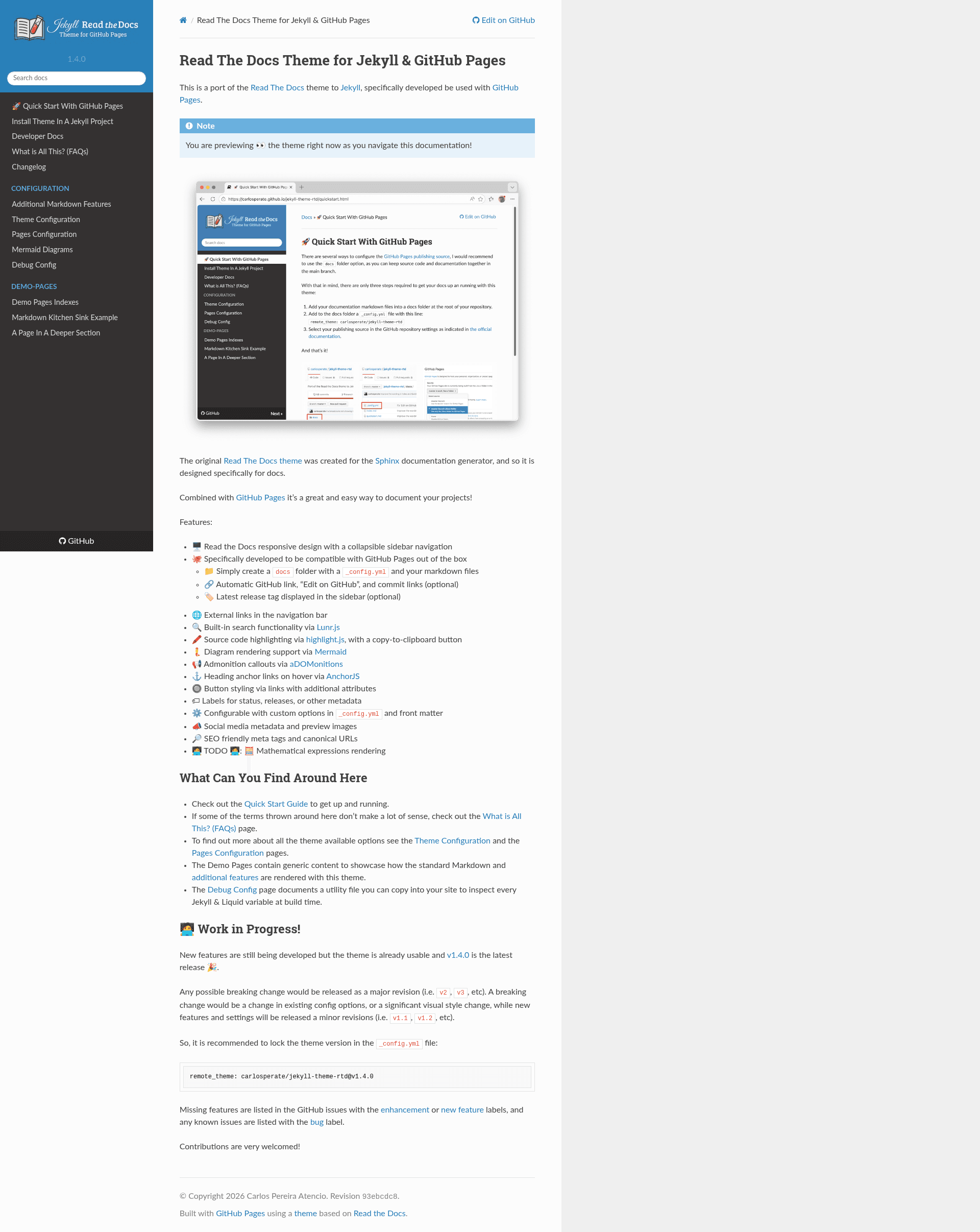
jekyll-theme-rtd is a Jekyll theme that ports the Read the Docs documentation design to GitHub Pages, giving project maintainers a documentation site with a collapsible sidebar, built-in search, and code highlighting.
What is jekyll-theme-rtd?
jekyll-theme-rtd is an open-source port of the Read the Docs theme, originally built for Sphinx, adapted for use with Jekyll and GitHub Pages. It takes Markdown files and a _config.yml configuration file as input and outputs a static documentation website with the Read the Docs responsive layout. The theme is maintained by carlosperate and is released under the BSD 2-Clause Simplified License.
Key Features
- Responsive sidebar navigation — The Read the Docs design includes a collapsible sidebar that adapts to mobile screens.
- GitHub Pages integration — Works out of the box with GitHub Pages; you can reference it via
remote_theme: carlosperate/jekyll-theme-rtd@v1.4.0in_config.yml. - Automatic GitHub links — Optionally shows an "Edit on GitHub" link, commit links, and the latest release tag in the sidebar.
- Built-in search — Uses Lunr.js to provide client-side search without any external service.
- Code highlighting — Source code is highlighted with highlight.js and includes a copy-to-clipboard button.
- Mermaid diagram rendering — Supports Mermaid diagram syntax in Markdown files.
- Admonition callouts — Renders note, warning, and other callout boxes via the aDOMonitions library.
- Heading anchor links — AnchorJS adds on-hover anchor links to headings for easy deep linking.
- Configurable options — Customize via
_config.ymland front matter, including social media metadata and SEO meta tags.
Who is it for?
- Open-source maintainers — Document a GitHub repository by placing Markdown files in a
docsfolder and enabling GitHub Pages. - Technical writers — Write documentation in Markdown with support for diagrams, callouts, and code samples without maintaining a separate static site generator.
- Small teams — Stand up a project docs site quickly using the same design as many popular open-source projects.
- Educators and course authors — Publish structured course notes with a sidebar for navigation and search functionality.
What can you do with it?
- Project maintainers: create a professional documentation site for a GitHub project with a consistent sidebar and search, deployable directly from the repository.
- Technical writers: include Mermaid diagrams, admonitions, and highlighted code blocks in Markdown, all rendered automatically.
- Open-source educators: publish tutorial series with SEO-friendly meta tags and social media previews.
How does it work?
To use the theme, create a docs folder in your GitHub repository, add a _config.yml that specifies the remote theme, and write your content as Markdown files. Push the repository to GitHub with Pages enabled, and the site is built and served. The quick start guide at carlosperate.github.io/jekyll-theme-rtd/quickstart.html walks through the setup.
Pros and cons
- Pros: Free and open source; designed specifically for GitHub Pages; includes search, code highlighting, and diagram support out of the box.
- Cons: Math expression rendering is still on the TODO list; the theme is labeled as work in progress, so breaking changes could arrive in future major releases (v2, v3), though version locking is recommended.
Pricing
Free and open source. The theme is released under the BSD 2-Clause Simplified License and can be used without cost.
Alternatives
- Sphinx with the Read the Docs theme — the original documentation system this theme ports.
- MkDocs with the Read the Docs theme — the MkDocs port that this Jekyll theme is based on.
- Just the Docs — a popular Jekyll documentation theme with its own sidebar layout.
FAQ
Is jekyll-theme-rtd free?
Yes, it is open source under the BSD 2-Clause Simplified License, so it can be used freely for personal and commercial projects.
How do I install jekyll-theme-rtd?
Add remote_theme: carlosperate/jekyll-theme-rtd@v1.4.0 to your _config.yml file and place Markdown files in a docs folder. GitHub Pages will build the site automatically.
Does jekyll-theme-rtd support search?
Yes, the theme integrates Lunr.js for client-side search, so no external search service or API keys are needed.
Can I use jekyll-theme-rtd with Mermaid diagrams?
Yes, the theme includes Mermaid rendering support, so you can add diagram code blocks in your Markdown and they will display as diagrams.
Are there any missing features?
Mathematical expression rendering is listed as a TODO. The theme is still under active development, so it is recommended to pin the version in your config to avoid surprises from breaking changes.